spout

January 3, 2004 spout

On Genghis, WinForms and How to Move Towards Avalon

Saturday, January 3rd, 2004

Inspired by my pending interview of Don Box, Paolo Severini sent along an interview for me.

Paul: Being a faithful reader of your books, articles and of your blog, I’d like to ask you a few questions about LH, Avalon and the future of WinForms. Before all, let me say that I’m really fascinated by Longhorn, and especially by Avalon. I installed the PDC stuff as soon as I received it through my MSDN subscription and I’ve begun exploring it with “pure geek” enthusiasm. Everything is extremely interesting, but I’m now not sure what to do with it.

Chris: I know what you mean, Paul. I’m going through that myself. Suddenly having so many fewer barriers tends to throw off the engineer in me. I’m working through it by begging the Longhorn User Experience team for guidance, learning Adobe Illustrator, reading graphic design books and trying to open my mind to the graphic designer inside us all (I hope : ).

Paul: Paraphrasing one of the questions you proposed to Don Box: what should a WinForms programmer *really* do today to prepare for Avalon?

Chris: If you want to write code today that’ll work well on Longhorn tomorrow, write WinForms today. WinForms in Whidbey gets tons more features and I expect they’ll be some cool new Longhorn-specific stuff when the time is right. If, when you’re preparing a Longhorn version of your application, you’d like to host Avalon controls from your WinForms app or even build Avalon apps that host your WinForms controls, you’ll be able to do that in Longhorn via WinForms/Avalon interop.

For maximum flexibility in the code you write now, be very thorough about separating the data from the view of the data so that you can write a 100% Avalon front end to replace your WinForms front end if such is your need. Likewise, be very thorough about separating the data from the storage of the data is that you can take advantage of WinFS.

Paul: I’m very grateful to MS for having disclosed their future technologies so soon, and more generally, to have become so “opened” to outsider’s eyes, with so many devs and PMs now blogging about their work.

Chris: Me, too. Without this openness, I’d get into lots more trouble. : )

Paul: But I somehow also think that maybe LH was presented a bit too soon. Since it’s not planned to be released before 2006, chances are that the shipped version could be significantly different. (Will it? Is it already? Can you write anything about that? :-).

Chris: I used to think that we were unveiling Longhorn too soon, too. However, the later in the development process we get it out to reviewers, the fewer major changes we’ll be able to make based of your feedback. What that means, of course, is that some major things are going to change between now and release, but those changes will be based on decisions that include feedback from you. The downside is that you’ll have to relearn some of the things you learn with these bits. Hopefully, the upside is that most of what you have to unlearn will be replaced with something significantly better.

Paul: Furthermore, even when the new presentation subsystem will ship, it seems like it won’t be easy to write code that supports both the new and the old platforms, being they so different, and that could slow down its widespread acceptance even more. So I’m afraid that we’ll all have a difficult time writing user interfaces, having to decide whether to take advantage of the new features or simply stay with the old portable libraries. After all, there are today still (too many) people running Windows 9x. And Windows XP is such a great OS that won’t universally be replaced so soon.

Chris: I’ve already mentioned how well WinForms will work under Longhorn, so I think I’ve answered part of your question. However, you’re asking something deeper here, i.e. when do I give up the old “way” that has more ubiquitous support for the new “way?” In this case, you’re talking about .NET and Longhorn, but you could as easily be talking about DOS and Windows or Win32 and .NET. This is the eternal struggle and the reason that we need software engineers in the first place. As with all such questions, the answer is “it depends.”

My general purpose answer is to always pick the newest thing that meets my requirements. The newer the technology you pick, the longer the shelf life. Can I build cool, scalable apps that take advantage of the high resolution monitors and GPUs of tomorrow in DOS? Absolutely. Do I want to? Hell no. Can I do it in WinForms? Yes, although it’ll still be harder than doing it on Avalon. Will I increase my available market by targeting DOS today? The answer used to be “yes,” but for a while now it’s been “no.” What about WinForms? The answer is definitely “yes” today and will be for a while yet, even after Longhorn ships.

The answer to the question of when to adopt new technology has too many variables for me to provide any general advice better than “as soon as possible.” Of course, Microsoft wants the answer to that question to be “sooner rather than later,” and we’re working to make Longhorn kick-ass for developers, business users and consumers so that ubiquity is taken out of the equation as soon as possible. Please use all channels of communication you have into the company to help us make sure we’re doing that. The WinFX newsgroups are one good place for such feedback. They are heavily monitored by all of the WinFX teams and the Longhorn User Experience (Aero) Team.

Paul: I found out that the PDC build of Avalon doesn’t really work in kernel mode but simply uses two (unmanaged) DLLs, milcore and milrender built upon the old GDI APIs (to the point that it is actually possible to run Avalon on XP). Of course, that’s bound to change, as Chris Anderson wrote, with the new video driver model and when the desktop composition stuff will get turned on. But wouldn’t it be nice if a subset of Avalon ran on XP? After all, not every app will take advantage of its more advanced features.

Chris: Before I answer this question, I just wanted to point out that GDI is not part of the Avalon rendering path. Instead, Avalon is built on DirectX, which is built directly on the drivers. GDI is still supported, of course, but it’s a parallel rending path to Avalon’s.

The answer to the core question, i.e. why not ship Avalon on XP, is one of resources. Chris Anderson once told me that something like a man millennia has gone into the development of Avalon thus far. Even if Chris was exaggerating for effect, that’s still one hell of a lot of work. That work has gone into building an architecture that allows application developers to take advantage of features present all the way down to the hardware level, including changes at every point in the presentation stack. What kind of work do you think it would take to make a subset of that available under Windows XP? Or Windows 2000? Or Windows 98? What kind of work do you think it would take to support those features on those down-level operating systems in their subsetted states? If we’re looking at a release years into the future already, how many more years are we willing to wait to release Avalon in a form that works in a subsetted form on those OSes? And what will we ship to our customers expected a new OS in the meantime?

It may be that you could come up with answers that you love to these questions. Would our other customers answer them the same way? Would our shareholders answer them the same way? Would your answers best position us against our competitors?

Even if you got a subset of Avalon that works across .NET platforms today, would it really enable you to be more successful at your business or is it an engineering “gosh that’d be neat?”

I know that our product teams really listen to our customers these days, so if you’ve got specific scenarios that you need enabled to be successful, please let them know.

Paul: Furthermore, if XAML is, in the end, only a way to glue together a graph of CLR objects, why don’t use it also to build WinForms UI? Both these options would make the transition much easier.

Now that’s a question I can provide a more satisfactory answer to, I think (sorry about that last answer : ). In the Longhorn PDC bits today, you can generate WinForms apps using XAML for the very reason you state. Likewise, if you’d like to try a subset of XAML in today’s version of the .NET Framework, there are not one, but two 3rd parties providing early access to projects to allow this to happen. Given the amount of work that has gone into, and will go into, getting Avalon out the door, I doubt very much that their versions of XAML will be full-featured, but it may help ease the transition, as you say.

Paul: That brings me to ask you about the future of WinForms (about which I’m now reading your book and really enjoying it). In the near future I will surely have to write WinForms code. But is it still worthwhile to spend time studying and trying to improve it? (I personally think so). Or should I rather concentrate my interest learning everything about the new LH technologies? So I’m back on the question about how to prepare for Avalon…

Chris: I’d say that it absolutely makes sense to continue to write WinForms applications for years to come. Not only in WinForms a great platform for client applications today, but in Whidbey, it about doubles in size and capability. Plus, WinForms applications will continue to work great under Longhorn and will form the core of an application that needs to take advantage of Longhorn features under Longhorn but continue to work on the rest of the .NET platform. Unless you are planning to target only Longhorn, WinForms is absolutely where you should be spending your client development effort today and for years to come.

Paul: Speaking of WinForms, one of the things I’ve never liked is the absence of windowless controls. It has been said that windowed and windowless controls are difficult to make live together, and that’s true. But windowless controls are sometimes very useful (and cool! just think to the Windows Media Player UI). I found in your Genghis page that the “Windowless control architecture” feature is still “opened” and I’d like to try to work on it. (In the past, I wrote an ActiveX control container that supported windowless controls, so I wouldn’t start from zero).

Chris: Windowless controls were meant mostly as an optimization when creating thousands of Window handles brought the platform to its knees. Some folks also used windowless controls as a good way to fake non-rectangular controls. In modern implementations of User32, neither is much of an issue, so windowless controls provide a service that is no longer required in most cases. In the specialized cases where it is still necessary, I find that building an aggregate control that does the drawing of multiple controls that you would have made windowless in the past solves most of my needs in this area, although your mileage may vary. Given that Genghis has most of the rest of the features that I wanted for it, but no windowless control architecture, I’d say that folks seem to agree with me that windowless controls are no longer as important as they once were.

Paul: But I also noticed that the Genghis project has been still for a few months, so I’m now wondering if it is still alive and if my project still makes sense now that Avalon is on its way. May you give me an advice?

Chris: I was waiting for a wizard that would generate MDI, SDI and multi-SDI applications before shipping the next drop of Genghis, but there are enough new things and fixes that we should have another version of Genghis out in a week or so. If you or anyone would like to build the wizard (or just send Scott Densmore email begging him to finish the one he already started and has promised to me several times) that’d be great.

Thanks for your wonderful job and for the time you dedicated to this mail. I just hope my English was understandable… :-)

Best regards from Italy,
Have a wonderful new year!
–Paolo Severini

December 23, 2003 spout

Lending a Helping Hand

I know this sounds like spam, but it’s not — it’s from my Uncle Mark, who’s also my godfather and the nicest man I’ve even known:

Chris, I’m writing you to ask your help. My brother Tom was gravely ill. Tom is 55 years old, married with two grown sons. He needed both a liver and a kidney transplant. He just received his transplants. It was by the grace of God just in time as he was within 2 to 3 days of death. He is doing well with no signs of rejection and just some minor complications. Unfortunately, he is nearly bankrupt from all his medical bills. Tom’s life has been marked by several challenges, many overcome through hard work and determination. He is a man of immense spirit and we all love him dearly. This is a challenge he can’t face alone. As you can imagine, our family is very concerned. We pray a lot. We have also undertaken a benefit and raffles for him to help him with his expenses. Right now we’re just trying to help him pay his mortgage and put food on his table. He hasn’t been able to work for three months. He also faces a tremendous bill from the transplant that his health insurance won’t pay.

There are five courses of action I’d like you to consider. First of course is I’d appreciate your prayers for my brother Tom that he continue to recover his health and his finances. The next four things I am asking for is your support of our raffles and benefit.

I would like you to consider purchasing a ticket for what we call the “Big Money Raffle”. There will be a limit of 110 tickets sold. First prize is $2000. Second prize is $1250. Third prize is $750. There will be an additional ten $100 winners. Odds of winning some prize are 13 in 110. 3 in 110 chance of bettering your bet. 1 in 110 of winning the top prize. Tickets cost $135 apiece. Much better odds than the lottery. Drawing 1/11/04.

Also available are Quilt tickets at $1 apiece. My sister made the Queen size quilt. Value is somewhere between $1000 and $1500. Drawing 1/11/04.

The third thing I’d like you to consider is if you know anyone among your connections in the computer world who might also like the opportunity to purchase “Big Money” and “Quilt” raffle tickets. I know you know a lot of people and some of them might be generous of spirit and/or gamblers. I think this time of year people yearn to be of help and service but aren’t often sure what they can do. This is one such opportunity.

The fourth thing I’d like you to consider is helping with the benefit dinner. It will be January 11th. There will be a silent auction. I thought with your connections at Microsoft you might be able to get them to donate something for the silent auction like some software or ?. Mr. Gates has such a wonderful legacy of philanthropy and I’m hoping that may reach down the organization for individuals in need.

Thank you Chris for your consideration. If all you can offer is your prayers I will understand and greatly appreciate them. If you or anyone you pass this on to wish to purchase tickets, checks can be made out to “TOM NEEDHAM LIVER TRANSPLANT FUND”. Anyone wishing more details can contact me, Mark Needham at 952-226-1769 or e-mail me at emkayen@aol.com. I will be happy to fill out the tickets and return the stubs to them. The information needed is name, address & phone number for both the Big Money and Quilt raffles. The Minnesota lawful gambling exempt permit # is X-34753-04-001.

While I don’t know my uncle’s brother (his part of the family never really mixed with mine for some reason), because it’s important to my uncle, I’ll be purchasing one of each of the two kinds of raffle tickets, publicizing my uncle’s plea on my web site, investigating Microsoft’s matching for charity and, of course, sending my prayers. If any of you is interested in participating in the raffles, let Mark know directly. If you wanted to publicize this on your own web sites or donate something for the silent auction, let Mark know about that, too. Of course, all prayers are warming accepted.

Thank you very much and have a Merry Christmas and a Happy New Year.

November 30, 2003 spout

Learning to Learn, Part II

Tony R. Kuphaldt, an instructor at Bellingham Technical College in Washington recently emailed me that my Learning to Learn piece spoke to him and pointed me to his web site where he provides a wonderful look at his own experiences in self-teaching. In this paper, Tony describes his insights, starting with an amazing look into my own previous field of employ:

“Industry training, at least in its popular form, is roughly based on the model of a fire hydrant: sit in front of it, open the valve, and take a big drink. Due to time limitations, trainers present information at a rapid pace, with participants retaining only a fraction of what they see and hear. What knowledge they do gain seldom passes on to co-workers after the training session, and is forgotten almost as rapidly as it is presented, necessitating continual re-training. … [Students] often leave with the impression of the instructor being something of a genius for being able to present so much information so quickly, and instilling within their own minds a sense of inferiority for not grasping all of it at the delivered pace.”
Further, Tony describes the technique I use to really learn something:
“What did I do to learn? Simple: I would challenge my existing knowledge of a subject by trying to apply it to real-world conditions and/or thought experiments. If I didn’t know enough about a topic to successfully apply it to a realistic problem, I would research and study until I did. If ever I was completely baffled by a problem, I could determine my own conceptual weaknesses by incrementally simplifying the problem until I could solve it. Whatever complexity I eliminated from the problem that enabled me to solve it was where my understanding was weak. Once I knew what I didn’t know, I not only knew where to focus my study efforts, but I also felt more motivated to study because I could perceive my own needs.”
Tony characterizes his (and my) self-teaching technique as an internal feedback loop, where the student knows what he doesn't know. This is as opposed to an external feedback loop in an instructional setting, where the instructor knows what the student doesn't know, but the feedback loop is broken between the student and the instructor.

And as if that weren’t enough, Tony takes his goals on the road, as it were, testing a self-teaching-based curriculum on his students and reporting on his results. I find his work especially interesting not because I feel the need to teach the world to teach themselves; I’m perfectly happy to encourage folks to learn to learn, but to have them choose other techniques. However, I do feel very strongly that the Sells brothers learn to learn. I can’t imagine sending them out into the world without a firm grasp of the ability to teach themselves. I don’t know how to do that, though, unless I start home schooling them. That wouldn’t be out of the question except for this unhealthy addiction I have to a steady income stream…

November 29, 2003 spout

The Wonder that is XAML’s Extended Attribute Syntax

The Wonder that is XAML’s Extended Attribute Syntax

Saturday, November 29, 2003

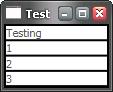
I’ve been playing with GridPanel today and really like how elegant it is. If I say the following:

<GridPanel>
  <SimpleText>Testing</SimpleText>
  <SimpleText>1</SimpleText>
  <SimpleText>2</SimpleText>
  <SimpleText>3</SimpleText>
</GridPanel>

I get the equivalent of an HTML table with four rows with each SimpleText element forming a cell like so (augmented with Border elements not shown above to accentuate the cells):

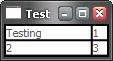
If I want to split the data into columns, I can do that using the Columns attribute:

<GridPanel Columns="2">
  <SimpleText>Testing</SimpleText>
  <SimpleText>1</SimpleText>
  <SimpleText>2</SimpleText>
  <SimpleText>3</SimpleText>
</GridPanel>

Which gives me two rows of two columns each:

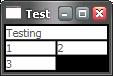
That’s all nice and simple, but still flexible. For example, if I want to set the Testing string to cover two columns, I can give it an ID in the XAML and call the GridPanel.SetColumnSpan static method in code, e.g. when the Window loads:

<!-- xaml -->
<Window ... Loaded="window1_Loaded">
  <GridPanel Columns="2">
    <SimpleText ID="testingSimpleText">Testing</SimpleText>
    <SimpleText>1</SimpleText>
    <SimpleText>2</SimpleText>
    <SimpleText>3</SimpleText>
  </GridPanel>
</Window>
// C#
void window1_Loaded(...) {
  GridPanel.SetColumnSpan(testingSimpleText, 2);
}

This code yields 3 rows arranged as follows:

This is all fine and makes you appreciate the elegance of the GridPanel. However, that’s not what inspired me to write this entry.

Remember that the SimpleText element serves as a cell in the GridPanel. Even better, the SimpleText element doesn’t know it’s serving as a cell in a GridPanel. The architecture of Avalon is loosely-couple so that all of the elements don’t need to have intimate knowledge of each other. This loose coupling is really great for future elements that some developer wants to host in a GridPanel or that want to host SimpleText elements. Still, I’d like to be able to set GridPanel-related properties for each “cell” on the cell element itself, even if the cell element doesn’t know it’s a child of a GridPanel. And that’s what the extended attribute syntax in XAML lets me do. Instead of writing the code, I can just do this:

<GridPanel Columns="2">
  <SimpleText GridPanel.ColumnSpan="2">Testing</SimpleText>
  <SimpleText>1</SimpleText>
  <SimpleText>2</SimpleText>
  <SimpleText>3</SimpleText>
</GridPanel>

This dotted attribute syntax allows me to set a GridPanel setting for the SimpleText element w/o any knowledge from the GridPanel of the SimpleText or vice versa. That means that if I define the FooBar element tomorrow, I can set it’s GridPanel.ColumnSpan on it when it’s used inside a GridPanel w/o extending GridPanel. This also means that if FooBar has a Quux per-child property, I can set the FooBar.Quux attribute of the SimpleText element w/o extending SimpleText. Nice!

BTW, if you’d like to see the code that provides the GridPanel in “outline mode” as above, it looks like this:

<Border Background="black" Width="100%" Height="100%">
  <GridPanel Columns="2">
    <Border Background="white" GridPanel.ColumnSpan="2">
      <SimpleText >Testing</SimpleText>
    </Border>
    <Border Background="white">
      <SimpleText>1</SimpleText>
    </Border>
    <Border Background="white">
      <SimpleText>2</SimpleText>
    </Border>
    <Border Background="white">
      <SimpleText>3</SimpleText>
    </Border>
  </GridPanel>
</Border>

Notice that the GridPanel.ColumnSpan is on the Border element, not the SimpleText element. That’s because it’s the Border that’s the cell of the GridPanel, not the SimpleText.

November 24, 2003 spout

I don’t know UIs, but I know what I like…

I don’t know UIs, but I know what I like…

Monday, November 24, 2003

The user in me sees Longhorn and dreams of software without limits. The engineer in me sees Longhorn and is scared of software without limits. An engineer’s days are defined by requirements and restrictions. Those restrictions come not only from the capabilities of the tools and technologies being bolted together, but also accepted practice. For years, I’ve been comfortable designing “rich” client applications because a) my tools and technologies haven’t let me do much that was really “rich” and b) because “rich” was pre-defined by existing applications.

In fact, when I started programming Windows 3.1, I adopted a single 3-step UI design process:

  1. Figure out the the requirements of the particular UI doodad I needed
  2. Find my favorite example of it in Visual Studio, Word or Outlook
  3. Make User/MFC/WTL/WinForms do that

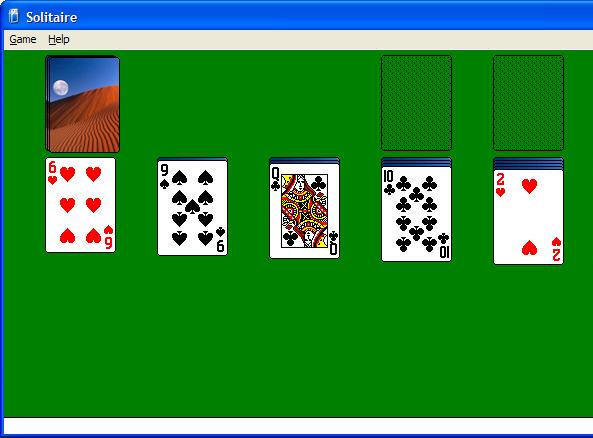
It doesn’t take much to design an application that looks like this:

or even one that looks like this:

when the process is merely aping existing apps. I was even encouraged to use this kind of UI design by books with color pictures from well respected authors:

User Interface Design for Programmers

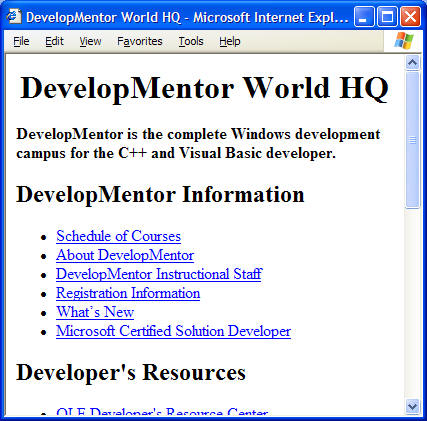
When the web came along, things were scary because all the guidelines were gone. However, at first the limitations were strict, so I didn’t have any trouble building sites that looked like this:

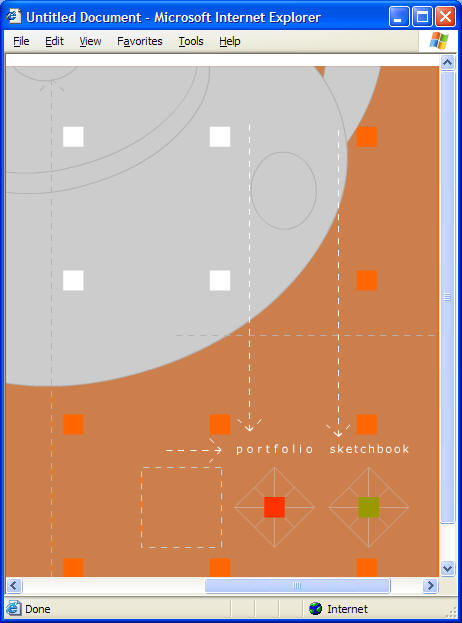
but when a few years later, the limitations faded away and I was expected to conceive of and implement stuff like this:

I didn’t have a clue. Luckily, the web “way” settled down over the years so that we figured out basically how to design web sites:

Book cover: Don't Make Me Think!

Plus, limitations took hold as we realized that you could build pretty much anything you wanted unless you wanted it to work on someone’s machine besides yours, which turned the screws down pretty tightly.

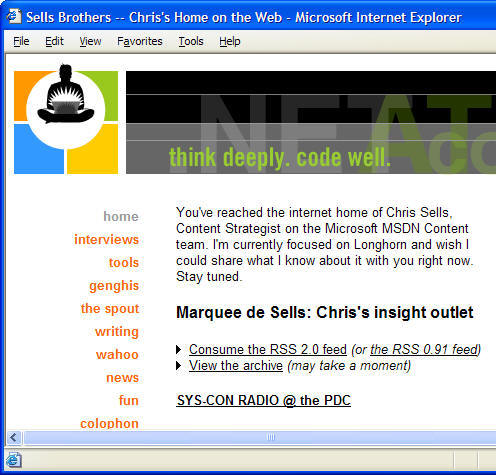
Still, while the emerging conventions helped me figure out what I wanted my own web site to look like in general, I had to *pay* for help from a otherly-skilled professional before I could get the specifics:

This is where it got scary until I had the one application designed for which I would ever need a designer. With my web site out of the way, it was smooth sailing.

That is, until Longhorn and Avalon came along.

Avalon drops the bottom out of the limitations and the guidelines again, leaving guys like me in a lurch. Oh sure, I’ve done pretty much everything there is to do in this industry, from coder to President, from docs to QA, from project management to *shudder* marketing. However, what I haven’t done and always hoped to avoid was design the graphics that go along with an application. Those were always things that I could hire done, most often as a deductible expense.

But now what do I do? MS doesn’t provide MSDN authors a “graphic artist” budget. We do have very talented graphic artists at MSDN, but what’s my boss going to say when they’re swamped doing graphics for my pet projects and not the public-facing web site?

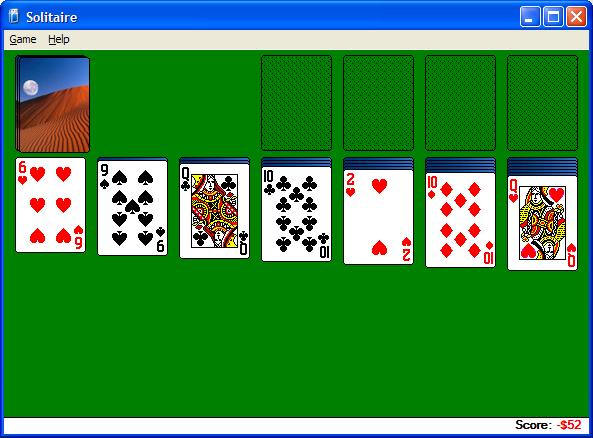
And standard bitmap graphic artifacts aren’t enough; I need *vector* graphics. Even I can see that while this is fine:

nobody is expanding sol.exe’s main window to get more “green space”:

To solve problems like these, we need vector graphics that look good when they’re scaled, which I understand is roughly 10x harder than bitmaps (which are already beyond me).

But just the graphics aren’t enough, either. MS is busy redesigning the Windows “user experience” to include the best of Windows and the web:

Apps are supposed to behavior sensibly (which I can handle) *and* look cool (where do I learn to make *that* happen?!?).

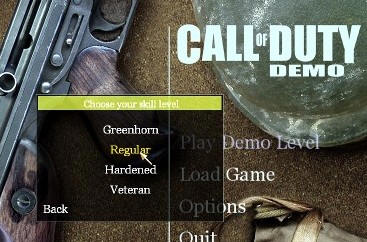
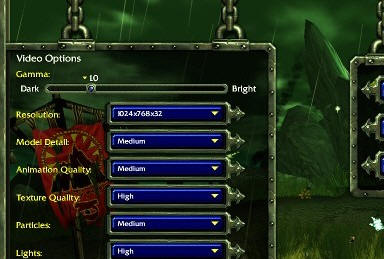
In fact, taking the next step from the budding UX guidelines, we seem to be heading into a place where if I want to build my own sol to fix the scaling, I’ll be trying to fit a “menu system” on the front like the gaming guys do:

and like so:

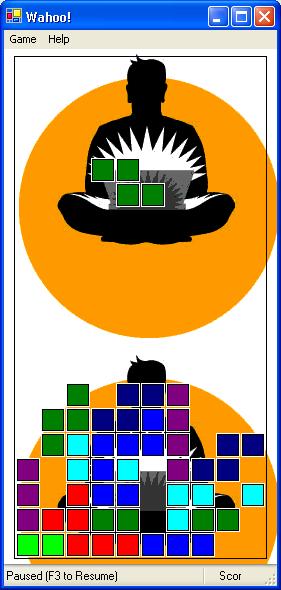
In fact, I’ve heard tell that there’s a special guy that designs these pre-game antics separately from the rest of the game just so folks think the game is cool as soon as it starts, long before you’re actually playing it. How can I stand up to that kind of pressure? I was pretty damn happy with myself when I made blocks fall and stack:

And while this is the only scalable game of its kind of which I know (I was ready for Avalon a while ago, apparently : ), it still has the standard un-cool “menu system” that Windows comes with out of the box.

And there’s no relief in sight! Avalon, by taking advantage of 3D hardware and displays that haven’t even been invented yet, along with intrinsic support for every kind of media and animation that I’m familiar with, blows right by the limitations we’ve grown to know and love in Windows and web applications. Now we’re into the world of game programmers, where if you can imagine it, you can do it.

But where am I going to get the graphics for what I can imagine?

How do I imagine a user experience when MS is literally still writing the book on it and they haven’t shipped a Longhorn Visual Studio, Word *or* Outlook?

Graphic/user experience designers of the world, please be gentle; the engineers are spooked and could stampede at any moment…

Know where I can get some graphics/user experience designers cheap?

November 15, 2003 spout

My First Meeting with BillG’s Technical Advisor

Saturday, November 15, 2003

In my continuing quest to take advantage of unique experiences at Microsoft for those that aren’t able to, I spent an hour in a meeting with Bill Gates’s Technical Advisor, Alexander Gounares, earlier this week. Among other things, Alex is responsible for getting answers when Bill asks questions like “Hey, what are we doing about adding air conditioning to Windows?”

I’ve had meetings with senior execs at MS before and I always end up saying stuff that upsets them. This time, the guy was so nice, I just wanted to nod my head and do whatever he asked of me. In fact, the thing I volunteered to work on (a “vision” whitepaper exploring a new application of technology that’s still under development) wasn’t so much that he asked me to do it, but rather because he asked for a volunteer and made eye contact with me in such a heart-warming way that I couldn’t say no. (Of course, my boss kicking me under the table didn’t hurt, either… : )

BTW, in case you wondered, while the Sr. VP I upset knew me from my blog, Alex didn’t know me from Adam. : )

For folks keeping track, in my six month career at MS, I gotten to do *lots* of cool stuff:

  • Launch the Longhorn Developer Center
  • Hang out back stage at the PDC, including preparing to act as Chris Anderson’s demo understudy and helping ship one of MSDN’s new features (annotations)
  • Write a Think Week paper for BillG and receive his comments back on it
  • Meet Anders Hejlsberg, Eric Gunnerson and Robert Hess
  • Have meetings with several execs, including one Group VP, one Sr. VP and BillG’s TA
  • Crash a WinFX API review
  • Introduce MS to the joy of a DevCon
  • Help get my PUM blogging
  • Invent an extension to RSS that is getting fairly wide implementation, e.g. SharpReader, RssBandit and .Text.
  • Appear on The .NET Show
  • Get a few mentions in the press as an official MS employee (including one that my Mom saw that made her very proud : )
  • Keep up contact with the community as much as I’m able via email, mailing lists, newsgroups, articles, conference talks and appearances

I list these not to brag, but to reflect on how many cool things there are to do at MS. I assume it’s all down hill from here. : )

November 3, 2003 spout

Time For An Exciting Career In Electronics

Monday, November 3, 2003

Depending on how you look at it, what I’m best at in the whole world has either become completely unnecessary or incredibly easy. The skill that I spent most of the last 10 years learning was to look at a group of types, APIs, reference docs, headers, source code, etc., distill it down to a set of architectural intentions and then to weave a story through the whole thing to make sense of it for developers that weren’t able to glean the intensions themselves (most often because they had real jobs). I call this exhaustive search for intention officially at an end. I’m no longer needed except as a gatherer for those not yet facile in RSS aggregators (which, luckily for me, is still a large number : ).

Blogs like Chris’s, Scott’s and Raymond’s go way beyond the “what” that docs and web sites and even mailing lists/newsgroups/web forums have typically stuck with and gone right into the “why.” And not only that, but Chris is actually taking that next step on his blog. In the old days, before my favorite technology company became so damn open, if I wanted to comment on something, I had to painstakingly track down the right people at Microsoft, make friends with them (which first demanded that I learn social skills) and then convince them that someone outside of MS might actually have something intelligent and useful to say. This often involved years of stalking ’softies in mailing lists and conference halls and now Chris is letting anyone give him feedback to which he actually listens!

What use a hack like me that doesn’t invent something, but merely figures out how existing things work so that I can tell someone about it if the guy that invents it does that part, too?!? I wonder if there are slots left in the vocational technical school near my house…

November 3, 2003 spout

My First PDC as a Microsoftie

After all the preparation, planning and sheer work, it’s a letdown for the PDC to actually be over. It was an amazing experience for me to be “back stage” at a PDC, the only conference I’d spent my own money on for years (although as a speaker, they let me in gratis this year : ).

Things I Heard:

As a Microsoft employee, my job is to listen and take feedback home. Here’s what I heard:

  • Longhorn, Avalon/XAML, Indigo, WinFS, ClickOnce: good
  • Improvements in VS.NET and ASP.NET: good
  • Indigo and ClickOnce on existing versions of Windows: good
  • Avalon not available on existing versions of Windows: not so good
    (Avalon changes things all the way to the device driver level, so retrofitting it to existing versions of Windows is impractical)
  • Not being able to download the PDC Longhorn and VS.NET Whidbey bits: not so good
    (MSDN subscribers can request the CDs to be sent to them)
  • Developers that didn’t go to the PDC and don’t have MSDN subscriptions not getting PDC bits: not so good
    (the public beta in the summer of 2004 will open this up considerably)
  • The Longhorn Developer Center features and content: good
    (whew : )
  • Having all kinds of Microsofties at the PDC and on the newsgroups and mailing lists to answer questions and take feedback: good
  • Publicly contributed annotations on the Longhorn SDK content: good
  • Longhorn bits running under Virtual PC: good
  • Longhorn bits amazingly functional and stable: good
  • Longhorn bits not especially speedy: not so good
    (these are the earliest OS bits we’ve ever given to folks — Longhorn will have years to improve in this and every other regard)
  • Availability of PDC network, both wired and wireless: not so good
    (don’t know why this happened)
  • Stacking up outside the rooms of overflowing sessions: not so good
    (although MS attendees were very good about giving up their seats to paying customers)
  • Microsoft’s commitment to pushing managed code so far into the OS: good
  • Lots of folks interested in contributing to the Longhorn developer community: good
    (if you’re planning something, please let me know)

Things I Got To Do:

Also, as a first timer backstage at the PDC (and a long-time member of the Windows developer community), I got to do all kinds of fun things:

  • Give a pre-conference tutorial on WinForms with Rocky Lhotka, a fellow giant Minnesotan with whom I’d never before had a chance to work
  • Prepare Sunday night to do the keynote demo in Chris Anderson’s place on Monday morning with Don Box and Jim Allchin in case Chris couldn’t make it past the fires in time
  • Hang out on the PDC keynote stage late at night, soaking up the Chairman of the Board and Sr. VPs doing their last minute preparations (and inadvertently making career-limiting statements : )
  • Watch Don and Chris and Jim pull off an amazing all-code keynote that will go down in history as one of the PDC’s best
  • Hang out at the Ask The Experts session, coding up repros and solutions to WinForms questions alongside Mark “Mr. WinForms” Boulter
  • Wandering the streets of downtown LA with Frank Redmond looking for Tim Ewald’s surprise birthday party
  • Answer questions instead of ask them at the MSDN booth
  • Being interviewed by Jon Box of Sys-Con Radio and an old ATL student who blames me for his career choices
  • Spent a lot of time telling people about MSDN Developer Centers, where my friends at MSDN work very hard to pull information out of the vast MSDN library and organize it for particular audiences, e.g. C#, VB.NET, ASP.NET, Security, VS.NET, the .NET Framework, Architecture, etc.
  • Shake hands and sign autographs and have my picture taken with all kinds of old friends and ex-students and readers and conference attendees
  • Gush like a fan-boy at Tim O’Reilly
  • Watch a block full of cars all go backwards one night getting back into “first positions” (it was California, after all : )
  • See the 4′ high by 20′ long WinFS schema and realize just how much work the WinFS guys are actually doing to capture “Everyday Information”
  • Send out the official welcome to the WinFX newsgroups
  • Make tweaks to several potential keynote demos at the last possible moment
  • Do an interview with .NET Developer Journal that let me tell my side of all kinds of stories
  • Get all kinds of feedback from internal and external folks saying nice things about the project that has consumed me for the last 6 months: the Longhorn Developer Center
  • Go to a 1am show of The Metal Shop heavy metal “mock ‘n’ roll” band at the Viper Room on the strip in Hollywood with John Shewchuk and Matt Pietrek and screaming my voice raw to the lyrics
  • Meet Sunny Day live and in person
  • Hang out with Matt Pietrek, one of my personal heroes, along with Tim and Sarah and most of my closest friends (where was Craig?!?)
  • Shake my tail feathers to yet another amazing Band on the Runtime gig
  • Attend all kinds of technical sessions on the technologies of Longhorn so that I can continue to live the Longhorn life for those developers that aren’t yet able to
  • Start the collection of items for a Longhorn Developer FAQ which I’ll post when it reaches critical mass
  • Hang out with architects from two of the three main pillars of Longhorn (Don Box, Indigo and Chris Anderson, Avalon) at the The Kettle in Hermosa Beach
  • Share a room with the 19-year old .NET wunderkind, Ryan Dawson

At this PDC, I definitely got to see how the sausage was made, but that still didn’t take away from the deep, rich flavor. Recommend.


← Newer Entries Older Entries →