spout

October 16, 2005 spout

More Workflow Communciation Spelunking

More Workflow Communciation Spelunking

After complaining about the inability to bind directly to event inputs, Dennis suggested I try the Workflow Communications Activity generator utility (wca.exe). If you point it at an assembly that contains interfaces decorated with the DataExchangeService attribute, it will generate typed invoke method and event sink activities for each method and event in the interface. To support this, I moved the communication interface, IOrderService, and types the interface depends on, i.e. Order and OrderEventArgs, to a separate library project and added the following post-build step:

"C:\Program Files\Microsoft SDks\Windows Workflow Foundation\wca.exe"
  "$(TargetPath)" /o:"$(SolutionDir)\EventSinkAndMethodInvoke2"

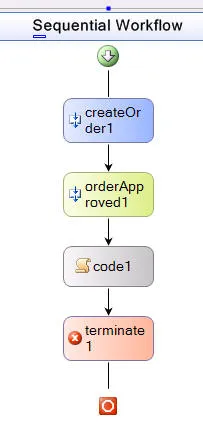
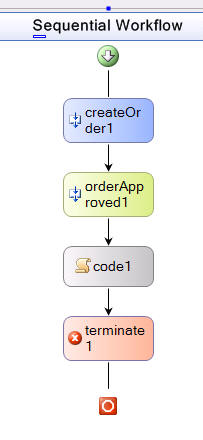
The reason I added this as a post-build step in the library project instead of as a pre-build stuff in the actual wf app, is because I want to have the types to program against whenever the library changes. However, either way, to get the new activities to show up on the toolbar, you have to build the application. Once I’d done that, I updated my workflow using the typed activities:

Unfortunately, just as I was capturing that screenshot, the Workflow Designer couldn’t find the activities, so it dropped them from my workflow without so much as a “by your leave,” reminding me where much of the early WinForms Designer.

However, two nice things result from these generated types. The first is that my design-time experience, either in the designer or in the XOML, is improved because I don’t have to do a bunch of parameter binding:

<SequentialWorkflow
  x:Class="EventSinkAndMethodInvoke2.Workflow2"
  x:CompileWith="Workflow2.xoml.cs"
  ID="Workflow2"
  xmlns:x="Definition"
  xmlns="Activities">

  <ns0:CreateOrder
customer="Fabrikam"
    orderDescription="42&quot; Plasma TV"
    ID="createOrder1"
    MethodName="CreateOrder"
    InterfaceType="EventSinkAndMethodInvoke2.IOrderService"
    xmlns:ns0="IOrderService_Operations" />

  <ns1:OrderApproved
ID="orderApproved1"
    EventName="OrderApproved"
    InterfaceType="EventSinkAndMethodInvoke2.IOrderService"
    xmlns:ns1="IOrderService_Events" />

  <Code ExecuteCode="code1_ExecuteCode" ID="code1" />

  <Terminate
Error="*d2p1:ActivityBind(ID={orderApproved1};Path=Comment)"
ID="terminate1"
    xmlns:d2p1="ComponentModel" />

</SequentialWorkflow>

The other nice thing is that, because the typed event sink has properties that directly expose the event arguments, i.e. Comment and Order, instead of just via parameter bindings, I can bind to them in the b1 build of WF. This reduces my coupling, because the terminate activity doesn’t know where it’s getting it’s input, and it takes away that “global variable” feel I had when I was binding parameters in and out of fields on the workflow itself. If I want to access the event sink’s typed properties directly, I can do so, as shown in the code activity’s handler:

public partial class Workflow2 : SequentialWorkflow {
  void code1_ExecuteCode(object sender, EventArgs e) {
    Console.WriteLine("Order: approved w/ comment= {0}", orderApproved1.Comment);
  }
}

I really like that typed activities are generated for me based on my data exchange service interfaces, but it’s still a manual, multi-stage process today. I’d prefer that it happened automatically, like typed resources and settings in VS05. If that can’t happen, I’d prefer to be able to bind directly to the parameter binding list that the generic event sink activity already knows about. At least that way, if there’s a problem, my workflow doesn’t get destroyed because of it.

The updated VS05b2, WF/WinFXb1 sample code is available for your enjoyment.

October 14, 2005 spout

Workflow Communication Spelunking

Workflow Communication Spelunking

I just an interesting week taking a crash course in Windows Workflow Foundation (formerly WWF, not just WF) programming. My big hang-up was, how do I communicate into, out of and between activities?

I started with Dennis’s explanation of communications into and out of a workflow. The fundamental idea is that, once a workflow has started, you can’t talk to it directly. Instead, you set up a communications interface that the workflow can use to talk to the host and that the workflow can use to watch for events from the host, e.g.

[DataExchangeService]
public interface IOrderService {
  void CreateOrder(string customer, string orderDescription);
  event EventHandler<OrderEventArgs> OrderApproved;
}

The interface is marked with the DataExchangeServer attribute to mark it as an interface suitable for host<->workflow communication, but other than that, it’s a normal .NET interface. The host, i.e. the chunk of code that creates the WF runtime, implements data exchange service interfaces as singletons, e.g.

class OrderServiceImpl : IOrderService {
  Dictionary<Guid, Order> _workflowOrderMap = new Dictionary<Guid, Order>();

  public void CreateOrder(string customer, string desc) {
    _workflowOrderMap.Add(BatchEnvironment.CurrentInstanceId, new Order(customer, desc));
  }

  public void ApproveOrder(WorkflowInstance wf, string comment) {
    if (OrderApproved != null) {
      Guid wfId = wf.InstanceId;
      OrderApproved(null, new OrderEventArgs(wfId, _workflowOrderMap[wfId], comment));
    }
  }

  public event EventHandler<OrderEventArgs> OrderApproved;
}

With this implementation, the host is allowing the workflow to call the CreateOrder method (which we’ll see it do later) and to subscribe to the OrderApproved event. The CreateOrder method uses its arguments to create an Order object and associate it with the ID of the currently executing workflow (available via BatchEnvironment.CurrentInstanceId). Remember, the service implementation is a singleton, but any number of workflows can call it, so when they do, we track information on a per workflow basis.

WF Question #1: How do I associate objects directly w/ a running workflow instead of tracking things in dictionaries?

The OrderApproved event is used to get information into the workflow.

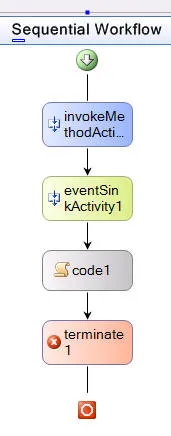
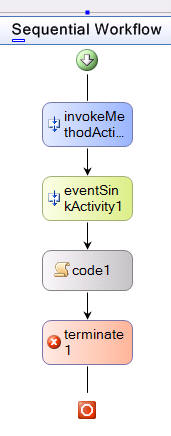
In our scenario, imagine we’re creating an order, approving it (w/ a comment) and logging the result. In my sample, I have a workflow imaginatively named “Workflow2” which captures this sequence:

The invoke method activity is bound to the CreateOrder method of the IOrderMethod method:

<InvokeMethodActivity
ID="invokeMethodActivity1"
  MethodName="CreateOrder"
  InterfaceType="EventSinkAndMethodInvoke2.IOrderService">
  <InvokeMethodActivity.ParameterBindings>
    <wcm:ParameterBinding ParameterName="customer" xmlns:wcm="ComponentModel">
      <wcm:ParameterBinding.Value>
        <?Mapping XmlNamespace="System" ClrNamespace="System" Assembly="mscorlib" ?>
        <ns0:String xmlns:ns0="System">Fabrikam</ns0:String>
      </wcm:ParameterBinding.Value>
    </wcm:ParameterBinding>
    <wcm:ParameterBinding ParameterName="orderDescription" xmlns:wcm="ComponentModel">
      <wcm:ParameterBinding.Value>
        <?Mapping XmlNamespace="System" ClrNamespace="System" Assembly="mscorlib" ?>
        <ns0:String xmlns:ns0="System">42" Plasma TV</ns0:String>
      </wcm:ParameterBinding.Value>
    </wcm:ParameterBinding>
  </InvokeMethodActivity.ParameterBindings>
</InvokeMethodActivity>

In this case, we’re hard-coding the custom and order description fields, but in a real workflow, you’d take those as input parameters.

WF Question #2: How do you pass input parameters into a workflow?

WF Question #3: Is it legal XML to have a processing instruction in the middle of a file, e.g. <?Mapping…?>?

After the workflow creates the order, it waits for a human to approve it via an event sink activity:

<EventSinkActivity
ID="eventSinkActivity1"
  EventName="OrderApproved"
  InterfaceType="EventSinkAndMethodInvoke2.IOrderService">
  <EventSinkActivity.ParameterBindings>
    <wcm:ParameterBinding ParameterName="Comment" xmlns:wcm="ComponentModel">
      ...
    </wcm:ParameterBinding>
    <wcm:ParameterBinding ParameterName="Order" xmlns:wcm="ComponentModel">
      ...
    </wcm:ParameterBinding>
  </EventSinkActivity.ParameterBindings>
</EventSinkActivity>

The event sink waits for the host to fire an event, which has several interesting bits. The first interesting bit is the parameter names, which are bound to the public properties of the OrderEventArgs class passed to the OrderEvent event:

[Serializable]
public class OrderEventArgs : WorkflowMessageEventArgs {
  Order _order;
  public Order Order { get { return _order; } }

  string _comment;
  public string Comment { get { return _comment; } }

  public OrderEventArgs(Guid workflowInstanceId, Order order, string comment)
: base(workflowInstanceId) {
    _order = order;
    _comment = comment;
  }
}

Notice that the custom OrderEventArgs class derives from the WorkflowMessageEventArgs class and passes in the workflow instance ID. This is required so that the event can be routed to the appropriate workflow. Without it, you’ll get the following illuminating error in beta 1:

“An unhandled exception of type ‘System.Workflow.Runtime.EventDeliveryFailedException’ occurred System.Workflow.Runtime.dll”

WF Question #4: Can we get more descriptive exception messages?

Luckily, this error only happens when you’re running under the debugger; it’s swallowed completely when your program runs normally.

WF Question #5: Can we get exceptions at runtime, too?

Notice also that the OrderEventArgs class is marked with the Serializable attribute. This is required to cross the boundary into the workflow. Without it, you’ll get the ever helpful EventDeliveryFailedException exception.

WF Question #6: What boundary are we crossing when fire an event into a workflow?

Further, all objects sent into a workflow need to be serializable as well, like the Order class (also yielding EventDeliveryFailedException if you forget):

[Serializable]
public class Order {
  Guid _orderId = Guid.NewGuid();
  public Guid OrderId { get { return _orderId; } }

  string _customer;
  public string Customer {
    get { return _customer; }
    set { _customer = value; }
  }

  string _desc;
  public string Description {
    get { return _desc; }
    set { _desc = value; }
  }

  public Order(string customer, string desc) {
    _customer = customer;
    _desc = desc;
  }
}

Firing the event is as easy as calling our helper function from outside of our workflow to cross the boundary into the workflow:

class OrderServiceImpl : IOrderService {
  ...
  public void ApproveOrder(WorkflowInstance wf, string comment) {
    if (OrderApproved != null) {
      Guid wfId = wf.InstanceId;
      OrderApproved(null, new OrderEventArgs(wfId, _workflowOrderMap[wfId], comment));
    }
  }

  public event EventHandler<OrderEventArgs> OrderApproved;
}

Notice that we need the workflow instance ID, which we pass in via the WorkflowInstance we get when starting the workflow:

static void Main() {
  WorkflowRuntime workflowRuntime = new WorkflowRuntime();

  // Add IOrderService implementation
  OrderServiceImpl orderService = new OrderServiceImpl();
  workflowRuntime.AddService(orderService);

  workflowRuntime.StartRuntime();
  workflowRuntime.WorkflowCompleted += OnWorkflowCompleted;

  Type type = typeof(EventSinkAndMethodInvoke2.Workflow2);
  WorkflowInstance wf = workflowRuntime.StartWorkflow(type);

  // Simulate human decision time and approve the order
  System.Threading.Thread.Sleep(1000);
  orderService.ApproveOrder(wf, "this is a *fine* order!");

waitHandle.WaitOne();
  workflowRuntime.StopRuntime();
}

Once the event data is fired into the event, the event sink’s parameter binding provide enough infrastructure to be able to access the data in subsequent activities, e.g. the code activity that comes right after the event activity:

<Code ExecuteCode="code1_ExecuteCode" ID="code1" />

In the code1_ExecuteCode method, my code can reach over to the event sink activity’s parameter bindings and access the data that was fired into it:

public partial class Workflow2 : SequentialWorkflow {
  void code1_ExecuteCode(object sender, EventArgs e) {
    Console.WriteLine("Order: approved w/ comment= {0}",
eventSinkActivity1.ParameterBindings["Comment"].Value);
}

There are three reasons I really don’t like this code. The first is that I have to cast to get something typed out of the Value property and I don’t like casting. The second reason is that this technique only works through code; I can’t bind to a parameter from an event sink to a property on another activity, e.g. the Error property on a Termination activity. The third, and most damning reason, is because this induces coupling from my code activity to my event sink activity. I don’t want this coupling to be captured in code, which is another reason to really like the declarative data binding solution.

WF Question #7: Why can’t I bind event sink parameters as input into other activities?

Unfortunately, while I can’t solve reasons #2 or #3 very well, I can solve them partially and I can solve #1 nicely by adding some fields to my workflow class:

public partial class Workflow2 : SequentialWorkflow {
  Order _approvedOrder;
  string _approvalComment;

void code1_ExecuteCode(object sender, EventArgs e) {
    Console.WriteLine("Order: approved w/ comment= {0}", _approvalComment);
  }
}

The _approvedOrder and _approvalComment fields can be bound to the event sink parameters like so:

<EventSinkActivity
ID="eventSinkActivity1"
  EventName="OrderApproved"
  InterfaceType="EventSinkAndMethodInvoke2.IOrderService">
  <EventSinkActivity.ParameterBindings>
    <wcm:ParameterBinding ParameterName="Comment" xmlns:wcm="ComponentModel">
      <wcm:ParameterBinding.Value>
        <wcm:ActivityBind Path="_approvalComment" ID="{/Workflow}" />
      </wcm:ParameterBinding.Value>
    </wcm:ParameterBinding>
    <wcm:ParameterBinding ParameterName="Order" xmlns:wcm="ComponentModel">
      <wcm:ParameterBinding.Value>
        <wcm:ActivityBind Path="_approvedOrder" ID="{/Workflow}" />
      </wcm:ParameterBinding.Value>
    </wcm:ParameterBinding>
  </EventSinkActivity.ParameterBindings>
</EventSinkActivity>

Now, when the event sink activity fires, these two workflow fields are populated so that by the time the code activity is executed, they’re ready for use, all typed up and ready to go. However, while this reduces coupling to some degree, i.e. the code activity just hopes that somebody provides the data and not that is has to be a specific activity, this is not the same as failing to execute an activity until you have valid values to pass to a function. Instead, it’s like setting global variables, hoping they’re set properly when the code that accesses them needs them and having no idea what’s affected if you have to remove them.

Still, with the parameter binding in place between the event sink parameters and the workplace class fields, I can bind the input to an activity:

<Terminate
Error="*d2p1:ActivityBind(ID={/Workflow};Path=_approvalComment)" ID="terminate1"
  xmlns:d2p1="ComponentModel" />

Clearly, this is binding syntax only a mother could love, but luckily the designer did it for me, it’s going to change in the next beta and it does most of what I want, i.e. bind the input of the Error property on the Terminate activity to something produced by another activity. It’s not the same as binding the event sink activity parameters directly, thereby allowing me to shed this dirty global variable feeling, but it’s oh so close.

The VS05b2, WF/WinFXb1 sample code is available for your enjoyment.

Props to Dennis Pilarinos and Anandhi Somasekaran from the WF group for help figuring this out.

October 10, 2005 spout

Open Office is a “real” thing

I use my family as a litmus test of when things are “real” or not. None of them have technology backgrounds or training, so if something is real to them, it’s real. For example, it was my grandmother that asked whether she need Windows 95 (she didn’t have a computer, mind you). I head from my folks about spyware and phish attacks. And now, my sister-in-law asked me if she should be upgrading her Windows ME machine to OpenOffice.

Of course, OpenOffice isn’t an OS, but as far as she knows, MS Office is her current OS, so maybe OpenOffice is what she needs.

I believe that it’s in her best interest for me to steer her away from unsupported OSS software unless I want to become her tech support liaison (difficult, since I’ve never used OpenOffice). Also, she’s looking for “something that will function with little or no problems,” which I can’t claim of any software, free or not.

Still, it makes you wonder if these OSS guys could really make a credible play for the desktop. Obviously, they’re not going to produce Office 12 or Windows Vista anytime soon, but they’re nipping at our heels pretty credibly if they can attract the attention of the secular members of my family. How much longer before OSS becomes “good enough” for most uses and the latest thing you buy from actual software vendors is just fancier? In fact, how many actual software vendors do we really have left anyway?

October 8, 2005 spout

I’m also a huge Ian fan, as you should be

Ian Griffiths, my co-author on Programming Windows Presentation Foundation, is very well worth your attention.

He was a colleague of mine at DevelopMentor and now teaches for PluralSight.

I’m on a private mailing list filled with the smartest people I know and Ian is the one we look to for the definitive word on a wide variety of wacky technologies. In spite of his tendency to write long missives covering huge areas (or because of it), he’s the one guy I always read on that list. He’s also graces the off topic mailing list a great deal and, of course, the blogesphere.

Ian wrote the XAML Appendix that Don so loves, as well as half the rest of the WPF book, including layout, custom controls and resources, all of which I constantly refer to. It goes without saying that his feedback made a huge difference in the quality of my own writing. When I asked Ian to co-author with me, I knew I was obtaining one of the community’s most potent secret weapons.

If you’re not an Ian Griffiths fan yet, you soon will be.

October 8, 2005 spout

I’m a fan

Charles Petzold taught the first generation of real Windows programmers.

Charles Petzold sold so many copies of Programming Windows 3.1 that he broke the MSPress accounting software.

Charles Petzold helped define what it means to write books for Windows programmers.

I’m a Charles Petzold fan. I’m also a fan of the other luminaries of this community, including Jeff Prosise, Jeff Richter, Matt Pietrek, John Robbins and Don Box.

They’re the giants that provide the provided the shoulders.

P.S. Petzold has literally sold more copies of Programming Windows 3.1 in a single quarter of the 16-bit years than I’ve sold of my books in a 10-year writing career.

October 8, 2005 spout writing

Wise Advice from Tyler Brown

How can you argue with someone so obviously intelligent?
October 6, 2005 spout

The Competition

Charles Petzold says he doesn’t envy me. Hell, I’m just flattered he knows my name. Like the rest of my generation, I learned how to program Windows from Petzold.

Still, even though Petzold doesn’t envy Ian and I for writing the beta edition of the WPF book, it hasn’t turned out to be so bad. Oh sure, we wrote against first a creaky CTP, then a slightly less creaky beta 1 RC, but we made it mostly work. Of course, but the time the book was published at the PDC, MS had released a new version, making some of the details of our book obsolete, but not so many that we weren’t able to catalog the changes for readers w/in a week or so of the PDC bits. We’ve also posted samples for both beta 1 and the September PDC and we plan on posting changes and samples for every major version from now ’til the WPF v1.0 version of the book.

Plus, I happen to know that another “competitor” is constantly bombarded with copies of the book on the desks of his colleagues, while a friend makes parts of our book required reading for the people he’s working with.

Still, all of that pales in comparison to the real value of getting a book (or any product) out as early as possible: feedback from the readers (users). I got a ton of feedback on my early Avalon writings and now we’re getting more from our book readers, all of it feeding into the pipeline to make the book better the next time around.

With all of this in our favor, I don’t envy Petzold having to start from scratch…

P.S. I have to say, the only thing better than beating Petzold, my long-time hero, in sales and reviews is having him complain about me on his blog. I’ve peaked. It’s all down hill from here… : )

October 6, 2005 spout

How I Stopped Worrying And Learned To Love the Reboot

A while has passed since the 2005 PDC, so I can laugh about it now, but at the time, things were not fun at all.

It started long before the PDC. Doug Purdy and I were asked to do the Avalon/Indigo “interop” talk. We got together and I volunteered to “PM” it (PM is a verb as well as a noun at MS). Over lunch (we both love CPK), we hammered out our ideas for a fun demo that showed off the integration points between these two technologies, split the tasks, set the dates and off we went.

My first task was to gather the graphics we’d need for our Avalon front-end, since neither Doug nor I are artists. I asked newly hired Adam Kinney, who did a fabulous job. Everything good about the app is Adam’s fault. Thanks, Adam! I was also to build a script for our demo that we could run by folks internally, which I did.

Doug’s job was to put up a web service that I could write my app against. The problem is that Doug has far, far more responsibility than I do, since while my day job is to PM a group of about 5 people, Doug’s is to PM a group of about 250. At MS, when you’ve got too much to do, the time you set aside for a lower priority task is often “pimped” to service the higher priority task (that’s a technical term : ). I got pimped — hard (without so much as a kiss…).

When you’re pimped at MS, one handy trick is to schedule a “working” meeting, where you sit in the room with the folks that were supposed to do the work on their own and you work “with” them, i.e. look over their shoulder and give them shit if they’re not working on your thing. Unfortunately, the only time I could get with Doug was 6pm-10pm one evening, but I took it and we spent a pleasant evening writing our bits of the app and making them work together under WinFX beta 1.

Then the September CTP bits came along that we were to give away at the PDC. I spent a few hours porting my bits, but Doug didn’t have the time to do his ’til just before the PDC, so we didn’t get a chance to integrate our two apps ’til the week of the PDC itself.

But let’s back up. I’m at the PDC Tuesday morning. My Avalon app portion is ported and running, as is Doug’s Indigo app portion. I go to the keynote in the Microsoft employee overflow where we get to make fun of the people on the screen w/o disturbing anyone and we’re having a good ol’ time. I don’t see Doug, but that’s not surprising, so I head up to the speaker lounge, grab a network connection and drop him a line.

By Wednesday afternoon, I still hadn’t heard from him. I drop him another line. Still nothing. Martin Gudgin, my long-time friend and Doug Purdy direct (aka Martin works for Doug), places a call to him for me. Doug picks up. He can do that because he’s not on a plane down to LA. No, he wouldn’t do that because planes freak him out. Instead, he’s on a train. The ride is 35 hours long and he’s still in the middle of it. I won’t see him ’til later this evening, if at all. At least he’s safe and he’s using the training ride to polish his demo, so I go to a party and feel better.

I awake to find an S+ in my inbox. “S+” is what what ’softies call an Outlook appointment request because we used to schedule meetings using a program called Schedule Plus and, like many things at MS, the noun was verbitized. The S+ is from Doug and he wants to meet to me this morning to have a working meeting to do our integration. I’m happy to do so, so I report to the speaker’s lounge on Wednesday at 10am.

Except for commitments, like Doug’s other talks, my Windows Technology Off Topic mailing list member mini-DevCon and a tiny bit of sleeping, Doug and I are working on the integration of our demos from Wednesday morning at 10am until Friday morning at 4am (our talk is at 10:30am Friday). To get things to work, we’re battling issues we never saw before because in an effort to give our customers the latest and greatest bits, the CTP has regressed on the Avalon/Indigo integration front.

For example, while the add-in that adds Avalon/Indigo features to VS05 modifies the Add Web Reference to create an Indigo client-side proxy, there is no way to set the flag to give us async methods and the generated code for endpoints with more than one method doesn’t actually compile (nor is it easily fixed to compile). The command-line utility, svcutil, generates async methods and the output compiles, but when the async methods are called, they block the UI thread. The worker thread is still spawned and used, mind you, it’s just that the UI thread is blocked ’til the worker thread is done (handily defeating the purpose). Even when we switch the client to use BackgroundWorker so that async calls are really async, the first Indigo call takes 20+ seconds. We didn’t learn this ’til later, but this was apparently due to a DNS look-up error when Indigo was used with a network connection (we were using two machines to be as real-world as possible…). This list went on and on.

We did finally get it all working by 4am, but by then we were swearing at everyone and everything that had gone into the creation of either technology, which made us good company for the other last-minute-Lou’s that were hammering away at their demos into the wee hours of the morning (although Doug and I had the dubious honor of being the last ones in that damn speaker lounge).

I woke up early, so I headed to our session early. Doug had another talk right before ours, so I thought I’d get things set up, test them out as much as possible, etc. Sitting in the back of the room about 15 minutes before the other talk was about to end, I started my laptop up from Hibernate mode just as my cell phone rang. It was a friend, so before my machine had fully booted, I flipped the lid closed again and answered my phone. Just then, the speaker ended his talk, so I ended my call and wandered to the front of the room with 45 long, juicy minutes to set up.

I sauntered onto the stage. I got out my power cord in a leisurely fashion and started my laptop to boot.

I hooked up my power cord and thought I saw a hint of blue on my laptop screen and it was booting again.

I watched more carefully and yes, that was the BSOD. I shutdown the power completely and waited a few seconds. Booting again gave me a BSOD again. Minutes are ticking by, eating into my comfortable lead. The IT guys are coming up to test my laptop’s video output and to hook up the mic. I ask if someone technical could help me. They get onto their radios with a hint of panic in their voices.

By now, I’ve trying safe mode booting, both into Windows and into the command prompt, both of which yielded a BSOD. Then I remember my CD case. I always carry a set of CDs with me with my most critical software, just in case (those old instructor habits die hard). I had recently gone through it and cleaned out a bunch of stuff, so the single CD left in the case is my Windows XP SP2 boot CD. I put it in and pray. As it turns out, I’ve got plenty of time to establish a connection with my maker, because it takes ages for that XP CD boot to get somewhere useful. I chose the Recovery Console and wait.

In the meantime, Martin has wandered in to say hello. It’s about 10:10 and my talk starts in 20 minutes. I ask him if he’s got WinFX and VS installed on his laptop. He says he’s got WinFX and a version of VS installed, but neither are the PDC bits, so they’re not likely to help me (I was up ’til 4am getting my bits working for the PDC build — I couldn’t imagine switching versions on the fly). I ask him to find someone else with a machine I can use. In the meantime, I’m checking the PDC boxes. They’ve got two, both running WinXP (great!), but neither running WinFX or VS05 (boo!). All I can do from these machines is run my PowerPoint deck, but because this session was meant to be code only, we’ve only got about 3 slides. Without the demo, we’ve essentially got nothing.

Now it’s 10:15 and the audience is gathering. Also gathering are people trying to help. One guy’s got a machine with the right bits, but they’re running in a VPC, which is not the greatest place to show off Avalon (but thanks, whoever you are, for trying!). One attendee offers his laptop, which has the right bits installed, but he doesn’t have a power cord and there’s only about 30 minutes worth of battery life left. Rob Relyea (I think) finally comes up with his shuttle PC with the right bits and a power cord and starts hooking it up, along with everyone else I can find that might be able to help me, all of whom are now busy hooking up PCs in line line that nearly bows the table on the stage.

At last, I’m at the recovery console and I’m running every command I can think of, e.g. fixmbr, fixboot, chkdsk, etc. Most of the commands are saying scary things like “Are you sure you want to execute this command? It might work, but I can’t promise not to cause flames to shoot out the USB slots.” I’m typing “y” as fast as I can ’cuz I’ve got nothing and at least flames would be engaging.

Now it’s 10:20 and Doug has just shown up from his previous talk. He boots his laptop without a problem, the sound guys have their way with him, his video works and he announces that he needs caffeine. Of course, I’ve got adrenaline shooting out of my eyeballs by now and I want him to feel my pain, so I tell Doug his is absolutely not going anywhere. He says he is. I tell him he’s not. Now, Doug and I are both big, loud guys, so all of the folks in the front rows, including representatives from the technologies we’re demonstrating that asked us to give this talk, are witnessing us fighting with each other minutes before the talk begins. Finally, Rob to the rescue again, offers to get Doug some coffee.

At around 10:25, all of the fixthis and chkthat commands have been run and I reboot. For the first time in almost an hour, I can log into my laptop and I start to think I might actually get to give my first PDC session ever (did I mention I felt a little pressure?). We pull up the finished version of our app and test it end to end. There’s still the initial 20 second lag, but it all works. Brimming with confidence that only comes from avoiding a bullet with your name on it, I hook up the video on my laptop.

All that comes out is scrambled garbage.

Now we’re panicked again, frantically futzing with the video settings. They all seem mostly right, so we change some things that shouldn’t matter, but nothing fixes the problem.

We can’t get the video to work and now it’s 10:30.

The sound guy puts on my mic and practically dives off the stage in case something does burst into flames, as seems the logical next event.

I pull up the slides on one of the PDC computers so we can start the talk and reboot my laptop at 10:31.

At 10:32, we’ve started the talk. Doug is telling folks who we are and why we’re here. I’m looking for the backdoor.

I log into my laptop, start up the talk on the same slide that’s currently showing and press the switcher to show my laptop’s video.

It shows and I am Superman.

This is where things get fun, because at our most morose, Doug and I are loud and obnoxious in a way that most audiences like. By now, we’ve poured so much energy into the talk right up until literally the very last minute that now we’re practically levitating.

Doug has the idea to take questions first, so I’m writing down a list of stuff that has nothing to do with the talk, all the while we’re making fun of each other and the audience. The audience eats it up.

I’ve got a developer from Indigo and a PM from Avalon in the front row that we bring up on stage because they’ve just gotten engaged and we made them kiss to show off the power of Avalon and Indigo integration, I announce that I got ordained on two separate internet churches the night before in case they wanted me to marry them on the spot. They politely decline, but the audience eats it up.

I show off our application with increasingly funny caricatures of Doug and me. The audience eats it up.

We start into the actual code integrating Avalon and Indigo, joyfully pointing out the problems with the current versions of each other’s technologies, making sure the audience knows the current state of the bits and how to work around problems while pledging to fix things by RTM. After a bit of trouble, we get our integration code working across the network between machines and give each other an enormous hug, professing our undying love for each other and guess what? The audience eats it up.

It’s like a TV sitcom with a laugh track every 60 seconds, except that Doug and I are just riffing and the laughter is real. I’d say it was the speaker version of jazz and it rocked the house.

Of course, as was inevitable, we got to a place where our demo finally failed, but only after we’d gone over our allotted time by 5 minutes and Doug redeemed us with 10 seconds more typing, an off the cuff demo and a flourish, at which time we wisely took our bows and got the hell off the stage.

What was the result? Lots of folks said stuff in their evals like, “Siegfried and Roy have nothing on Chris and Doug. It was a perfect way to wake up on the Friday of the conference.” However, some folks dinged us for “too much show, not enough substance,” and they were right. We would’ve shown more stuff if we could have, but frankly, I’m just happy one of us didn’t spontaneously combust.

The best results of the talk was that Doug went home with a giant list of bugs to get fixed before the WinFX RTM and I kicked off the “WinFX Cross-Pillar SDK Technology Sample Working Group” dedicated to making sure we have a much greater set of SDK samples to show off and drive quality into the cross-pillar integration points between Avalon, Indigo and Workflow. I’d actually like to poke my head out of the speaker lounge at the next PDC and I’ll be damned if I’m going to let the quality of these particular technologies stop me next time if I can help it (and I can).

Still, I find I have a new appreciation for jazz…


← Newer Entries Older Entries →