My friend Jeff asked me to do a terrible thing yesterday: “How do I show a form in the popup window that a menu shows?” I said, “Dude! Don’t do that — write a dialog!” And that’s what he did, but then, like a train wreck, I couldn’t look away. It took me all of 10 minutes of very straight forward coding and here we are:
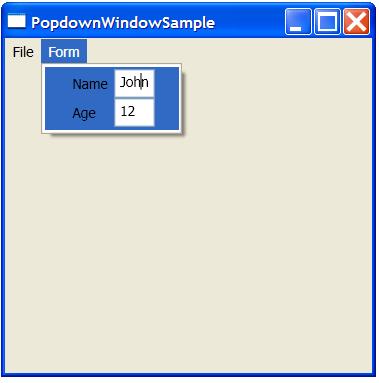
If you’re familiar with WPF, data binding and data templates, this is all standard stuff. Here’s the data structure:
class Person : INotifyPropertyChanged
{
    string name;
    public string Name
    {
        get { return name; }
        set { name = value; Notify("Name"); }
    }
    int age;
    public int Age
    {
        get { return age; }
        set { age = value; Notify("Age"); }
    }
    public event PropertyChangedEventHandler PropertyChanged;
    void Notify(string prop) {
    if( PropertyChanged != null ) {
        PropertyChanged(this, new PropertyChangedEventArgs(prop));
    }
}
}
The data template is also bog standard:
<DataTemplate DataType="{x:Type local:Person}">
  <Grid>
    <Grid.RowDefinitions>
      <RowDefinition Height="auto" />
      <RowDefinition Height="auto" />
    </Grid.RowDefinitions>
    <Grid.ColumnDefinitions>
      <ColumnDefinition Width="auto" />
      <ColumnDefinition Width="auto" />
    </Grid.ColumnDefinitions>
<Label Grid.Row="0" Grid.Column="0">_Name</Label>
<TextBox Grid.Row="0" Grid.Column="1" Text="{Binding Name}" />
    <Label Grid.Row="1" Grid.Column="0">_Age</Label>
    <TextBox Grid.Row="1" Grid.Column="1" Text="{Binding Age}" />
  </Grid>
</DataTemplate>
Setting up the app itself is nothing special:
<Window ...>
  <Window.Resources>
    <DataTemplate DataType="{x:Type local:Person}">
      ...
    </DataTemplate>
  </Window.Resources>
  <Grid>
    <Menu>
      <MenuItem Header="File">
        <MenuItem Header="Exit" x:Name="fileExitMenuItem" />
      </MenuItem>
      <MenuItem Header="Form" ItemsSource="{Binding}" />
    </Menu>
  </Grid>
</Window>
Notice that the items that make up the menu come from a binding to the ambient data source, which we set in the code-behind:
protected override void OnInitialized(EventArgs e)
{
    ...
    Person tom = new Person();
    tom.Name = "Tom";
    tom.Age = 11;
    DataContext = new Person[] { tom };
}
The only thing at all tricky is that, even though we’re only editing a single object in the “popdown window,” it has to be in an implementation of IEnumerable so that the menu can display it (it expects items to come in a list).
That’s it. You can download the RC1 WPF project here.
You might wonder why I would post such a sample, when clearly that’s not a UI we want to foster on folks. The answer is simple: because WPF allows it.
The power of any platform should be judged by how well it lets you write bad code. Early versions of Visual Basic let you write really bad code — but it worked. Likewise, WPF lets me build the worst UIs ever — but they work. This is necessary so that UI visionaries can experiment and get to a place where they’re doing something completely different from UIs of today and we like it.
Do you think the Office folks, who, for all practical purposes, have been setting UI guidelines on Windows for a decade, could use MFC or Windows Forms? No, because they’re not flexible enough. Could they use WPF? Absolutely they could. And so can you.
The crayon box has lots of colors that I don’t like, but in the hands of an artist, they can create beauty.

 October 6, 2006
.NET
October 6, 2006
.NET