May 10, 2002·
Tools
Announcing Genghis
Genghis is a set of extensions built on top of .NET and integrated with WinForms to provide application-level services in the same flavor as the Microsoft Foundation Classes. Genghis gets its name as the functional heir to Attila, a similar set of functionality built on top of ATL.
May 10, 2002·
Tools
SafeFormatter for .NET
Are you building and deploying .NET applications in a secure
environment, e.g. over the intranet or the internet? If so, they you’ve
probably mourned the loss of the binary and SOAP formatters that can
automatically serialize a graph of objects that are marked as [Serializable]
and that may also implement ISerializable and IDeserializationCallback. Both
of these formatters are dependent on reflection, which will not be available
in a more restrictive security environment. Likewise, even
ISerialization.GetObjectData is verboten if you wanted to do this kind of
thing yourself. As far as that goes, [Serializable] and ISerialization
should be forbidden in a secure environment, as it allows a client to
get and set the private variables of an object, potentially causing harm.
Still, security is the enemy of usability, to paraphrase
Keith Brown. So, in the spirit of a balancing the design need for objects
that can serialize themselves with the goal of complete disclosure in a
secure world, I’ve built my own “safe” formatter. It only uses facilities of
the runtime that work in the most secure environment of the default settings
for the internet zone. So that objects can guard themselves against
malicious data, I define a new interface called ISafelySerializeable that
they need to implement to support this serialization facility. The protocol
is exactly the same as ISerializable, so if that interface is already being
implemented, the implementation of GetObjectData can be shared between both
interfaces.
Currently, the code is in alpha and is riddled with TODO
statements, but its functional enough today for actual usage.
My SafeFormatter and test harness are available
for your feedback. Enjoy.
 May 10, 2002·
.NET
May 10, 2002·
.NET
Adding Custom Project Item Templates to VS.NET
This article describes how to add a custom project item wizard to the Add New
Item dialog in Visual Studio .NET. Instead of building a custom implementation
of IDTWizard and generating the code ourselves, however, we’re going to leverage
Microsoft’s implementation using strategically placed template files and script.
The Sample
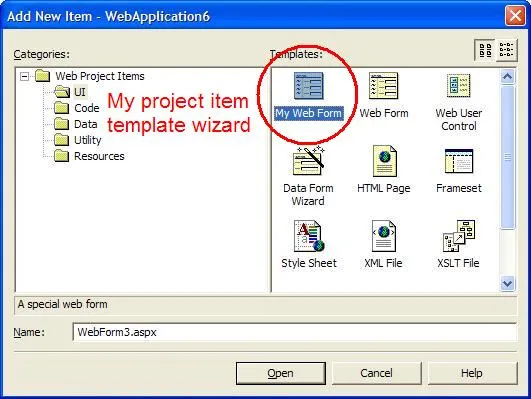
The sample project item template
wizard I built to go along with this article is called My Web Form and adds
a custom aspx file along with a custom aspx.cs file (the latter being the hard
part), as shown below. It also advertises the Web Services DevCon.
Enjoy.
NOTE: If you’re going to use this sample in VS.NET 2003, you need to
append a “.7.1” onto the Wizard = VsWizard.VsWizardEngine line in the .VSZ file
located in the CSharpProjectItems directory, other you’ll get a Wizard can’t run
error in VS03 (and thanks to Randy Brown for pointing this out).

The Steps
Feel free to follow along:
- Under your VS.NET installation folder, find the ProjectItems folder for
the type of template item you’d like to add, e.g. VC#\CSharpProjectItems is
the directory for C# project items.
- Create a .vsz file to configure your project item wizard, e.g. here’s a
sample CSharpAddMyWebFormWiz.vsz:
VSWIZARD 7.0
Wizard=VsWizard.VsWizardEngine
Param="WIZARD_NAME = CSharpAddMyWebFormWiz"
Param="WIZARD_UI = FALSE"
Param="PROJECT_TYPE = CSPROJ"
Notice that the Wizard value looks like a COM ProgID. It is. Specifically,
it’s VS.NET’s built-in VsWizardEngine. That’s so I can skate by using their
template expansion engine and their script hosting without having to build it
all myself.
In the part that says WIZARD_NAME, give that the name of your own custom
template, e.g. CSharpAddMyWebFormWiz. This name will be used later.
See more information about .vsz files.
- The directory structure underneath the ProjectItems folder mimics the
folders in the Add New Item dialog. Navigate to the one you like and add a new
.vsdir file to reference the wizard you created in the vsz file above, e.g.
here’s a sample mywiz.vsdir for under ProjectItems\WebProjectItems\UI (this is
all on a single line):
..\..\CSharpAddMyWebFormWiz.vsz|{FAE04EC1-301F-11d3-BF4B-00C04F79EFBC}|
My Web Form|0|A special web form|{FAE04EC1-301F-11d3-BF4B-00C04F79EFBC}|4534|0|
WebForm.aspx
We’ve got several fields here, all separated by old fashioned pipes. The 1st
field is the relative path the vsz file we created earlier. The 3rd field is a
short description for the Add New Item dialog. A long description (also shown
in the dialog) can be provided in the 5th field.
The 4th field is the sort order, smaller means close to the top. I assume
since you’re going to all the trouble to add a custom project item that you
think it’s important, so we’ve promoted it all the way.
Notice also the last field. It shows the general format of the file to be
generated and added to the project. The other fields are GUIDs that we copied
from the VS.NET CSharpAddWebFormWiz.vsz to “leverage” their icon for display.
See more information about .vsdir files.
- The mywiz.vsdir file shown above will show your custom template item under
the folder you picked, but will not show it at the global level. To show it at
the global level, you need to copy your .vsdir file up to the just under
LocalProjectItems or WebProjectItems, remembering to update the relative file
path, e.g.
..\CSharpAddMyWebFormWiz.vsz|{FAE04EC1-…
- Once you’ve set up the pointers to your new project item template, you
will need the template that will form the output of your wizard. This
information is placed into a folder under the type of template item you’re
building, e.g. VC#\VC#Wizards is where the C# wizards live. The directory
structure for your item will look like this:
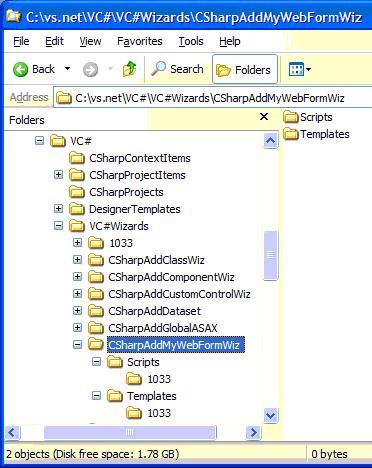
The contents of the Template\1033 directory is the manifest for the file to
generate for your project item in a file called templates.inf and the file
that you would like to use as the template. The template file and the
templates.inf file use wizard-provided symbols to example statements like
[!output SAFE_CLASS_NAME] into strings like “MyClass”.
See more information about the template language.
The following is an example templates.inf file with a single file in it:
WebForm1.asmx
By default, all project items have a single file as specified in the Add New
Item dialog, which is why we only have a single file in this templates.inf
file. When running, the wizard will expect a file named WebForm1.asmx in the
Template folder to serve as the template.
- The templates.inf file turns out to be a convention and is not at all
required. The default.js file in the Script\1033 directory of your wizard is
what uses the templates.inf file to process each template file. Unfortunately,
even a simple default.js file is too complex to reprint here, so I recommend
that you find one from a wizard that’s close to what you want to do and copy
it. If you just want a single file as determined by the templates.inf file,
you’re all set.
- On the other hand, if you want more, you’re going to be doing some
spelunking. For example, I wanted to produce a project item template wizard
that output a custom aspx file and the corresponding aspx.cs file. I started
by duplicating the CSharpAddWebFormWiz folder, renaming it
CSharpAddMyWebFormWiz and following steps 1-6. Then I added another file to
the templates.inf file and all heck broke loose.
First, the default.js file that I duplicated from the Add Wizard Form wizard
assumed that it was generating a single file, e.g. WebForm1.aspx, so when I
added another file to generate, it reused that file name and VS.NET didn’t
like it one bit.
Second, the IDE itself generates files when certain kinds of files are added
to a project, e.g. aspx files. For C# projects, those files live in VC#\DesignerTemplates.
Since the aspx.cs file is auto-generated when an aspx file is added to a
project, VS.NET didn’t like it when I tried to generate another one right over
it.
Finally, deleting the file in the middle just after the aspx.cs file was
generated didn’t work too well either, because default.js tells VS.NET to open
the aspx file as soon as it is generated, which causes VS.NET to look for the
code behind file, which causes more problems, since we just deleted it.
So, after digging through the undocumented common functions in
VC#\VC#Wizards\1033\common.js that the C# default.js uses to do its work [1], I
was able to produce a project item template wizard that produced both an aspx
file and an aspx.cs file. See the default.js
in the sample for the details.
[1] The VC++ team actually
documented the functions in the VC wizard’s common.js. Thanks!
Acknowledgements
Thanks to XP Systems for asking me to help them solve this problem. Also,
thanks to Elton Wells for pointing me at some of the docs and the common.js
files that the wizards use.
 May 10, 2002·
Fun
May 10, 2002·
Fun
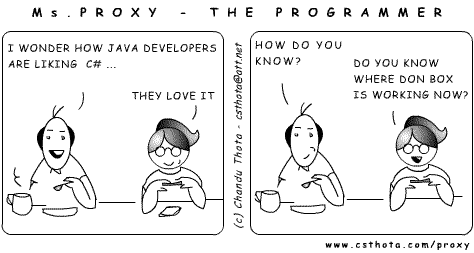
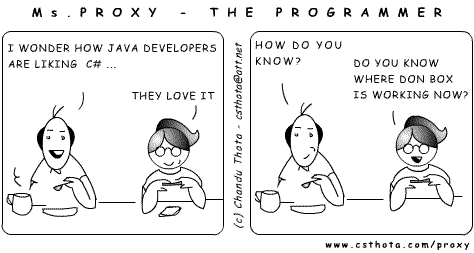
C# vs. Java
Chandu Thota
Fri 5/10/2002 10:31 AM
May 10, 2002·
Spout
Now the Fun Begins
Last night at 4:46pm, Sara Williams announced the availability of
Microsoft’s 4+ years of labor: the Microsoft .NET Framework, v1.0. And then,
at 5:59pm, the great land rush to download the matching VS.NET bits began.
Here are some links you may find interesting as you move to the RTM of
.NET and VS.NET:
Here are some fun facts for you:
- The compressed VS.NET Enterprise Architect download is 1.8GB and
it took my puny cable model 4+ hours to download.
- It took my laptop (574MHz, 512MB RAM) 30+ minutes to unzip.
- The resulting pre-installed folder was 2.45GB.
- The .NET runtime build number is 3705.
- The VS.NET build number is 9466.
- The codename for .NET was “Lightning” (hence the ildasm icon).
- The codename for C# was “Cool” (hence the “C# is Cool” t-shirt).
- Mike
Woodring’s most excellent
asmstats
tool reveals the following:
Done processing c:\windows\microsoft.net\Framework\v1.0.3705.
Processed 69 assemblies comprising 70 modules.
Types: 8,866 (of any kind)
Classes: 5,602 (2,183 public)
Attributes: 297 (257 public)
Delegates: 334 (213 public)
Interfaces: 983 (659 public)
Enums: 1,085 (710 public)
Value types: 565 (121 public)
Members: 414,990 (of any kind, instance and static)
Methods: 281,630 instance, 12,797 static
Events: 13,160 instance, 24 static
Properties: 44,689 instance, 1,233 static
Fields: 28,478 instance, 32,979 static
Congrats to the Microsoft .NET team for a job well done!
May 9, 2002·
Spout
For the Love of the Story
It’s only happened a few times in my entire life, but I want it to
happen more. It’s that feeling you get when you’re telling a story,
trying to describe a scene or a technology or a something and, suddenly,
without warning, it starts to tell you. It happened twice in college in
a creative writing assignment: one of those times it actually gripped me
from the moment I started writing my life story on a 3x5 card (I
remember it started “I was an accident.” : ). It happened once while
writing ATL Internals: Chapter 7, Collections and Enumerations. And it
just happened again while finishing up a writer’s journal entry I started
yesterday:
Whack-thump-thump. Whack-thump-thump. The sound
filled the first floor. Whack-thump-thump. Tom knew he wasnt supposed
to play ball in the house. Whack-thump-thump. His father, watching from
the kitchen, had laid down that law several times when things had gotten
out of hand. Whack-thump-thump. The ball continued hitting his hand, the
floor and the door in
the never-never land between the kitchen and the front entry.
Whack-thump-thump. Tom, at 6, seemed to be using the mesmeric sounds to
enter another place, somewhere regular, somewhere safe, somewhere
comfortable. He had always been able to enter that place, whether he
was playing with action figures, with clay or even with ordinary items
like pencils or popsicle sticks, using them in the theater taking place
in his head. Whack-thump-thump. Whack-thump-thump. His father was a much more
literal thinker. He was creative, but creative in an
engineering/problem-solving way and he envied his sons ability to enter
this world seemingly effortlessly, never getting bored when the ordinary
world around him failed to offer what was safe and regular and
comfortable. Whack-thump-thump. Whack-thump-thump.
I started writing this to describe what my son Tom was doing
yesterday morning just before school and it turned into a look into how
much I loved and admired my 6-year-old son. He’s so much different than
me, but just like his mother and looking at him makes me realize just
how much I love my wife. That’s what writing is supposed to do. It’s
supposed to help you reach into your self and share what you’ve got with
others. That’s what this blog is all about and I appreciate you being
here to listen.
