The Basics of EF Validation: IDataErrorInfo January 15, 2011

The Basics of EF Validation: IDataErrorInfo

When you’re adding or updating data in your database, you really want to make sure that the data being sent to the database is good and true. Often, that’s something that can be checked in the database itself. The first thing you’ll want to do is make sure that the database has validation constraints set on the columns, like nullability or max data sizes. If you’re going EF model-first, you can set these properties on the properties of your entities. If you’re not, you can set these properties in the database or get even fancier and write triggers that check the validity of the data. Finally, you can disable insert, update and delete altogether in favor of stored procedures, changing your EF mapping to generate calls to those instead. The nice thing about checks in the database is that no matter how the data gets there, whether it’s via your EF-based app or not, the checks happen.

However, if you’d like to also put checks into your EF code, perhaps because you’d like to avoid a round-trip to the database for bad data, you can do so in your EF-enabled language of choice, e.g. C#.

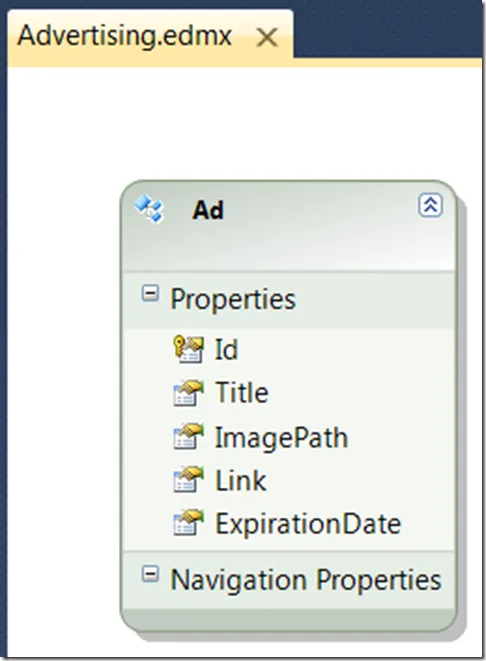
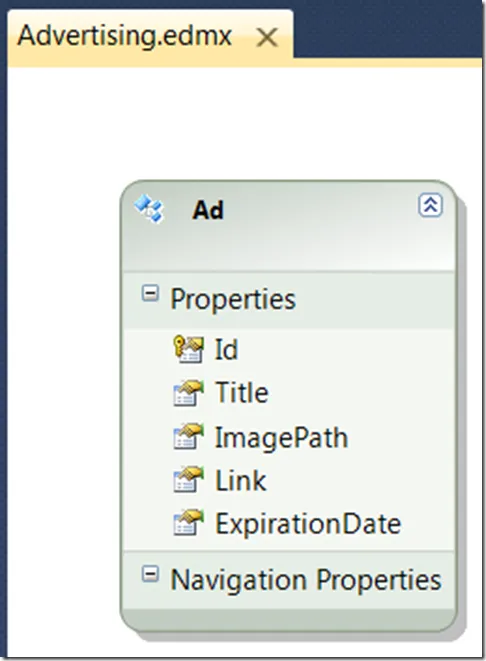
Imagine a very simple EDM to describes web advertisements:

image_thumb4

All properties on our entity type get a generated On<<PropertyName>>Changing and On<<PropertyName>>Changed method. If you want to check one property in isolation, it’s easy to provide an implementation of your partial method of choice, e.g.

namespace EdmTest {
  partial class Ad {
    partial void OnLinkChanging(string value) {
      if (!value.StartsWith("http://",
StringComparison.InvariantCultureIgnoreCase)) { throw new ArgumentOutOfRangeException("Link must start with 'http://'"); } }
} }
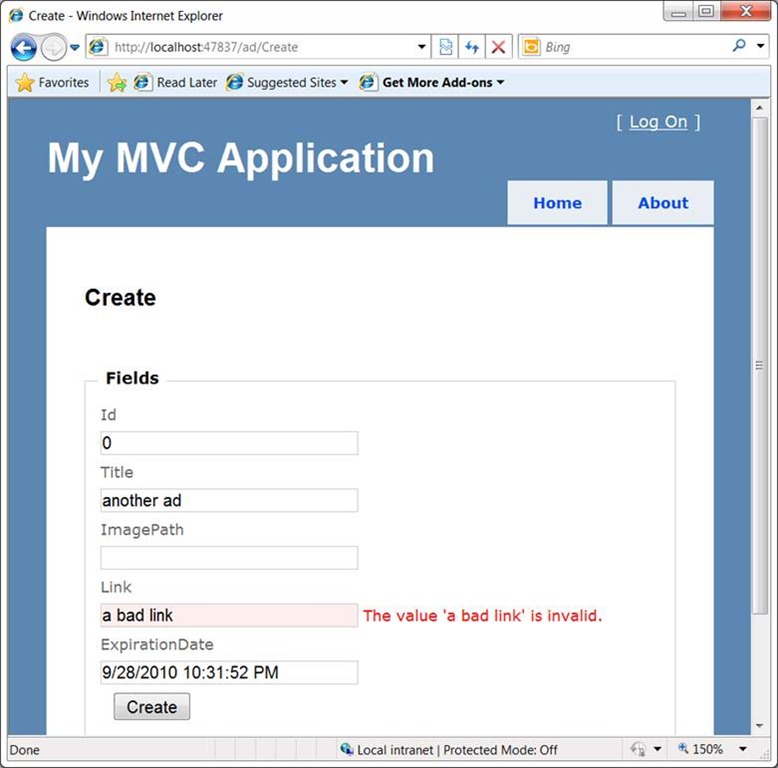
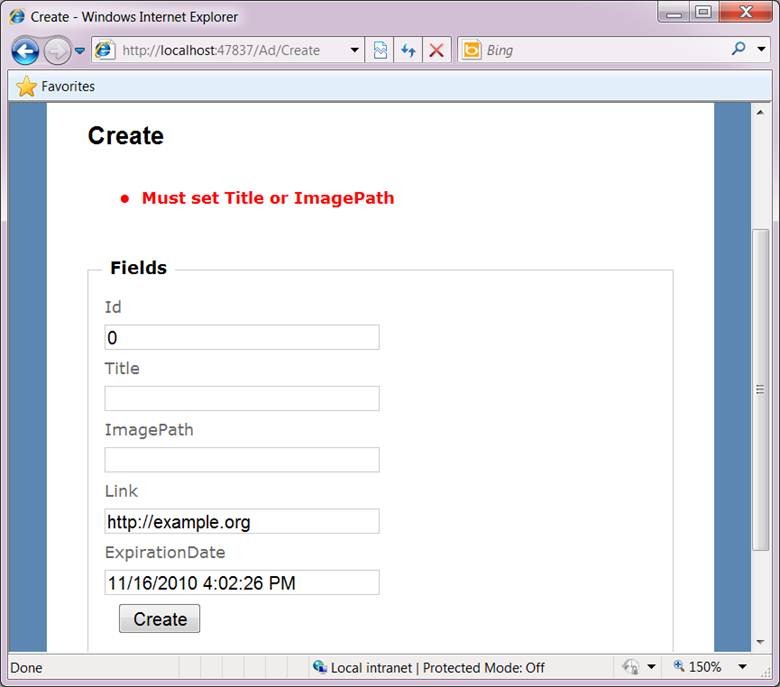
Here we’ve made sure that whenever we set the Link property, it must be of a certain format. If we were to violate that restriction, things go boom:

clip_image002

As MVC translates the form fields into values on the Ad object that is passed to the controller’s Create method, setting the Link property with a bad value triggers the exception:

// POST: /Ad/Create
[HttpPost]
public ActionResult Create(Ad ad) {...}

MVC catches the exception before the Create method is even called and the view shows the error message. Notice that the error message is not what we provided, however.

Further, sometimes there are problems on an object’s state that span more than one property. Unfortunately, because such a constraint can’t be checked on any single property change, we need to at least check it at the object level, not just at the property level.

For both of these issues, we have IDataErrorInfo.

IDataErrorInfo

The IDataErrorInfo interface was introduced back in the mists of time with .NET 1.x for use specifically with data binding in Windows Forms. I wouldn’t recommend that anyone invest in anything but maintenance on their WinForms apps, but ASP.NET, the Windows Presentation Foundation (WPF) and Silverlight all support IDataErrorInfo . Data binding is involved enough and GUI-framework-specific enough that you’ll need to read up on it in your favorite GUI-framework-specific book, but the IDataErrorInfo interface is exactly what we need even without data binding:

namespace System.ComponentModel {
  public interface IDataErrorInfo {
    string Error { get; }
    string this[string columnName] { get; }
  }
}

Notice that IDataErrorInfo exposes error descriptions at both the object and the property/column level. It’s easy to implement this standard interface on our example Ad class:

partial class Ad : IDataErrorInfo {
  public string Error {
    get {
      // Check the ad for errors
      if (string.IsNullOrEmpty(Title) && string.IsNullOrEmpty(ImagePath)) {
        return "Must set Title or ImagePath";
      }
      return null;
    }
  }


public string this[string columnName] {
get { // Check any specific property for errors switch (columnName) { case "Link": if (Link != null && !Link.StartsWith("http://",
StringComparison.InvariantCultureIgnoreCase)) { return "Link must start with 'http://'"; } break; } return null; } } }

Because each of the generated entity classes is partial, you can provide your own implementation to be merged with the generated implementation, in our case the IDataErrorInfo interface implementation. Now, when MVC hydrates an object that implements IDataErrorInfo, it’ll check to see if there are problems. To check, our controller provides the ModelState property, which itself provides the IsValid flag:

// POST: /Ad/Create
[HttpPost]
public ActionResult Create(Ad ad) {
  try {
    if (!ModelState.IsValid) { return View(); }
    ...
  }
  catch {
    return View();
  }
}

// POST: /Ad/Edit/
[HttpPost] public ActionResult Edit(Ad ad) { try { if (!ModelState.IsValid) { return View(); } ... } catch { return View(); } }

In addition to the IsValid flag, the ModelState provides a list of property name/error message pairs that show in the code that the view generator spits out when it’s creating forms, e.g.

...
<% using (Html.BeginForm()) {%>
<%: Html.ValidationSummary(true) %>
...
<%: Html.TextBoxFor(model => model.Link) %>
<%: Html.ValidationMessageFor(model => model.Link) %>
...

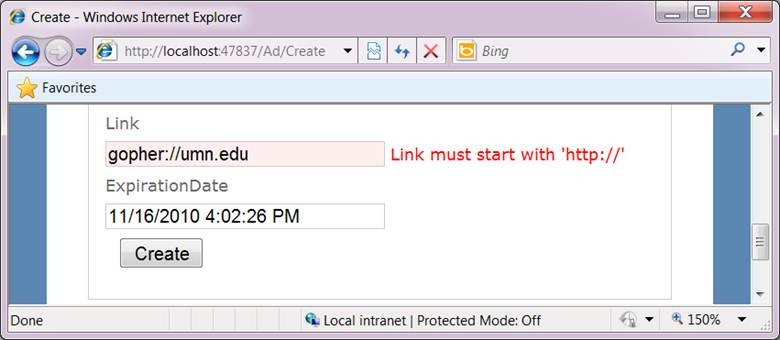
It’s in the ValidationSummary helper that shows object-level errors and the ValidationMessageFor helper that shows property-level errors:

clip_image004

clip_image006

There are other means of validation that you will want to investigate, like the validation attributes supported by MVC and SilverLight, but IDataErrorInfo is the one with the broadest reach. It’s also the one that’s simplest for you to check yourself if you’re not getting the automatic support you want from your GUI framework. For example, because the SaveChanges method on the context base class is virtual and because we’ve got the Object State Manager, we can check ourselves for object errors using IDataErrorInfo:

using System.Data.Objects;

namespace AdMan.Models {
  partial class sbdbEntities {
    public override int SaveChanges(SaveOptions options) {
      // Make sure we're detecting all changes. base.SaveChanges
      // does this, but that may be too late.
      DetectChanges();
// Get all the new and updated objects var objectsToValidate = ObjectStateManager. GetObjectStateEntries(EntityState.Added | EntityState.Modified). Select(e => e.Entity).OfType<IDataErrorInfo>();
// Check each object for errors foreach (var obj in objectsToValidate) { // Check each property foreach (var property in obj.GetType().GetProperties()) { var columnError = obj[property.Name]; if (columnError != null) { throw new Exception(columnError); } }
// Check each object var objectError = obj.Error; if (objectError != null) { throw new Exception(objectError); } }
// All clear return base.SaveChanges(options); } } }

Here we’re overriding the SaveChanges method we’ve been calling all this time to take advantage of the IDataErrorInfo interface. The first call to DetectChanges is to make sure we’ve gotten all the changes into the Object State Manager (only necessary if you’re using EF POCO classes). The call to the GetObjectStateEntries method on the ObjectStateManager class produces all of the added and modified objects, their state, what the old and new values are, etc. We pull off each one of the entities that implement IDataErrorInfo and call the methods to check for property and object-level errors. If we find one, we throw an exception, otherwise we let the call to SaveChanges through.

This code isn’t needed if you’re already using a GUI framework that supports IDataErrorInfo, but it’s still handy to know you can roll your own code into SaveChanges if you need to.

Where Are We?

IDataErrorInfo is the core of data validation support in GUI libraries since .NET 1.x and while there are simpler ways to do it for individual libraries, IDataErrorInfo works just fine with MVC and EF, two of the most popular GUI libraries we’ve got just now.

EF Concurrency Mode Fixed + MVC January 15, 2011

EF Concurrency Mode Fixed + MVC

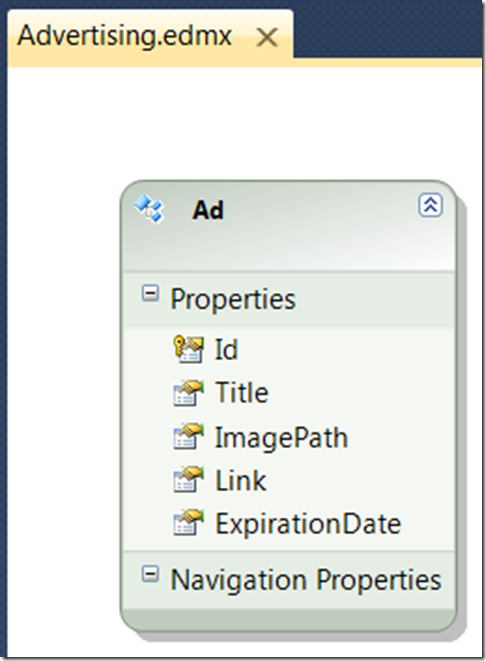
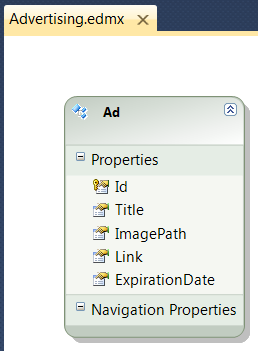
Imagine a very simple EDM to describes web advertisements:

image

Now imagine that I’d like to build a web application to manage instances of the Ad type. If multiple people are editing ads at once, especially the same set of ads, I’m likely to run into concurrency errors. By default, EF lets the last change win.

For example, if Chris and Bill are both editing Ad.Id == 1, if Chris pushes his changes to the database first, EF will not notice that the ad has been updated underneath Bill will he saves his changes and Chris’s changes will be lost. What we really would like to happen is that, when Bill attempts to save his changes, that we check if the data has changed since we cached it so that Bill gets an error and is able to merge his changes in with Chris’s.

This style of multi-user concurrency management is called “optimistic concurrency” because it assumes few people will be changing the same data at the same time. It’s the most efficient means of concurrency management when that condition is true. Another type of concurrency management is named “pessimistic concurrency,” and is generally implemented using locks on the database, which tends to slow things down.

By default, EF provides no concurrency support; if two people push changes to the same row in the database, whoever’s change goes in last wins. This results in data loss, which in the world of data is a big, fat, no-no.

The way that EF lets you decide how a row is changed is via the Concurrency Mode property on every one of the entity’s properties in the designer. By default, the Concurrency Mode is set to “None”, which results in SQL like the following when an update is needed:

update [dbo].[Ads]
set [Title] = @0, [ImagePath] = @1, [Link] = @2, [ExpirationDate] = @3
where ([Id] = @4)

The Id column is used to select whether to perform an update, so any changes made to the underlying columns for that row are not detected and are therefore lost. The way to tell EF which columns to check is with the Concurrency Mode property set from None (the default) to Fixed on an entity’s property. For example, if you set Concurrency Model to Fixed for each of the read-write properties for our sample Ad entity, the update would look like the following:

update [dbo].[Ads]
set [Title] = @0, [ImagePath] = @1, [Link] = @2, [ExpirationDate] = @3
where ((((([Id] = @4) and ([Title] = @5)) and [ImagePath] is null)
and ([Link] = @6)) and ([ExpirationDate] = @7))

This is handy, but it also requires that we keep around an entity in memory in both its original state and its updated state for the length that the user is editing it. For desktop applications, that’s not an issue, but for stateless web pages, like MVC-based web pages, it is.

It’s for this reason that the EF team itself recommends using a special read-only column just describing the “version” of the row. Ideally, whenever any of the data in a row changes, the version is updated so that when an update happens, we can check that special column, e.g.

update [dbo].[Ads]
set [Title] = @0, [ImagePath] = @1, [Link] = @2, [ExpirationDate] = @3
where (([Id] = @4) and ([TimeStamp] = @5))

Here, the TimeStamp column is our “version” column. We can add such a column in our SQL Server database using the “timestamp” type, as shown in SQL Server Management Studio here:

clip_image001[8]

The semantics of the timestamp type are just what we want: every time a row is updated, the timestamp column is updated. To see this new column in the Entity Data Model, you’ll have to right-click on the designer surface and choose Update Model from Database, which results in the TimeStamp being added to our model:

clip_image003

The TimeStamp field will come through as type Binary, since EF4 doesn’t have direct support for it, and with a StoreGeneratedPattern of Computed (which is exactly right). To enable EF to use the new column to perform optimistic concurrency, we need only change the Concurrency Mode to Fixed.

Now, here’s a simple Edit method on our MVC controller:

// GET: /Ad/Edit/5
public ActionResult Edit(int id) {
  return View(db.Ads.Single(ad => ad.Id == id));
}

This kicks off the view, but with one key missing ingredient — the view doesn’t have the TimeStamp field in it; because it’s mapped in EF as binary data, the MVC form generator wouldn’t provide a field for it. To make sure we pass the version of the data along with the data itself, we have to add a field to our HTML form and, because we don’t want the user to see it, let alone edit it, we need to make it hidden:

<% using (Html.BeginForm()) {%>
...
<%: Html.HiddenFor(model => model.TimeStamp) %>
...
<% } %>

The Html.HiddenFor is an MVC helper that produces HTML that looks like so:

<input id="TimeStamp" name="TimeStamp" type="hidden" value="AAAAAAAAB9E=" />

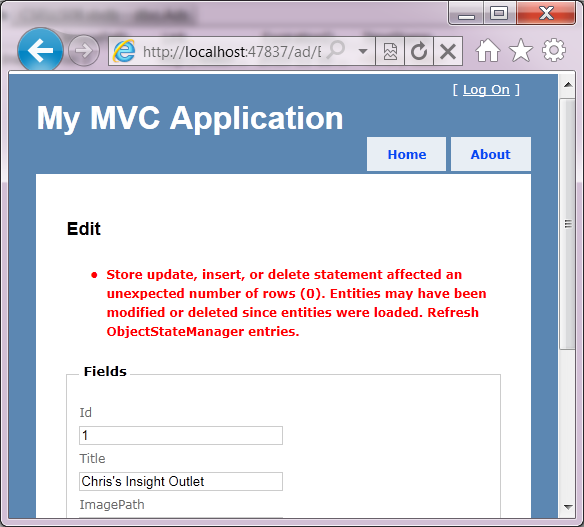
Now, when we press the Save button, the SQL we saw earlier is invoked to use the ad’s unique ID as well as the version (our timestamp column). If there’s a concurrency problem, i.e. somebody else has updated the underlying row in the database since we cached our values on the HTML form, we get an exception:

clip_image004

The message is saying that no rows were updated, which happens when the timestamp of the underlying row no longer matches. To provide a more helpful message, you’ll want to catch the specific error yourself:

// POST: /Ad/Edit/
[HttpPost]
public ActionResult Edit(Ad ad) {
  try {
    if (!ModelState.IsValid) { return View(); }
    // Attach the ad to the context and let the context know it's updated
    db.Ads.Attach(ad);
    db.ObjectStateManager.ChangeObjectState(ad, EntityState.Modified);
    db.SaveChanges();
    return RedirectToAction("Index");
  }
  catch (OptimisticConcurrencyException ex) {
    ModelState.AddModelError("", "Oops! Looks like somebody beat you to it!");
    return View(ad);
  }
}

Here we’re catching the OptimisticConcurrencyException and setting our own message before sending the user back to their data for them to grab what they want and try again.

Where Are We?

EF works great with MVC, but in the case of optimistic concurrency, you’ve got to work around the stateless model of the web a little to get it working just the way you like.

Using SQL Server Profiler with EF January 15, 2011

Using SQL Server Profiler with EF

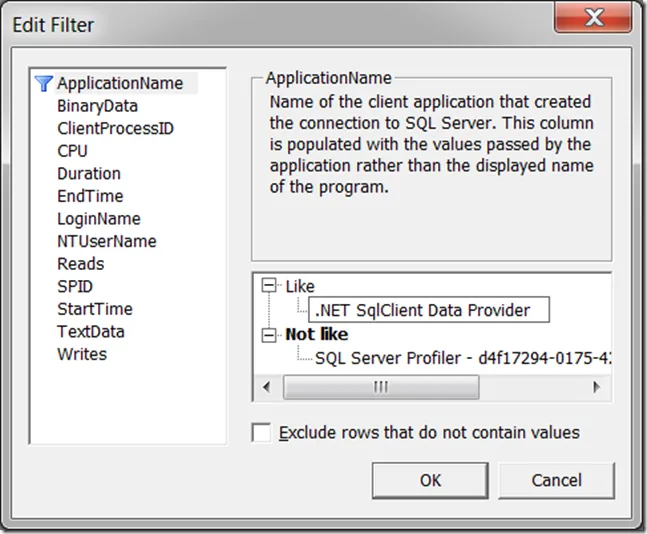
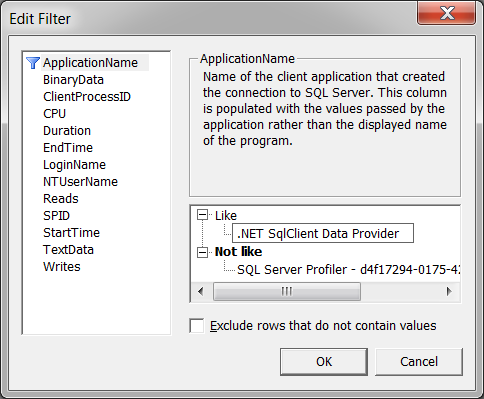
I’m a big fan of the SQL Server profiler for figuring out what the Entity Framework (EF) is really doing on the wire. If you’re unfamiliar with how to use the profiler, the easiest thing to do once you’ve got it started is File | New Trace. It will ask to which database you’d like to connection and then pop-up the Trace Properties window. If you click on the Events Selection tab, you can filter the events you see. For tracing EF, it doesn’t matter what type of events we see, but it does matter from whom they come. To see EF calls (or any ADO.NET calls) against your database, the easiest thing to do is to press the Column Filters button and set the ApplicationName to be like “.NET SqlClient Data Provider”:

clip_image001

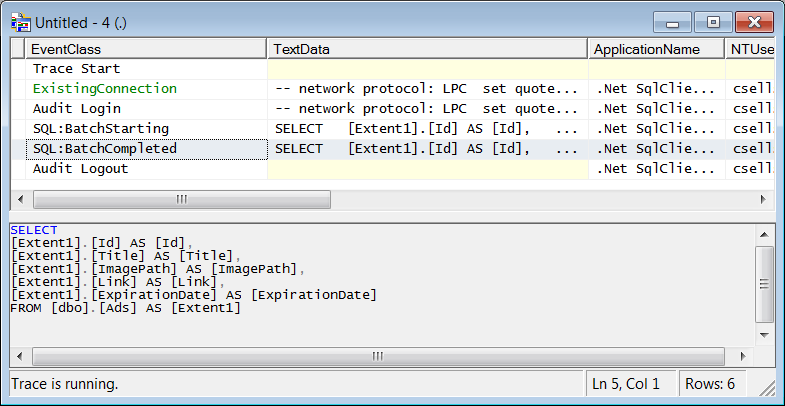
When you press the Run button, you’ll see a rolling list of calls made to that instance of SQL Server from EF. Now when you run an EF program, you’ll see exactly what SQL that EF is generating for SQL Server:

clip_image002

This is a handy technique to see whether EF batches SQL statements when you call SaveChanges (EF4 doesn’t batch) or how many round-trips lazy loading will cost you (lots — prefer the Include method).

Be Careful with Data Services Authentication + Batch Mode January 7, 2011

Be Careful with Data Services Authentication + Batch Mode

I was doing something quite innocent the other day: I was trying to provide authentication on top of the .NET 4.0 WCF Data Services (DS) on a per method basis, e.g. let folks read all they want but stop them from writing unless they’re an authorized user. In the absence of an authorized user, I threw a DataServicesException with a 401 and the right header set to stop execution of my server-side method and communicate to the client that it should ask for a login.

In addition, on the DS client, also written in .NET 4.0, I was attempting to use batch mode to reduce the number of round trips between the client and the server.

Once I’d cleared away the other bugs in my program, it was these three things in combination that caused the trouble.

The Problem: DataServicesException + HTTP 401 + SaveChanges(Batch)

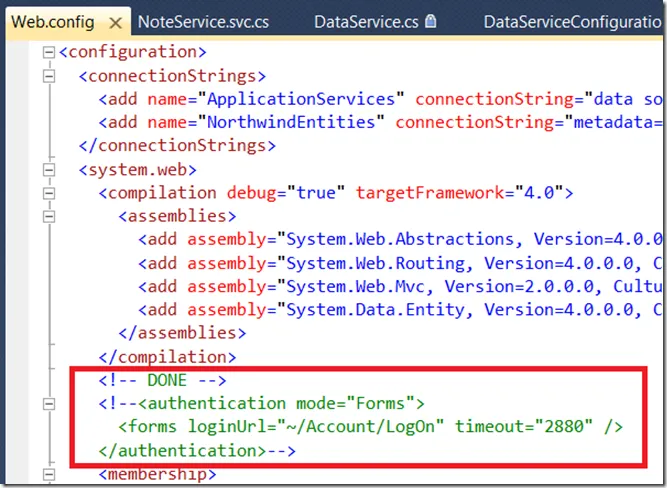
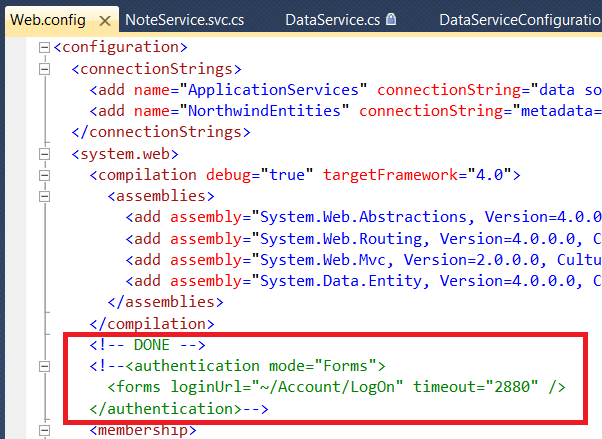
Reproducing the problem starts by turning off forms authentication in the web.config of a plain vanilla ASP.NET MVC 2 project in Visual Studio 2010, as we’re going to be building our own Basic authentication:

image

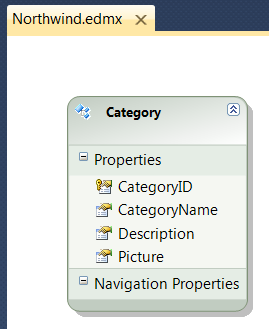
Next, bring in the Categories table from Northwind into a ADO.NET Entity Data Model:

image

The model itself doesn’t matter — we just need something to allow read-write. Now, to expose the model, add a WCF Data Service called “NorthwindService” and expose the NorthwindEntities we get from the EDMX:

public class NorthwindService : DataService<NorthwindEntities> {

  public static void InitializeService(DataServiceConfiguration config) {
    config.SetEntitySetAccessRule("Categories", EntitySetRights.All);
    config.DataServiceBehavior.MaxProtocolVersion =
      DataServiceProtocolVersion.V2;
  }
  ...
}

Notice that we’re allowing complete read/write access to categories on our service, but what we really want is to let everyone read and only allow authenticated users to write. We can do that with a change interceptor:

[ChangeInterceptor("Categories")]
public void OnChangeCategory(Category category, UpdateOperations operation) {
  // Authenticate
  string[] userpw = GetCurrentUserPassword();
  if (userpw == null ||
    !userpw[0].Equals("admin", StringComparison.CurrentCultureIgnoreCase) ||
    !userpw[1].Equals("pw")) {

    HttpContext.Current.Response.
AddHeader("WWW-Authenticate", "Basic realm=\"Northwind\""); throw new DataServiceException(401, "Unauthorized");
} } // Use HTTP Basic authentication string[] GetCurrentUserPassword() { string authorization = HttpContext.Current.Request.Headers["Authorization"]; if (string.IsNullOrEmpty(authorization)) { return null; } if (!authorization.StartsWith("Basic")) { return null; } byte[] base64 = Convert.FromBase64String(authorization.Substring(6)); string[] userpw = Encoding.ASCII.GetString(base64).Split(':'); if (userpw.Length != 2) { return null; } return userpw; }

The change interceptor checks whether the client program provided a standard HTTP Basic authentication header and, if so, pulls out the admin user name/password pair. If it isn’t found, we set the “WWW-Authenticate” header and throw a DataServicesException, which will turn into an HTTP error response, letting the client know “I need some credentials, please.”

The code itself is very simplistic and if you want better code, I recommend Alex James’s most excellent blog series on Data Services and Authentication. However, it’s good enough to return a 401 Authorized HTTP error back to the client. If it’s the browser, it’ll prompt the user like so:

image

The browser isn’t a very interesting program, however, which is why I added a service reference for my new service to my plain vanilla console application and wrote this little program:

class Program {
  static void Main(string[] args) {
    var service =
new NorthwindEntities(new Uri(@"http://localhost:14738/NorthwindService.svc"));


service.Credentials = new NetworkCredential("admin", "pw");
var category = new Category() { CategoryName = "My Category" }; service.AddToCategories(category); //service.SaveChanges(); // works service.SaveChanges(SaveChangesOptions.Batch); // #fail

Console.WriteLine(category.CategoryID); } }

Here we’re setting up the credentials for when the service asks, adding a new Category and calling SaveChanges. And this is where the trouble started. Actually, this is where the trouble ended after three days of banging my head and 4 hours with the WCF Data Services team (thanks Alex, Pablo and Phani!). Anyway, we’ve got three things interacting here:

  1. The batch mode SaveChanges on the DS client which bundles your changes into a send OData round-trip for efficiency. You should use this when you can.
  2. The DataServicesException which bundles extra information about your server-side troubles into the payload of the response so that a knowledgeable client, like the .NET DS client, can pull it out for you. You should use this when you can.
  3. The HTTP authentication scheme which doesn’t fail when it doesn’t get the authentication it needs, but rather asks for the client to provide it. You should use this when you can.

Unfortunately, as of .NET 4.0 SP0, you can’t use all of these together.

What happens is that non-batch mode works just fine when our server sends back a 401 asking for login credentials, pulling the credentials out of the server reference’s Credentials property. And so does batch mode.

However, where batch mode falls down is with the extra payload data that the DataServicesExpection packs into the HTTP error resposne, which confuses it enough so that the exception isn’t handled as a request for credentials, but rather reflected back up to the client code. It’s the interaction between all three of these that causes the problem, which means that until there’s a fix in your version of .NET, you need a work-around. Luckily, you’ve got three to choose from.

Work-Around #1: Don’t Use DataServiceException

If you like, you can turn off the extra information your service endpoint is providing with the DataServiceException and just set the HTTP status, e.g.

HttpContext.Current.Response.AddHeader("WWW-Authenticate", "Basic realm=\"Northwind\"");
//throw new DataServiceException(401, "Unauthorized");
HttpContext.Current.Response.StatusCode = 401;
HttpContext.Current.Response.StatusDescription = "Unauthorized";
HttpContext.Current.Response.End();

This fix only doesn’t work with Cassini, but Cassini doesn’t work well in the face of HTTP authentication anyway, so moving to IIS7 should be one of the first things you do when facing an authentication problem.

Personally, I don’t like this work-around as it puts the onus on the service to fix a client problem and it throws away all kinds of useful information the service can provide when you’re trying to test it.

Work-Around #2: Don’t Use Batch-Mode

If you use “SaveChanges(SaveChangesOptions.None)” or “SaveChanges()” (None is the default), then you won’t be running into the batch-mode problem. I don’t like this answer, however, since batch-mode can significantly reduce network round-trips and therefore not using it decreases performance.

Work-Around #3: Pre-Populate the Authentication Header

Instead of doing the “call an endpoint,” “oops I need credentials,” “here you go” dance, if you know you’re going to need credentials (which I argue is most often the case when you’re writing OData clients), why not provide the credentials when you make the call?

var service =
new NorthwindEntities(new Uri(@http://localhost/BatchModeBug/NorthwindService.svc));


service.SendingRequest += delegate(object sender, SendingRequestEventArgs e) { var userpw = "admin" + ":" + "pw"; var base64 = Convert.ToBase64String(Encoding.ASCII.GetBytes(userpw)); e.Request.Headers.Add("Authorization", "Basic " + base64); };

Notice that we’re watching for the SendingRequest event on the client-side so that we can pre-populate the HTTP Authentication header so the service endpoint doesn’t have to even ask. Not only does this work around the problem but it reduces round-trips, which is a good idea even if/when batch-mode is fixed to respond properly to HTTP 401 errors.

December 29, 2010 Spout

Enabling the Tip Calculator in Your Brain

I can’t imagine anyone reading this blog needs to read this, but I can’t help myself.

When I was just a wee lad, probably the most valuable thing I learned was how to perform mathematical estimation, the importance of which and several techniques you can get by reading Jon Bentley’s The Back of the Envelope (this essay along with several others, are collected in his most excellent books Programming Pearls and More Programming Pearls, both of which are still relevant a decade later). Not only is estimation generally quicker than running a calculator, but even when you do run a calculator, it helps you figure out when you did it wrong, the latter of which has saved my bacon time and again.

For example, as much as I love the Windows Phone 7 marketplace and it’s quality and quantity of applications, the ones that puzzle me are the “tip calculator” apps (several!). I don’t understand why it’s worth the trouble of pulling out your phone and punching buttons when you can know the tip instantly.

For example, let’s assume the dinner bill is $37.42. If the service was bad, that’s a 10% tip (you have to tip them something ’cuz the IRS assumes you will and taxes them accordingly — bastards). So, with a 10% tip, take the bill and move it right one decimal point: $3.74. Now, round up or down depending on how bad the service was, e.g. $3.50 or $4. Quick and easy.

Assuming the service was great, that’s a 20% tip, so double the bill and move it right one decimal point, making the math easier for yourself, e.g. $37.42 is close to $35, doubling is $70, so a $7 tip. Boom: 20% tip.

If you want to get fancy and provide a 15% tip for good but not great, then average the two numbers: ($4 + $7)/2 = $5.50. Zim zam zoom.

Honestly, as great as the apps are on your phone, tablet or BlueTooth headset (seriously), think about using the apps in your head first. Now only are they quicker and cheaper, but using them staves off dementia (which is a good thing!).

Oh, and if the tip is added as a mandatory minimum, then the additional tip is easy: $0.00. I don’t deal well with authority.

December 18, 2010

Windows Phone 7: Beating Expectations

Years ago, when I was on my T-Mobile Dash, I would purchase a new phone every quarter or so, just to see if something better had come along. Always, within a week or so, I returned it and went happily back to my T-Mobile Dash. Then came the iPhone, which I instantly fell in love with. I didn’t think I’d ever give it up. Then came the Samsung Focus, one of the first Windows Phone 7 phones and I haven’t turned my iPhone 4 back on since. It’s not all I’d hoped for, but it’s damn close!

Meeting Expectations

Let’s check my list and see how WP7 did:

  • A calculator, including scientific features: check.
  • A battery that lasts 24 hours: no. Unfortunately my Focus is as power hungry as any smartphone.
  • An easy, high-quality way to run the music through my car stereo: sorta. I can attach the phone to my car stereo, but it’s through the headset jack, so the quality isn’t what it should be and I need a separate attachment to charge, which causes interference on my radio. Much less than ideal.
  • Easy airplane mode: check.
  • Great auto-correct on my soft keyboard: yes! The Samsung has a soft keyboard, although other models have hard keyboards for you folks that want them (both landscape and portrait). Not only is the auto-correct generally correct, but it shows the list of words it’s gonna guess in case I want to pick one myself and, after I’m done typing, I can go back, pick a word that didn’t come out right and select a different guess or type it again myself. Brilliant!
  • Copy-paste: not yet, although I’m sure we’ll have it soon. BTW, I’m not on the WP7 team and have no special access to what is shipping or when. I just have faith in the team.
  • Full calendar support:
    • Sync’ing with Exchange and not Exchange: check.
    • Recognition of phone numbers and addresses w/ links: check.
    • Reply All to an appointment: check. In fact, there’s even an “I’m running late” button. Sweet!
    • Show my appointments on the home screen: big check! Not only is my next appointment shown on the home screen, but it’s also on my lock screen along with the meeting duration and location.
    • I only have my calendar appointments in one calendar, but if I wanted to spread appointments across multiple calendars, it’ll overlay them.
  • Wireless sync’ing to my PC: check! This was a stretch goal when I wrote it, but it works like a charm.
  • Tethering: sorta. Out of the box, it doesn’t work, but apparently there’s a hack I can try. I haven’t.
  • Turn-by-turn directions: sorta. AT&T ships a turn-by-turn directions app out of the box which you can activate for $10/mo, which isn’t worth it to me compared with the less functional free app. Plus, there seems to be no integration of AT&T’s map app with the rest of my phone, e.g. clicking on a location link doesn’t bring up their app and I can’t choose a route to one of my own contacts. In fact, with the lack of copy/paste (right now), the only way to get an address into the think is to type it. Ick!

    Further, I really don’t like the built-in maps app for directions. Too much screen real estate is occupied by the directions and not enough to the map. Also, I really want to see the yellow dot and my next turn, but those are very, very difficult to get on the screen at the same time. That should just happen for me automatically.
  • Pandora playing in the background: no. Not only is Pandora missing, but 3rd party music apps don’t run in the background, which I really miss.
  • Install apps from other sources: no. There was a side-loading app out there, but it’s down now. Right now, it’s $99 for developers to side-load and no one else.
  • Let me install extra memory: check, although only for selected models (my Focus is one of them) and only if you’re willing to reset your phone. Since the Zune software doesn’t seem to do full backups, that might be a painful process, but when the WP7-Certified SD cards out, that could be up to 32GB of additional memory, which will be worth some trouble. Right now I have more good stuff I want to load onto my phone than will fit.
  • Let me replace the battery: check!
  • Great audio and ebook reading experience: not yet. I haven’t tried an audio book on it yet, but I don’t see Windows Phone 7 mentioned on the audible.com site. I do know there’s no Kindle software on the phone yet (apparently it’ll be there RSN), but until then, I don’t know what the reading experience is except for browsing the web.
  • Phone-wide search: no.
  • Full contact look-up: check, including Exchange lookup, although the search only seems to get names and not other things, like notes, which I miss. The Exchange contact lookup does include details that other phones miss, however, like their office number.
  • Good camera (and flash): almost. The camera is 5MB and the video is there and there’s a flash, but the quality could be better. My iPhone 4 spoiled me here.
  • Apps I can’t live without:
    • Evernote: no, but OneNote is way better.
    • Social networking clients: check, including deep FaceBook integration.
    • Unit and Currency Converter: check.
    • Flashlight: check, although I want an app that turns my flash on — now that’s a flashlight!
    • TripIt: no, but there’s My Trips, which shows promise, and m.tripit.com, which works well.
    • Flixster: check.
    • OpenTable: check.
    • UrbanSpoon: no.
    • Mint: no and there is no mobile version of mint.com, so I really miss this.
    • Shazam: check and it’s integrated with the Zune marketplace. Half the songs I want don’t show up when I search for them, though, so that’s not cool.
    • Skype: no.
    • Tetris: check.

Stuff I Forgot To Ask For

I believe that the universe gives you what you ask for and in this case, even if I didn’t get everything, there was even some stuff I forgot to request:

  • After have a unified inbox, I miss it now that it’s gone. Of course, I never had the unified inbox I really wanted, but I can keep hoping.
  • I didn’t know how much I’d miss DropBox and Pandora ’til they were gone. There is a frontend for WP7 that works with my DropBox account called BoxFiles, but it doesn’t actually let me read any of my files, so it still has some room for improvement. Also, last.fm does not have anything like the same kind of algorithm for picking songs for me that Pandora does, so I’m missing Pandora. I have come to really like Slacker for music, however.
  • I didn’t know I wanted a browser that supported HTML5, ES5 and CSS3 until I started working in that field.
  • I can’t seem to make MMS work on my phone, although other people can, so I assume it’s an account issue. I’ll keep trying.
  • Fast application startup. Some do, some don’t. I wish they all did.

Beating Expectations

Seriously, ever day is something new and cool on this phone. I continue to get blown away by features I never thought I’d want that have really changed how I use my phone:

  • The way OneNote works is game changing. I keep lots of random notes about things and to have the phone seamlessly sync with the web and my PC is wonderful. The web site needs search and the phone needs better auto-sync’ing (right now if you don’t press the Sync button sometimes, you can get sync conflicts more than you expect), but it already works so well, it’s hard to complain. Plus, you can pin favorite notes, like your grocery list, to the home screen. Beautiful!

    I am a paid Evernote user, but free OneNote is better. The PC client is 10x better for keyboard users (i.e. me) and it’s free, assuming you have Office.

  • Live Tiles really do get me in and out faster. I know the commercials are there as marketing, but I really love seeing how many unseen (not unread) emails I have and the latest picture from my roll and the latest updates from my favorite contacts and the latest weather and my next appointment and and and…

    In fact, I like Live Tiles so much that I wish the little screen to the right of the home screen used them, too. I’d like to just have a set of Live Tile screens arranged horizontally where all my installed apps live, just arranged in priority order according to my own design. Getting rid of the long list to the right of the home screen would be very appreciated.

  • Automatic uploading of pictures to SkyDrive is so cool!

  • The Back button. It works so well that browsing from apps to web content, e.g. following a link from an RSS reader or an email, feels like an extension of the app itself. I had no idea how much I liked it ’til I picked up an iPad and it wasn’t there.

  • It is amazing to me how well voice dialing and voice search work. That alone cuts down on half of my typing on the device.

  • The quality of the calls is 10x better than my old phone and the number of dropped calls is 10x less. There ain’t nothing wrong with AT&T. Since I work from home and have no land line, this makes a huge difference in the quality of my life.

  • The Bose Bluetooth works very well with WP7. The pairing is seamless, the call quality is high for both parties, the volume buttons are on the hardware and easy to use, the in-ear fitting is solid and comfortable with no need for an over-the-ear hook, it charges quickly and it shares the micro USB connector with my phone, so I can share the cables. And, unlike the Jawbone, the quality of the audio is good enough to enable voice dialing, so I can really do the hands free thing that Oregon and Washington require by law.

  • Trial Mode means that I can try nearly every app in the app store! If you’re an app dev, it’s your job to ship your app in trial mode and make it so compelling that I’ll beg to pay for it and WP7 encourages that, which is good for consumers. Win-win.

  • I was never an Instapaper user ’til I got my WP7. Now, when I find something on my phone that I don’t have to read, I can mail it to my Instapaper email address and read it later with the Text view, which looks great on my phone. Or, if I press the Read Later button in IE9, then I’ve always got plenty to read on the go on my phone. Between that and the RSS Feed support in Outlook that sync’s automatically through Exchange to my phone, I’ve always got plenty to read, which I so love.

  • It seems like a small thing, but I love being able to link multiple contacts together from Exchange, Live, FaceBook, etc., into a single contact so that my searches find the person I’m looking for, not the 5 people that my phone thinks I might mean.

  • Another small thing, but it means that I don’t miss meetings, is the snooze button on my appointments. I thank you and my boss thanks you.

Where Are We?

According to my math, I got a little more half what I asked for, but true love can’t be measured in percentages. Of the features that I’m missing, only camera quality, copy-paste and Kindle are things I actually miss from my iPhone 4, and two of those are supposed to be fixed in software RSN.

On the other hand, my Samsung Focus has giving me more than a dozen things I never thought to ask fore and really use. The full calendar support, contact linking, voice dialing (with great Bluetooth support), voice searching, the auto-correct on the keyboard, the location and phone number recognition and OneNote sync’ing make this phone a delight to use every day.

December 14, 2010

If you want something from eBay, don’t bid on it!

I’m fond of quoting my father to my sons. I have a terrible memory for these kinds of things in general, but what he says sticks with me:

  • “Anything worth doing is worth doing right.” –Mike Sells
  • “Don’t start a fight, but be ready to finish one.” –Mike Sells
  • “Who got the goddamn jelly in the goddamn peanut butter?!” –Mike Sells

I’ve learned a ton of things from my father and continue to do so, so when I wanted to win something on eBay as a Christmas present for my girlfriend/fiancé’ (what’s it called when you’re engaged to be engaged?), I knew he had the experience, so I tapped it. And here’s what he told me:

If you really want something on eBay, don’t bid on it; that only gives your competition information on how to outbid you.

Instead, set yourself some free time when the auction is going to happen and start up two browser window at the following pages:

  1. The page where the count-down timer is shown.
  2. The page where you have already entered your top bid and are poised at the Confirm Bid button.

The idea is that people’s “top bid” changes over time as the auction goes on. I know this happens to me:

“Oh, this is only worth $20 to me. Well, maybe $25. OK, $40, but that’s all. Dammit I gotta have it! Where’s the button to enter the Social Security number of my first born!?”

So, instead of putting in your top bid and walking away, which lets other folks probe your top bid with their top bid and deciding later that their top bid goes toppier, wait ’til the last minute to put in your bid. I believe the practice is called “sniping” and there are even apps that do it, although so far, I’ve found IE and a cool hand sufficient.

Of course, the most important question is this:

“Dad, at what time in the countdown do I press the Confirm Bid button?”

“Oh, well, I do it at 4 seconds, but my computers are slow.”

What can I say; the man’s a pro.

Fluent-Style Programming in JavaScript December 11, 2010

Fluent-Style Programming in JavaScript

I’ve been playing around with JavaScript a great deal lately and trying to find my way. I last programmed JS seriously about 10 years ago and it’s amazing to me how much the world has changed since then. For example, the fifth edition of ECMAScript (ES5) has recently been approved for standardization and it’s already widely implemented in modern browsers, including my favorite browser, IE9.

Fluent LINQ

However, I’m a big C# fan, especially the fluent API style of LINQ methods like Where, Select, OrderBy, etc. As an example, assume the following C# class:

class Person {
  public Person() { Children = new List<Person>(); }
  public string Name { get; set; }
  public DateTime Birthday { get; set; }
  public int Age { get { return (int)((DateTime.Now - Birthday).Days / 365.25); } }
  public ICollection<Person> Children { get; private set; }
  public override string ToString() { return string.Format("{0} ({1})", Name, Age); }
}
Creating a set of them is a matter of using the C# member initialization syntax:
var chris = new Person() {
  Name = "Chris",
  Birthday = new DateTime(1969, 6, 2),
  Children = {
    new Person() {
      Name = "John",
      Birthday = new DateTime(1994, 5, 5),
    },
    new Person() {
      Name = "Tom",
      Birthday = new DateTime(1995, 8, 30),
    },
  },
};
Without even realizing it, I used the word “set” to describe how I think of this collection of people. That’s how the LINQ methods encourage me to think and I like it — I’m working on sets of things, whether I’m filtering them, projecting them, ordering them, aggregating them in some way, etc. For example, here’s how I would print all of the items in my set:
var people = new Person[] { chris }.Union(chris.Children);
Console.WriteLine("People: " +
  people.Aggregate("", (s, p) => s + (s.Length == 0 ? "" : ", ") + p.ToString()));
Console.WriteLine("Teens: " +
  people.Where(p => p.Age > 12 && p.Age < 20).
    Aggregate("", (s, p) => s + (s.Length == 0 ? "" : ", ") + p.ToString()));
Here I’m using the Union method to combine all three elements into a new set, the Where method to filter one set to produce another and the Aggregate method to produce a single string. The output should be unsurprising:
People: Chris (41), John (16), Tom (15)
Teens: John (16), Tom (15)

Fluent JavaScript

LINQ is lousy with such set-oriented functions, e.g. Select, OrderBy, Take, Skip, First, Single, etc. and I use them a ton in my code (and my scripts). As it turns out, JS has these methods, too, both provided by popular JS toolkits like jQuery and in the language itself. Specifically, ES5 has a number of lovely methods for fluent programming. For example, given the same “class” in JS:
// Person constructor
function Person(args) {
  if (args.name) { this.name = args.name; }
  if (args.birthday) { this.birthday = args.birthday; }
  if (args.children) { this.children = args.children; }
}

// Person properties and methods
Person.prototype = Object.create(null, {
  name: { value: "", writable: true },
  birthday: { value: new Date(), writable: true },
  age: { get: function () { return Math.floor((new Date() - this.birthday) / 31557600000); } },
  children: { value: [], writable: true },
  toString: { value: function () { return this.name + " (" + this.age + ")"; } }
});

I can do several LINQ-style things on it:

var s = "";
var tom = new Person({ name: "tom", birthday: new Date(1995, 7, 30) });
var john = new Person({ name: "john", birthday: new Date(1994, 4, 5) });
var chris = new Person({ name: "chris", birthday: new Date(1969, 5, 2), children: [tom, john] });
var people = [tom, john, chris];

// select
s += "<h1>people</h1>" + people.map(function (p) { return p; }).join(", ");

// where
s += "<h1>teenagers</h1>" + people.filter(function (p) { return p.age > 12 && p.age < 20 }).join(", ");

// any
s += "<h1>any person over the hill?</h1>" + people.some(function (p) { return p.age > 40; });

// aggregate
s += "<h1>totalAge</h1>" + people.reduce(function (totalAge, p) { return totalAge += p.age; }, 0);

// take
s += "<h1>take 2</h1>" + people.slice(0, 2).join(", ");

// skip
s += "<h1>skip 2</h1>" + people.slice(2).join(", ");

// sort
s += "<h1>sorted by name</h1>" + people.slice(0).sort(
  function (lhs, rhs) { return lhs.name.localeCompare(rhs.name); }).join(", ");

// dump
document.getElementById("output").innerHTML = s;

Notice that several things are similar between JS and C# LINQ-style:

  • The array and object initialization syntax looks very similar so long as I follow the JS convention of passing in an anonymous object as a set of constructor parameters.
  • The JS Date type is like the .NET DateTime type except that months are zero-based instead of one-based (weird).
  • When a Person object is “added” to a string, JS is smart enough to automatically call the toString method.
  • The JS map function lets you project from one set to another like LINQ Select.
  • The JS filter function lets you filter a set like LINQ Where.
  • The JS some function lets you check if anything in a set matches a predicate like LINQ Any.
  • The JS reduce function lets you accumulate results from a set like the LINQ Aggregate.
  • The JS slice function is a multi-purpose array manipulation function that we’ve used here like LINQ Take and Skip.
  • The JS slice function also produces a copy of the array, which is handy when handing off to the JS sort, which acts on the array in-place.

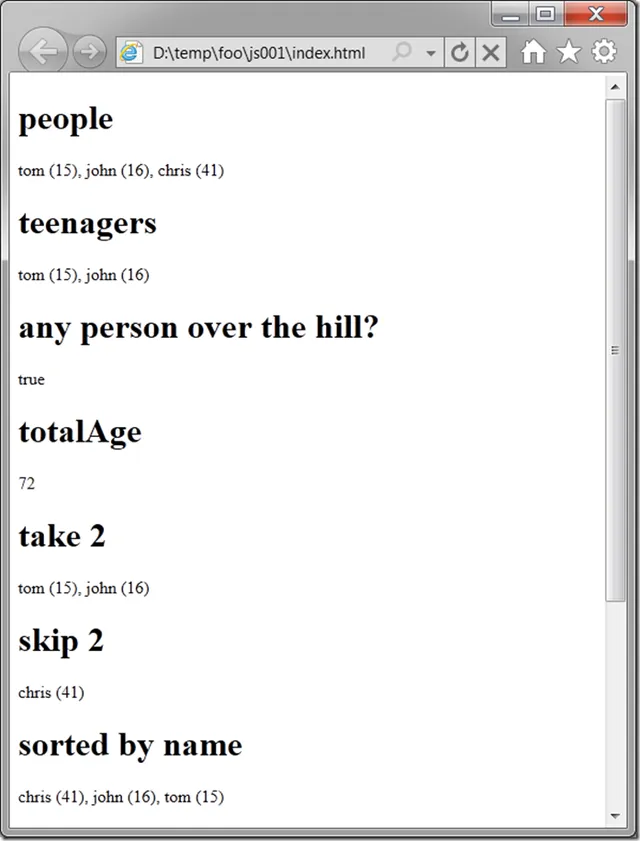
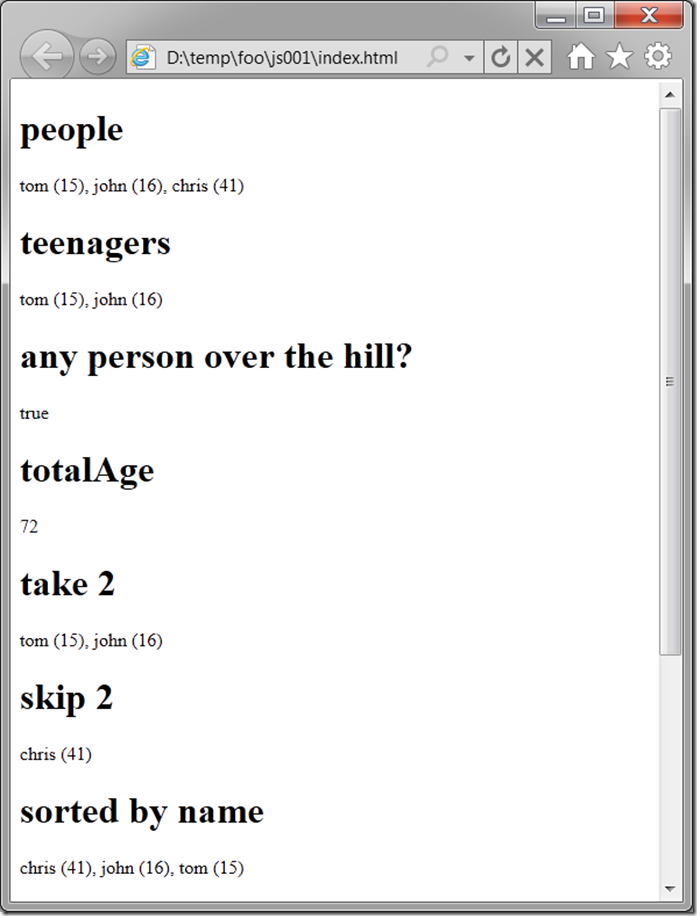
The output looks as you’d expect:
image

We’re not all there, however. For example, the semantics of the LINQ First method are to stop looking once a match is found. Those semantics are not available in the JS filter method, which checks every element, or the JS some method, which stops once the first matching element is found, but returns a Boolean, not the matching element. Likewise, the semantics for Union and Single are also not available as well as several others that I haven’t tracked down. In fact, there are several JS toolkits available on the internet to provide the entire set of LINQ methods for JS programmers, but I don’t want to duplicate my C# environment, just the set-like thinking that I consider language-agnostic.

So, in the spirit of JS, I added methods to the build in types, like the Array type where all of the set-based intrinsics are available, to add the missing functionality:

Object.defineProperty(Array.prototype, "union", { value: function (rhs) {
  var rg = this.slice(0);
  rhs.forEach(function (v) { rg.unshift(v); })
  return rg;
}});

Object.defineProperty(Array.prototype, "first", { value: function (callback) {
  for (var i = 0, length = this.length; i < length; ++i) {
    var value = this[i];
    if (callback(value)) { return value; }
  }
  return null;
}});

Object.defineProperty(Array.prototype, "single", { value: function (callback) {
  var result = null;
  this.forEach(function (v) {
    if (callback(v)) {
      if (result != null) { throw "more than one result"; }
      result = v;
    }
  });
  return result;
}});

These aren’t perfectly inline with all of the semantics of the built-in methods, but they give you a flavor of how you can extend the prototype, which ends up feeling like adding extension methods in C#.

The reason to add methods to the Array prototype is that it makes it easier to continue to chain calls together in the fluent style that started all this experimentation, e.g.

// union
s += "<h1>chris's family</h1>" +
[chris].union(chris.children).map(function (p) { return p; }).join(", ");

Where Are We?

If you’re a JS programmer, it may be that you appreciate using it like a scripting language and so none of this “set-based” nonsense is important to you. That’s OK. JS is for everyone.

If you’re a C# programmer, you might dismiss JS as a “toy” language and turn your nose up at it. This would be a mistake. JS has a combination of ease-of-use for the non-programmer-programmer and raw power for the programmer-programmer that makes it worth taking seriously. Plus, with it’s popularity on the web, it’s hard to ignore.

If you’re a functional programmer, you look at all this set-based programming and say, “Duh. What took you so long?”

Me, I’m just happy I can program the way I like to in my new home on the web. : )


← Newer Entries Older Entries →