tools

March 27, 2010 tools

Updated the CsvFileTester for Jet 4.0

I was playing around building a tool to let me edit a database table in Excel, so I updated my CvsFileTester project to work in a modern world, including the 32-bit only Jet 4.0 driver you’ve probably go lying around on your HD.

Enjoy.

February 9, 2010 tools

Entity Designer Database Generation Power Pack

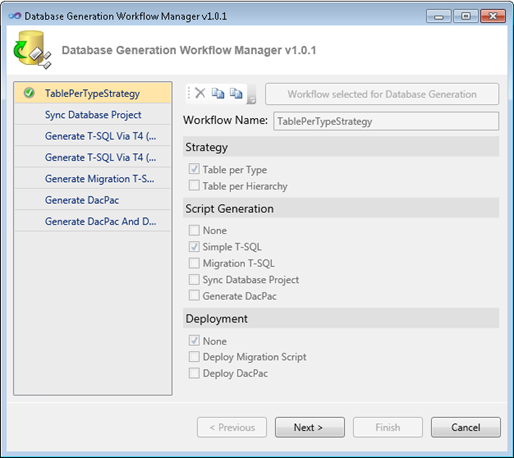
If you like Model-First design in Entity Framework, you're going to love the Entity Designer Database Generation Power Pack. The original Database Generation feature in the Entity Designer in VS 2010 is extensible via Windows Workflows and T4 Templates. This Power Pack builds on these extensibility mechanisms and introduces the following:
  • Basic Table-per-Hierarchy support. This is represented by the Generate T-SQL via T4 (TPH)” workflow.
  • The SSDL and MSL generation pieces can now be tweaked through T4 templates, both in TPH and TPT strategies through the Generate T-SQL via T4 (TPT)” and Generate T-SQL via T4 (TPH)” workflows.
  • Direct deployment and data/schema migration are available through the Generate Migration T-SQL and Deploy” workflow. This workflow will use the Team System Data APIs to diff our default T-SQL script against the target database and create a new script which will perform non-invasive ALTERs and data migration where necessary.
  • A new user interface will now display when Generate Database from Model” is selected — this acts as a workflow manager” which will present to you our default workflows and allow you to create your own, customizable workflows based on your own strategy, script generation, and deployment requirements.

Highly recommended. Enjoy!

December 15, 2009 tools

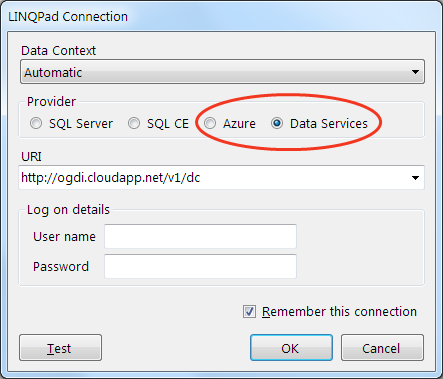
LINQPad updated to support Data Services!

Joe Albahari, the author of LINQPad, has added support for WCF Data Services to the 1.37.1 version beta of LINQPad. This means that you can point LINQPad at any Open Data (OData) endpoint and do queries interactively just like any other LINQ data source. He even supports HTTP security, in case the endpoint in question requires it. Further, if you have your own custom LINQ to Whatever and you’d like to plug a connection to it into LINQPad, Joe has already added the ability to create a custom data context provider. It is, as they say, a thing of beauty. Enjoy!

September 3, 2009 tools

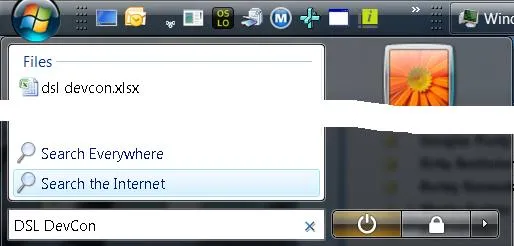
Add “Search the Internet” Back to the Win7 Start Menu

Add “Search the Internet” Back to the Win7 Start Menu

Windows 7 took away a feature I use all the time, as shown on the right: Search the Internet.

Here’s what I did all day, every day in Windows Vista: Ctrl+Esc to bring up the Start menu, then I start typing. If I’m searching on my HD, I immediately get matches and I can choose one with just the arrows and the Enter key. If I’m typing in the name of a program in the Start menu, I get those matches and choose one. If I want calc” or notepad” I can just type those and those work.

However, 80% of the time, I want to search the internet, so enter my search term, optionally including attributes like site:”, I press, down-arrow once, highlight Search the Internet” and press Enter. This brings up my default browser with my search results in my default search engine without me having to move the mouse or open the browser and wait for the home page or even decide where I want the search results to come from until after I’ve entered my search phrase.

And we took it out of Windows 7. : (

But, Shawn VanNess has shown me how to put it back! : )

Download this zip file, execute the .reg file, press Yes and OK a bunch, kill and restart the explorer.exe process and the next time you do the Ctrl+Esc+type+something dance, you’ll see your old friend Search the Internet” right back on the Start menu where Bill intended it to be. Thanks, Shawn!

Update: This post has been translated to Danish.

October 24, 2008 tools

Tired of writing unit tests yourself? Try Pex!

From the Pex site:

Pex (Program EXploration) produces a traditional unit test suite with high code coverage. … To do so, Pex performs a systematic white box program analysis. Pex learns the program behavior by monitoring execution traces, and uses a constraint solver to produce new test cases with different behavior. At Microsoft, this technique has proven highly effective in testing even an extremely well-tested component.” [ed: emphasis mine]

So, Pex will produce a parameterized set of unit tests for your classes and does all of this integrated with Visual Studio and the unit testing built into VS. I’ve seen the demo and it blew me away. Nikolai Tillmann, a developer at MSR (Microsoft Research), has a nice write-up that discusses his work and when you’re done with that, go download Pex!

September 8, 2008 tools

Custom Window Chrome in WPF

Joe Castro, a developer on the WPF product team, has written a very cool article about how to do custom chrome in your WPF applications. But, what makes it even cooler is that he dissects the various ways that shipping apps do custom chrome on various versions of Windows. It's amazing the number of techniques there are. Very nicely done, Joe.
March 8, 2008 tools

On Beyond Unit Testing

Quetzal Bradley is a software development engineer (SDE) on my team with *tons* of experience in all manner of infrastructure stuff including the requirements of real-world software testing from the trenches at Microsoft.

Q gave a talk about what comes after unit testing to my team and I was blown away, so I sent him to tell Scott about it so that you could hear it, too.

Enjoy.

January 18, 2008 tools

Configuring VS08 to Debug .NET Framework Source

Shawn Burke has released the details to set up VS08 to debug into the .NET Framework source code, including the following assemblies:

  • mscorlib.DLL
  • System.DLL
  • System.Data.DLL
  • System.Drawing.DLL
  • System.Web.DLL
  • System.Web.Extensions.DLL
  • System.Windows.Forms.DLL
  • System.XML.DLL
  • WPF (UIAutomation*.dll, System.Windows.DLL, System.Printing.DLL, System.Speech.DLL, WindowsBase.DLL, WindowsFormsIntegration.DLL, Presentation*.dll, some others)
  • Microsoft.VisualBasic.DLL

Others are coming. Thanks, Shawn!