spout

July 10, 2009 spout

PowerBoots makes me want to use PowerShell!

PowerBoots makes me want to use PowerShell!

I’ve picked up PowerShell half a dozen times or more. The central premise, that I can pipe streams of objects instead of streams of text between programs, is pure genius. However, in the day-to-day, two things make me put it down again every single time:

  1. The differences between ps and cmd.exe are annoying and unnecessary.
  2. The lack of pushing the boundaries on the text output in a GUI window leaves me wondering what I really gain when I get over the hump of #1.

I understand the need to reboot” the DOS command line and get something scalable and consistent, but ps is a superset of cmd.exe and aliasing could’ve made the transition seamless. However, because little more than dir” works (and dir /s” doesn’t) I’m constantly bumping into barriers just trying to get my work done in the new shell.

And I’d be really ready to learn ps, especially since it’s everywhere now, but what am I really gaining? I never wrote a bunch of shell scripts in cmd.exe and I don’t find myself writing them in ps either, which means that the cool piping objects” thing doesn’t make my life any simpler. What I really really want is for the text window of the ps shell to also be something active, e.g. if I do a dir”, I’d like to be able to click on a file or folder in output of dir and open it or right-click on a file and choose a method on the .NET File object to execute. Even better, I’d like all of that functionality but with a keyboard command interface like the old Norton Commander used to provide. I’ve tried the ps IDEs and GUI shells and haven’t liked any of them.

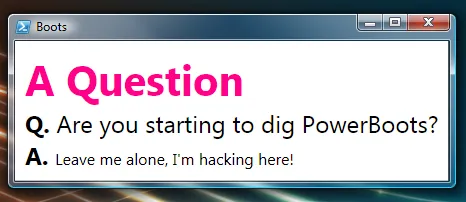
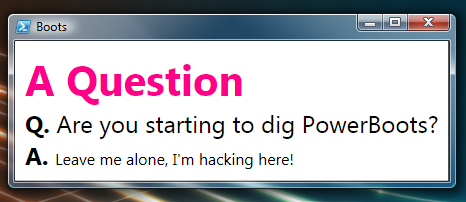
Anyway, the first thing that’s made me really really want to move to ps is PowerBoots! It’s starting to really deliver on what I had hoped to get out of ps and it feels like Shoes, which I already know I love. Check it out!

July 8, 2009 spout

Dynamic Languages: A Separation of Concerns

I saw Nick Muhonen give a talk on the new language features in C# 4.0 last night at the Portland-Area .NET User Group. He did a good job in spite of the constant questions I asked. He showed one example that I found especially compelling:

object GetConfig() {
  return new {
    WindowSize = new Size() { Width = 100, Height = 200 },
    ConnectionString = "...",
    ...
  };
}

Of course, you wouldn’t hard code settings in your application — you’d load them from somewhere (ideally a database, but that’s another story : ). Anyway, in C# 4.0, I can write code like this:

dynamic config = GetConfig();
mainWindow.Size = config.WindowSize;
...

Notice the use of the dynamic keyword — this means I don’t have to know the type at compile-type — I’ll check for the WindowSize property at run-time ala .NET Reflection, COM IDispatch or VB Option Explicit Off”. Of course, this is the cornerstone of all dynamic languages, e.g. Perl, Python, Ruby, etc. These languages have been gaining in popularity for the last few years and I didn’t understand why. Tim Ewald, my close friend and compadre, kept trying to explain it to me, but I’m just too slow to get it and I didn’t ’til last night watch Nick do his thing. It wasn’t looking at the code that Nick typed that made the point for me, it was looking at what he didn’t type.

When writing dynamic code, there is no requirement to define a type.

That is, when I inevitably add another property or 10 to my app config, I have to write code to use the new properties, but that’s all. I don’t have to write a class and I likely don’t have to update the save/load code either, because it’s also going to be dynamic and just expose whatever data is part of the serialized config. Or, to put it another way:

When writing dynamic code, I only have to write the part I care about.

In the case of dealing with application config, that’s about 2/3rds of the code I no longer have to write. Of course, this isn’t a new idea — Stuart Halloway has been talking about embracing essence (the code you care about) and rejecting ceremony (the code you don’t) for a long time now. It just took Nick’s concrete example for me to understand it.

And not only does this make dynamic code good for reducing the code you type, it always makes it good for the code you’re generating, e.g. COM interop assemblies, database mapping code, XML mapping code, etc. In general, I find that most of the code we have generated for us in the .NET programming environment is code to map to foreign type systems, i.e. COM, databases, XML, web services, etc. With dynamic languages, you can write that code once and just use it. In fact, in C# 4.0, there’s no need to use Primary Interop Assemblies (PIAs) anymore — those can just be mapped to a sub-class of the DynamicObject” type that .NET 4.0 ships to provide that dynamic mapping bridge.

When writing dynamic code, you don’t need generated code layers to map to foreign type systems.

This means I don’t have to do the mapping to databases per query or to XML per XSD — I can just have an implementation of DynamicObject, point it at my configuration and go — no muss, no fuss. Of course, purely dynamic languages have a construct for DO built right in, so it’s even easier.

Around the table after Nick’s talk last night, someone was complaining that with purely dynamic languages, I give up the benefits of the compiler doing static type checking (I think it was Nick : ). I argued that this was a good thing. The compiler is really just one kind of unit testing — it’s testing names. It can’t do any of the other unit testing you need done, however, so you still need unit tests. What that means is that, with static languages, you’ve got some unit tests separate from your code and some baked into the code via types, casts, etc.

When writing dynamic code, you can separate unit tests completely out of your code.

Of course, as software engineers, we already know that separating concerns leads to better, more readable and more maintainable code, which is why we’ve long separated our applications into tiers, separated our view from our data, our interfaces from our implementations, etc. Dynamic languages let us do another complete separation of concerns with regards to unit tests that static languages don’t allow. In a static language, the ceremony is required, thereby obfuscating the essence.

And all of this is great except for one question — how do I get my list of possible code to write when I type .” if I’m using a dynamic language or dynamic features of a static language ala C# 4.0?

When writing dynamic code, I don’t get Intellisense.

My name is Chris Sells and I’m an Intellisense addict. Admitting I have the problem is the first step…

April 17, 2009 spout

Win7 killed a feature I love in Vista!

Win7 killed a feature I love in Vista!

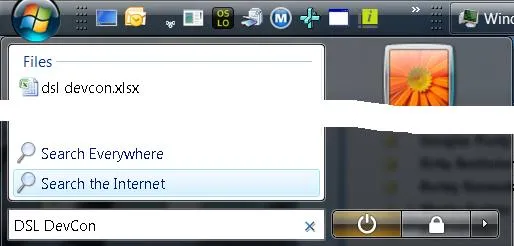
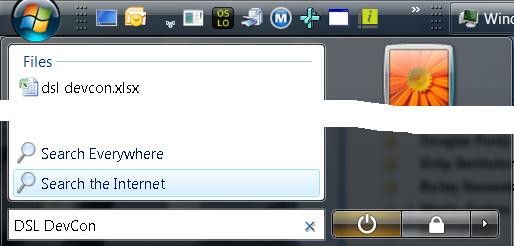
All my friends have updated to Windows 7. My 14-year old son is running Win7. I’m the only one I know that’s not running Windows 7. The reason? Windows 7 took away a feature I use all the time, as shown on the right: Search the Internet.

Here’s what I do all day, every day in Vista: Ctrl+Esc to bring up the Start menu, then I start typing. If I’m searching on my HD, I immediately get matches and I can choose one with just the arrows and the Enter key. If I’m typing in the name of a program in the Start menu, I get those matches and choose one. If I want calc” or notepad” I can just type those and those work.

However, 80% of the time, I want to search the internet, so enter my search term, optionally including attributes like site:”, I press, down-arrow once, highlight Search the Internet” and press Enter. This brings up my default browser with my search results in my default search engine without me having to move the mouse or open the browser and wait for the home page or even decide where I want the search results to come from until after I’ve entered my search phrase.

And they took it out of Windows 7. : (

I logged the bug and heard nothing.

Does anyone know of I 3rd party program I can run that will work exactly like the Vista Start menu under Windows 7? Please?

April 17, 2009 spout

Twitter takes a bite out of blogs

At the last DevCon in 2003, blogging was rampant. We had about 100 posts in the lead up to the conference and during the conference itself.

A this year’s DSL DevCon, there’s a ton of buzz, but almost none of it is in the blogosphere. Instead, it’s all in Twitter.Last I checked, it was more than 150 tweets and we’re still on the first talk of the 2nd day (and day #1 was only a half day).

The worm has turned.

March 15, 2009 spout

Why I Hate My iPhone

Why I Hate My iPhone

I’ve had an iphone for the last coupla weeks and there are some things that drive me crazy about it!

  • The battery life is crazy short. I can’t make it more than 6 hours on a charge. Good lord!
  • Pandora, an app I dearly love, can’t run in the background like the ipod app, so I can’t do SMS, email, check my calendar, etc. while I’m listening. Are you kidding me?
  • There’s no tactile feedback on the keyboard, although the auto-correct is amazing (“let go, let iphone!“).
  • There’s no copy-paste. I’ve never used a smart phone that did, but I soooo want this feature!
  • There’s no free out-of-the-box app for using my iphone as a laptop modem, which is something I really loved about my T-Mobile Dash.
  • I used to be able to use my T-Mobile account to get free wifi at Starbucks. Can I do the same with my AT&T account? I have the unlimited data option.
  • There’s no turn-by-turn directions on the map app and easy re-routing when I go off route. It’s so close; let’s go all the way!

And all of that pales in comparison to the single worst deficiency in the app-suite of the iphone for which I’ve found no good work-arounds; the calendar app is nearly worthless in a business environment:

  • There is no snooze, so I can’t set an alert for 15 minutes and then 5 minutes before, then at the time, etc. In a meeting driven environment like Microsoft, the lack of snooze means that I’m actually missing meetings.
  • There is no way to invite other people to events. Further, if I create an event via Exchange so I can invite someone, I can’t edit it on the iPhone.
  • I can’t do a Reply All to an event to ask a question or let folks know I’m running a little late.
  • There is no detection of phone numbers or addresses in event locations or the body, which means I get no integration with the phone or map apps. This means that I’m memorizing phone numbers and addresses stored in events so I can enter them manually. I have a smart phone so I don’t have to remember this stuff!
  • My appointments don’t show on the home screen, so I have to constantly check the calendar app to see what my day is going to look like.

The calendar app is the single thing that makes me miss my Dash. Someone please tell me there’s a workaround to these issues! I’ll pay!

The reason I list the things I hate about my iphone is because the list of things I love about it would be impossible to enumerate. I had a T-Mobile Dash for years and it went with me everywhere. It was as big a boost in my electronic lifestyle as my first laptop. After having a smart phone for contacts, email, music and surfing the web, I couldn’t go back. Plus, I loved the Dash so much that I’d try a new phone every 6 months or so and then bring it back because it just didn’t compare.

On the other hand, the iPhone replaced my Dash in 24 hours. I’ve been twittering iPhone development related apps. I’ve purchased iphone charing cables for everywhere in my life where I sit for more than 5 minutes. I want to integrate my iphone as closely into my car as possible.

They will pry my iphone out of my cold dead hands.

March 14, 2009 spout

How I learned to Stop Worrying and Love the Twitter

How I learned to Stop Worrying and Love the Twitter

Scott Hanselman performed an intervention on me in the mall the other day. I was in denial and while I can’t say I’m fully into acceptance, I’m at least past anger. : )

It took Scott 90 minutes and I fought him every step of the way, but I think I finally have a handle on what Twitter is. I’ve heard it described as a 24-hour virtual cocktail party,” which always turned me off. I’ll take a lake of fire any day over more than three strangers in a room with which I share no common task and with whom I’m expected to socialize. Making that into a 24-hour thing and including everyone in the world does not make this more attractive to me.

And while that is one valid way to describe Twitter, the more attractive way for me to thing about it is as a single global chat room with conventions and tools to pull out the bits and pieces you want, i.e. the people to which you want to listen, the topics you care about, etc.

Except that’s not right, either.

Instead, it’s more like a poetry reading in a hippy bar where you’re up on stage saying whatever comes into your head and the audience is generally ignoring you (because they’re also on their own stage) except occasionally when they holler yeah man! right on!” back at the stage.

And why is that cool?

Well, I can’t speak for anyone else, but until Scott turned the light on in my head, it wasn’t. Now I check Twitter (via TweetDeck) half a dozen times a day looking for direct messages first, then replies, then new search results (I search on my name, Oslo and DSL right now), then whatever’s on top of my All Friends.” When I find someone that says something interesting about a topic I like, I follow them for a while til I decide they’re saying mostly stuff I’m not interested in and then I unfollow.

The whole thing feels very much like what we used to do in email (“Look! Cute kiddie pictures!“) and then in blogs (“Look! I have a blog!“) before we figured out how to use it and what it was really for. I can’t say I really know what Twitter is for yet, although I’ve been following Scott’s advice, i.e. bigger, permanent stuff goes into blogs, transient stuff to a few people goes into email and transient stuff that goes to the hippy bar audience (i.e. the world) goes into Twitter.

I’m still very much learning and hardly anyone is following me (@csells), but that’s OK. I’m already finding out who’s in the Oslo community and have had lots of useful stuff on personal topics, too, e.g. sharing my iPhone love/hate.

Also, I have to say that I really love the social aspect — I’m working alone at my house a lot and it’s nice to have the world listening to every fool thing that comes into my head. : )

January 4, 2009 spout

Eat Less and Exercise: Before and After

Eat Less and Exercise: Before and After

A few years ago, I looked like the before” picture to the right. I didn’t look like that all the time, thank goodness — this was some couples’ party and I was doing the ballerina dance” challenge — but as you can tell, I was a tad overweight. Specifically, I weighed in excess of 100 pounds more than the top end of my idea weight range, which put me over 300 pounds.

I had been a skinny kid with a fast metabolism growing up. At 6′5″ it takes a lot of food to get to full grown, even when I had only a medium build (I can’t even claim to be big boned”). In college, living in a fraternity served by a cook that believed fully in the benefits of meat and potatoes and having been born in the Midwest with a gravy ladle in my mouth, I got my freshman 15″ in the first semester and kept on going until I was the jolly fellow you see to your right (complete with the belly that shook like a bowl full of jelly).

I tried dieting. A few years ago, I was able to lose 50 pounds on The Geek Diet (it was a freely downloadable PDF file at the time), but gained it all back in a year. The problem was that that diet is fundamentally based on deprivation: you count calories and don’t eat more than a certain amount based on your activity level. This made me hungry and crabby all the time. Then, one Christmas back in Fargo under the influence of my deep-fried meat, brownie, cinnamon roll and fudge pushing grandmother, I snapped. It was like a psychological rubber band, pulling me right back into my old habits. Also, I didn’t exercise, so I’d plateau’d and my metabolism wasn’t equipped to deal with even a few extra calories.

Over the last twelve months, I tried something different and as of a coupla week ago, I look like the guy on the left. I called it eat right and exercise.” It sounds revolutionary, I know, but I’ve lost 60 pounds over the last year and I’ve kept it off (even after the visit to my grandfather over the holidays!) The idea isn’t to diet at all, but to change your habits. I can’t say that I’m expert enough to recommend any of this to you, but here’s what I did:

Stop Eating When You’re Full. This was the hardest one to learn. In college, I learned up to drink and, most importantly, when to notice when it’s time to stop drinking. However, it took me til I was 38 to learn how to tell when I was full. This involves eating slowly and being very ready to leave food on your plate (which I always try to do now).

There’s Always More Later. This is the other key to stopping eating. As much as I might like something and want to finish it, I had to realize that there would always be more of whatever it was later. I learned to feel good about leaving food uneaten, no matter how good it was.

Eat Better Food. If you have to choose between eating 1000 calories of Doritos or of broccoli, I think we all know the right choice to make. The key is, making it. I’ve had to learn to like salad, fruits and vegetables, which I’m still working on. I’m always trying new things to learn to eat things that are better for me.

Don’t Buy Grazing Food. If I’m doing something I don’t like or am bored or reading or watching TV or any number of other things, I can easily eat chocolate or chips or any other manner of things that are bad for me, even if I’m not hungry. I have a hard time saying no” to an unhealthy snack when I’m watching a movie, for example, so I don’t buy them. Instead. I buy apples and applesauce and melons and other things that are good for me so that if I have to snack, there are only good things available.

Eat Lots of Meals. This one is counter-intuitive, but I find I do better if I eat a small amount every few hours than larger meals three times a day. In general, if I’m hungry, I eat and if I’m full, I stop. It’s really just that easy.

Don’t Deprive Yourself. If you want a piece of chocolate or a chip or whatever it is that you crave, then have it. Life is short and there is a variety of wonderful things to enjoy. Don’t gorge yourself — everything in motivation — but don’t make yourself crazy, either. I find it makes me feel good to eat a piece or two of my grandmother’s famous fudge and it feels equally good to stop eating it.

Exercise Regularly. This is one of my major failings with The Geek Diet. I was depriving myself of calories, but I wasn’t boosting my metabolism, so my body was just adapting to fewer and fewer calories. These days, I try to swim 2 miles/week and that seems to keep me at my fighting weight.

Mix It Up. I find I’m happiest eating a bunch of small portions than one or two large portions at a meal. I like variety, so I like a little bit of a few things. Also, to make sure that my body doesn’t get used to my level of exercise (it’s getting easier and easier to swim for distance), I try a variety of exercises. For example, I just did a 90 minute hot yoga class the other day (I thought I was gonna die) and I regularly do sprints in the pool, going as fast as I can. The latter’s useful because it always sucks, no matter how fit I get, so it’s almost more than I can handle.

Commit. The key to making anything happen is to decide it’s going to happen and then route around obstacles until it does. The days I swim without resting or swim a mile when I normally go half are the days I decide to do so. The key to weight loss or any other accomplishment is first to commit.

Don’t Beat Yourself Up. Didn’t do as much exercise as you wanted this week? Had a few too many Twinkies? So what. You’re human. Let it go. Don’t give up. Do better today.

The whole point of all this is that it’s not about a temporary diet, but about changing my habits permanently. I still have 40 pounds I’d like to lose, but I don’t obsess about it. In fact, I haven’t weighed myself in months. And even if I never do lose those pounds, I’m down from a 44 waist on my pants to a 38. If I do nothing but stay there, I’ll be happy as hell with myself.

I love that most of these tips are just like Scott’s newsflash — gives me some validation. Do you have tips to contribute? Tell me about them.

November 12, 2008 spout

tvrss.net + uTorrent + FiOS + WHS + 360 = DVR Bliss

So, the other day, Windows XP SP2 destroyed my Windows Media Center Edition install that I’ve been using for years and absolutely loved. It let me record all my favorite shows on two separate tuners and I could watch them on the TV attached to my MCE box, from all the PCs in my house and from my XBOX 360. Losing it was a huge blow, especially since it was clear I’d need to repave and I was swamped with PDC and post-PDC work (damn those MSDN Magazine deadlines!).

A little research revealed the following facts:

  • tvrss.net provides RSS feeds of every TV show I’ve ever heard of, whether it’s on normal TV, cable or a premium channel like HBO and Showtime. The shows are available in HD with the commercials pre-edited out, so I wouldn’t even have to do the 30-second fast-forward, 5-second rewind dance that MCE enables to skip them.
  • uTorrent provides automatic downloads from RSS feeds, including fancy features like only downloading each new episode once, even if it’s provided from multiple sources.
  • My Verison FiOS pipe provides 20MBps downloads, so a 22 minute TV program (30 minutes - 8 minutes of commercials) even at HD would only take about 20 minutes to download, on average.
  • My $500 Windows Home Server machine has 1.4TB of storage, so your average 22-minute sitcom, at 180MB, is only a tiny fraction of the storage. Put another way, I could store about 4000 hours of TV.
  • My XBOX 360 supports the same format (XVID) that TV shows available from tvrss.net seem to be provided in. Further, my 360 has direct support from playing videos from shares on my home network (which is wired for 1GB Ethernet, but only run by a 100MB Ethernet router right now).
  • The XVID codec is available, along with a ton of other useful codecs, from free-codecs.com (I’m partial to the K-Lite Codec Pack myself), which means that any videos that I download in XVID format can be played back on any PC in my house. Those PCs running Vista Ultimate that have a Media Center remote control on them can surf to videos on the network and pick them with an experience just like that of my XBOX 360.
  • It’s my understanding that the XBOX 360 menuing system will be updated this month to support Netflix streaming, so for the minimum subscription fee (1 DVD at a time, $8/month), I’ll be able to get live, streaming movies directly from my XBOX 360 and all my PCs for the movies I don’t yet own.

All of this means is that if I were to schedule episodes of say, Burn Notice, to be recorded by uTorrent and dropped into the Videos\TV\Burn Notice folder of my WHS box, I’d be able to access those and play them back on my XBOX 360 even more simply then I could access video from my MCE box, because I don’t have to start up the Media Center software first — access to shared folders is built right into the XBOX 360 menuing system. And I could have all of this in HD (no CableCard required) without commercials and without regard for how many tuners I have. This is all free and, if I don’t want to watch live TV (the Superbowl was the last time I did), then I don’t even need to spend $55/month on cable.

Plus, when combined with my photos, music and ripped DVDs, all of which are also stored on my WHS box, and streaming movies I don’t yet own, I could access all of my digital media from my XBOX 360 (attached to my 46″ LCD panel) and from all of my PCs simply and quickly.

Of course, I would never record my favorite TV programs like this, because it’s very much a copyright violation and therefore highly illegal.

But if I did, wow, it would rock…

Why do I need cable again?