colophon

October 12, 2026 colophon

Coders with Agents Fixing Websites

Coders with Agents Fixing Websites

Chris Sells holding coffee in the driver's seat of a vintage convertible while two robot agents repair the car, one under the open hood and one at a wheel beside a toolbox.

This site started in 1995 as a page of links for my students. Since then, I’ve used FrontPage, ASP.NET, SQL Server, a blogging API and Windows Live Writer to keep it going. The history of this site is the history of which tools I wanted to use with it.

In 2015 I moved to Blot because I wanted to write Markdown in whatever editor I felt like. It was a great service when I chose it and it remains so. Blot runs like the wind, and the proprietor, David Merfield, is super responsive. I was keeping my posts in a Dropbox and Blot picked up on changes to publish updates to the site. I enabled features and set styles by editing config and templates online.

However, now that I work with essentially all of the CLI coding agents via Gas City (it supports 16 as I write this), I wanted the whole website in a form that a set of agents and I could work on together. I’d prompt an agent for a change — a new feature, a template change, some CSS updates — look at the result locally and publish it when it was ready.

The result is a site built with Eleventy and hosted on Cloudflare Pages. Because David has so generously provided the Blot runtime as OSS, I was able to start my migration by self-hosting the site, checking that I got it right with pixel-by-pixel checks between the staged and the live site.

Along the way, the agents and I built our own static site generator, which made no sense to me, given the plethora of such tools already available (don’t let those agents push you around!). So I had them build the site with Hugo and with Eleventy using real pages from my blog. I picked Eleventy because it could apply Blot’s typography (small caps and hanging punctuation) as it rendered each page, so the local preview looked just like the real thing.

Once that was working and I was back in control of my site end-to-end, there were new features I wanted to build.

But first, I had three decades of tech debt to address.

I’ve been handing out links to sellsbrothers.com for thirty-one years. Some of them look like /news/showTopic.aspx?ixTopic=1153 from the ASP.NET days, and I still expect them to work (along with all of the other link formats I’d supported over the years).

I also had the agents track down the 404s. Some older posts linked to 75 places on my own site that weren’t there anymore. Most of them were links to news items on the old home page that had long since scrolled off, so now they point at the actual post. A few more needed redirects for old book and feed URLs. That fixed 39 of them. The rest point at pages that were gone long before this move, like the old conference pages under /public/conference.

Chasing down dead links also turned up images that went missing from the old site. We (the agents and I) recovered several full-size originals from the Wayback Machine and other verified sources, stored them with the content and updated the posts to use the local copies. The migration left six old image URLs without a verified original. I can’t fix the entire dead web, but I can keep a few more pieces of my corner of it together.

Finally Fixing “Here”

Before the site could show the beginning of an article as its summary, I used to write a separate little post describing it, with a link labeled “Here” (itself a fix from a previous port). The description would send you to the actual article. Once automatic summaries arrived, those extra posts were unnecessary. Finding and removing them was not a problem. Forwarding the description URL to the real post was not a problem. Moving all of the Disqus comments that had collected on the descriptions… that was a problem.

I wasn’t willing to lose those comments. We saved the Disqus exports and checked which discussions belonged to which pages before changing their associations. Where the destination had no comments of its own, we could display the original discussion there. Where both pages had comments, we used Disqus’s merge process and checked the result. Some destinations needed separate discussions kept accessible rather than folded together. The source content and migration evidence stayed backed up throughout.

The descriptions turned out to hold 731 approved comments and another 37 hidden records. All 768 were preserved, including their authors, dates, replies and moderation state.

Inline HTML Style

Before I moved to Markdown for content authoring (I’m typing these words into Typora, my favorite Markdown editor ever), I wrote content in HTML using FrontPage.

While reviewing the cleanup locally, I noticed that my 2004 post about Edward Tufte used different fonts from the rest of the site. The HTML still contained <font face="Times New Roman" size="3"> and inline 12-point sizing, including inside section headings. The template couldn’t give those headings the site’s typography while the content insisted on its own.

We cleaned up the old presentation markup in the source files, keeping the words, links, anchors and meaningful formatting. That didn’t mean stripping every style attribute. Code samples, tables, diagrams and mathematical notation can have good reasons for particular formatting. We compared the content before and after, then looked at representative pages on desktop and mobile.

This is the kind of thing that has been bothering me for a decade or more, and I never found the time or energy to track it down. But agents could do all of it in minutes.

Giving It a New Look

With the old stuff fixed, I could get to the new stuff, starting with a few design updates and a couple of new features.

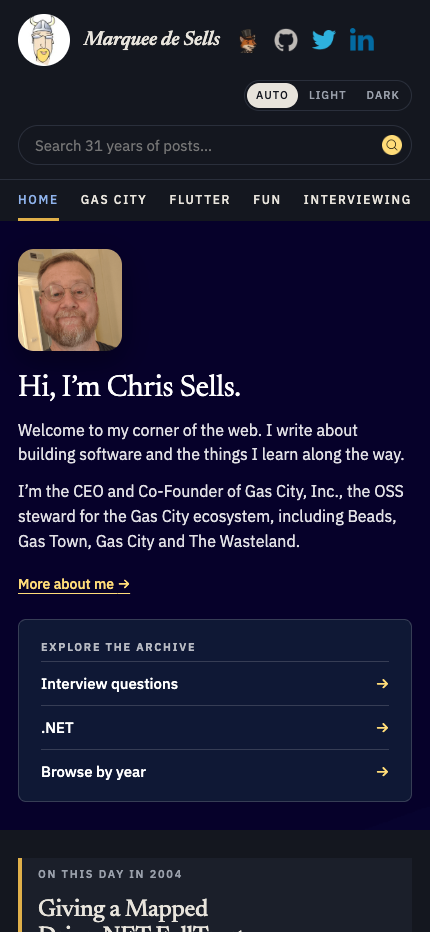
For example, readers can now choose their light/dark preference in the header. 30-year-old HTML made dark appearance more interesting than changing the page background; some old posts supplied their own text and table colors, which dark mode now overrides. And I made sure it looked and worked well in both light and dark mode on mobile, too.

The homepage on a phone in dark appearance, with search on its own row and horizontally scrolling topics.
On a phone, in dark mode.

Looking through the restyled pages exposed a few things that weren’t design choices at all. Topic listings already had additional pages, but no links to get to them. Some browser tabs showed heading markup in the title, and a paragraph beside a floated image could intercept the click meant to enlarge it. We fixed those while we updated the styles.

My Own Personal Wayback Machine

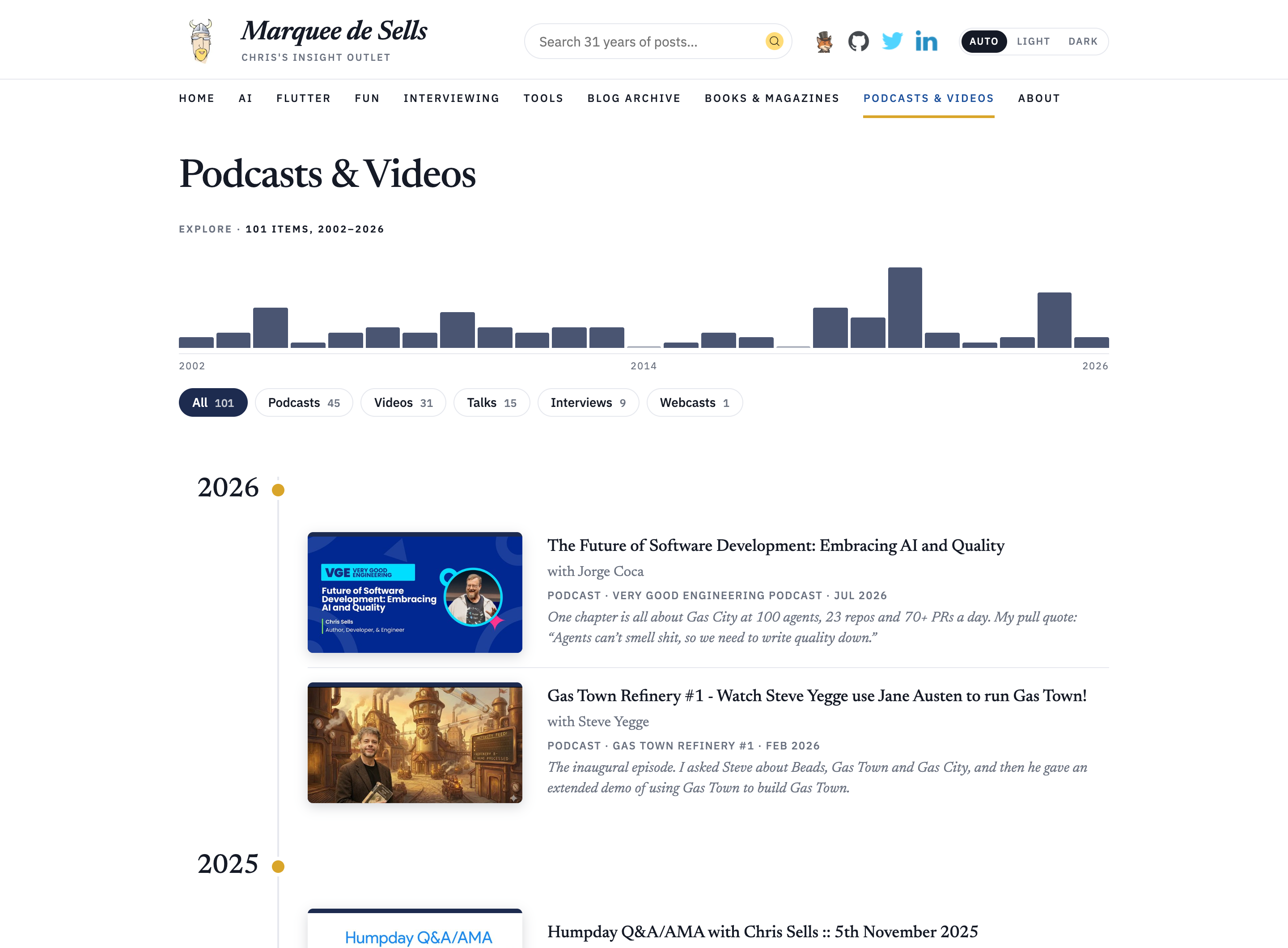
After all of the work to fix all of the old posts and update the style a little, I wanted to address navigation. Scrolling through 2600+ posts stretching back to 1995 is not an ideal experience. Search helps when you remember what to ask for, but sometimes you just want to see what was going on in 2004.

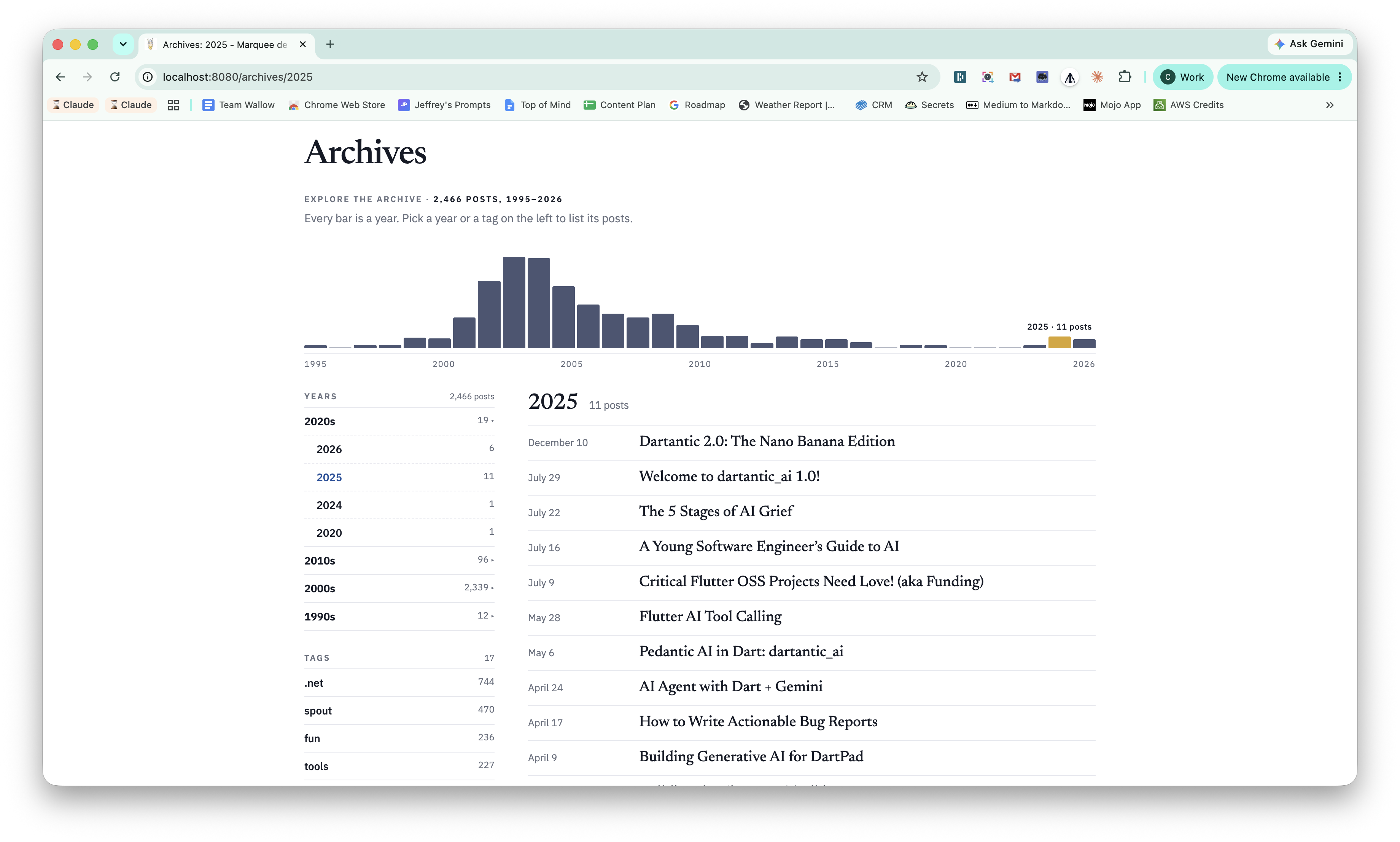
So we added an archive browser. There’s a bar for every year, with the busy years easy to spot, and a list of years grouped by decade. Pick a year to see its posts, or pick a tag to follow a subject across the years. Each entry takes you to the original article. I’ve turned the site into my own personal Wayback Machine.

The archive browser with 2025 selected, showing a timeline of posts from 1995 through 2026, decade and tag navigation, and the year's article titles.
Browsing 2025 in the archive. The busy years are a little farther to the left.

The archive also has an “All posts” view, with a way back to it from any year or tag. These are ordinary links to generated pages, so browsing doesn’t depend on JavaScript. I can send you a link to 2025, and you can open that same view directly.

Putting the tags in front of me also exposed some housekeeping. Posts about Oslo had ended up under several different tags; now they’re together. We folded “books” into “book” and made the Gas City tag consistent with the others. The old tag URLs redirect to their replacements, so tidying up the navigation didn’t break somebody’s bookmark.

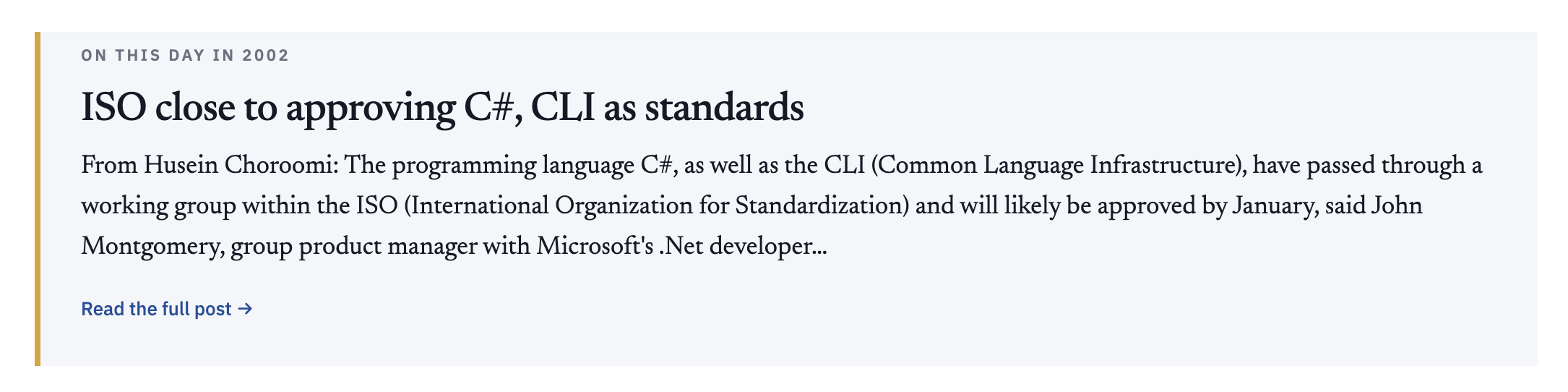
And you don’t even have to go to the archives to see posts from the old days. The home page now has an “On this day” section that picks one of the posts I wrote on today’s date in an earlier year:

An On this day in 2002 card on the home page, showing the post ISO close to approving C#, CLI as standards, its opening lines and a Read the full post link.
October 12, 2002, when C# was about to become a standard.

The good news is that you’ll find no postings from Christmas Day in my blog history. The bad news is that I was working pretty much every other holiday at least twice and sometimes up to 25 times (why did I post so often on Halloween?).

Finding What I Meant

The other navigation improvement I needed was search, which never worked very well on Blot. We did the work to make sure that a static website had dynamic search. Then I searched the live site for wasm and got nothing.

I had a post about WebAssembly, but the search didn’t know that the abbreviation meant the same thing. A sweep of 32 representative queries against a local build turned up two more gaps: misspelled short queries and standalone pages we’d deliberately left out of the index, including About and Books.

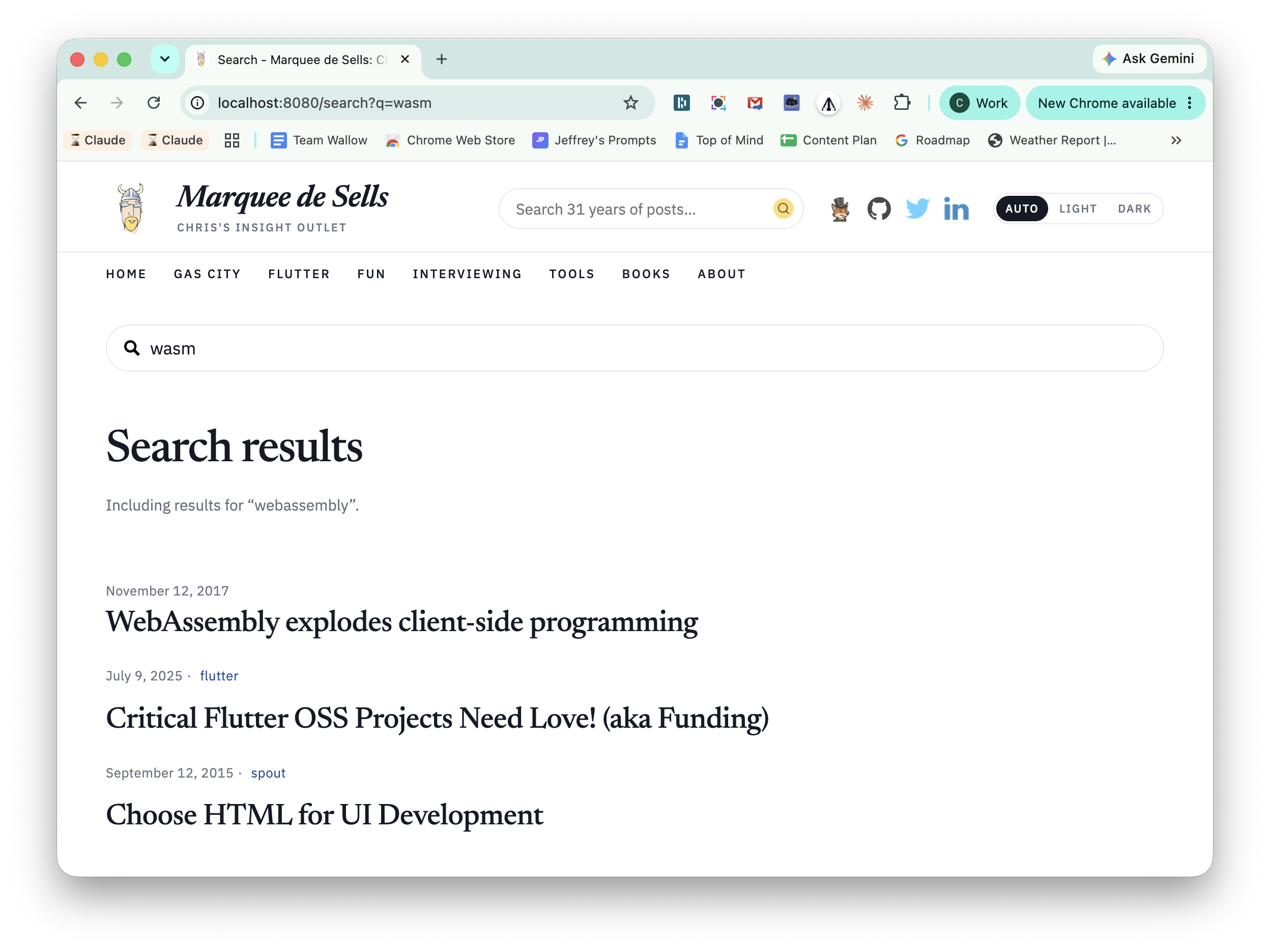
We added a small, hand-maintained list of aliases. Searching for wasm also searches for WebAssembly; dotnet includes .NET, and winforms includes Windows Forms. Results are combined, duplicates removed, and the page tells you which alternate spelling it included. The WebAssembly post now comes first:

A local search for wasm includes results for webassembly and lists WebAssembly explodes client-side programming first.
The post was there all along. Now searching for “wasm” finds it.

For misspellings, the build collects words that appear at least twice in the indexed text. When a search still finds nothing, the browser loads that vocabulary and looks for nearby spellings. A search for flutterz can offer “Did you mean flutter?” as a link, while still reporting no results for what you actually typed. Quoted queries keep their exact meaning. The old fallback could work around a bad word in a query of three or more words; this also helps with short searches.

What We Have to Work With

The content is still ordinary Markdown and HTML. Here’s the rest of it:

  • Eleventy builds the site
  • Pandoc renders the Markdown, including all of the HTML mixed into the old posts
  • Typeset does the typography I liked from Blot
  • Pagefind does the search, right in the browser
  • Disqus hosts the comments
  • Cloudflare Pages hosts the site, with a couple of small functions to handle old URLs like that showTopic.aspx one

When I push to main, GitHub Actions runs the tests, builds and verifies the site, uploads it to Cloudflare and checks the result. Blot is no longer a dependency.

Where Are We?

The bulk of this work was done over a weekend. I made more fixes and added more features in that weekend than in the previous 11 years. All on a whim.

This is the way.

Feedback? Comments are open below!

September 13, 2015 colophon

Moved to Blot

Moved to Blot

You’re reading this on the 5th version of my blog.

Some History

The first was a set of static text files I managed in FrontPage. The editing was nice (once it get the HTML-on-the-disk problems right), but I dropped everything into the same file, using anchor tags to separate posts in one giant file, which didn’t scale.

The second version was ASP.NET code to pull in my static content (I did not want to give up my FrontPage) and arrange it into a nice layout.

The third version has been lost in the mists of time.

The fourth version was a complete rewrite in ASP.NET using SQL Server as the backing store. The bulk of the content was in SQL Server as either HTML fragments or image blobs, requiring me to implement a blogging API (I was way into AtomPub at the time, so that’s the one I implemented). Along the way, I moved this version of the site to Azure.

The good news is that Windows Live Writer worked very well with this site (even better than FrontPage!). The bad news is that it was the only editor that did, it requires Windows and we no longer live in a single OS world. I want to write my blog in Markdown from OSX or even my phone.

So, the fifth version my site, the one you’re looking at now, is running on Blot. It was the video of the workflow on the home page that really did it for me. I saw that, paid my $20 and have been spending weekends exporting the data from my old blog ever since.

The Beauty of Blot

Here’s what I get by moving to Blot:

  • A Dropbox-based file management system with complete flexibility to arrange things how I like. Blot just takes what I give it and uses it to produce my blog. And I don’t need to maintain certs to protect my writeable AtomPub endpoint anymore, either. Blot and Dropbox use OAuth2 for such things and leave me out of it.

  • A mix of HTML and Markdown content, which let me dump all of my old HTML fragment-based content into Dropbox but still letting me write new content in Markdown with whatever editor I feel like, including one hosted on Windows, two hosted on the Mac and one that runs on my phone.

  • A live preview that’s updated every time I save. I get a preview by prefixing the post filename with “[draft]”, which produces a cooresponding “[preview]” file that matches the styles on my site. When I’m ready to publish, I remove the “[draft]” prefix and it’s live with a date that matches the first time that Blot saw this post. Or if I want to provide my own date in the future, I can easily do so with a bit of metadata in the file. Easy peasy.

  • Integration with Disqus, where I keep my comments. Not only do new posts get Disqus comments, but I was able to drop in a bit of metadata to point to the existing comments for my existing posts.

  • Direct integration with my existing Google Analytics account by simply providing my ID.

  • Forwarding of old URL patterns to their new spot on my new site, so I’m not contribuing to the “dead web.”

  • Several Blot templates provide mobile-friendliness out of the box (as defined by Google mobile friendliness test tool), which is handy so that mobile searches continue to find things on sellsbrothers.com without bias. This saved me from having to figure out the issues with the old site.

  • Fabulous support from David, the proprietor of Blot. I don’t think he’s had anyone drop 20 years of blog content into Blot all at once before, but he was super responsive, fixed all of my issues and even added some features just to support my scenarios. Blot is worth it just for David.

  • I get the piece of mind knowing that all of my content is in Dropbox, so if Blot goes away in another 20 years, then I have confidence that I’ll be able to take my content and drop it somewhere else or even build my own host. Also, while I’m not quite 100% confident in Dropbox’s ability to keep all of my files for all time, I’m got the whole thing checked into GitHub, too, which Blot has no issues with.

  • And I get all of that for $20 a year! That’s a bargain and a half.

Not quite everything

While Blot does let me drop in JavaScript and do dynamic things, it’s not a place to host server-side code. So, I rebuilt tinysells.com (the URL forwarding service that I built for my books) and moved it to the Google Cloud Platform. It’s about six lines of Python code if you’re interested (not counting the hardcoded data which I’m sure I’ll move someday).

Also, while Blot has a full set of fully customizable templates, none of them was quite what I wanted and my hacking has left me vaguely unsatisfied. If anyone has design advice, I’d sure love to hear it!

Where are we?

I imagine that I would’ve been just as happy with WordPress as Blot, but David does such a good job with Blot that I couldn’t say “no.” Certainly I’ve blogged more in the last week than I have since joining Google, so I’ll take that as a good sign. Blot seems to have inspired me; what more could you ask from a blog service than that?

September 5, 2015 colophon

Blog Past and Future

Blog Past and Future

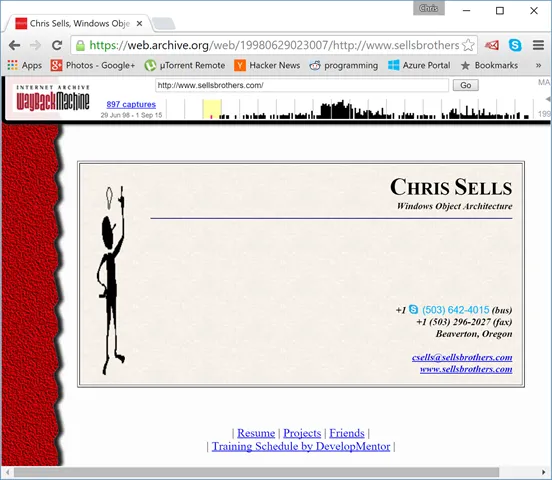
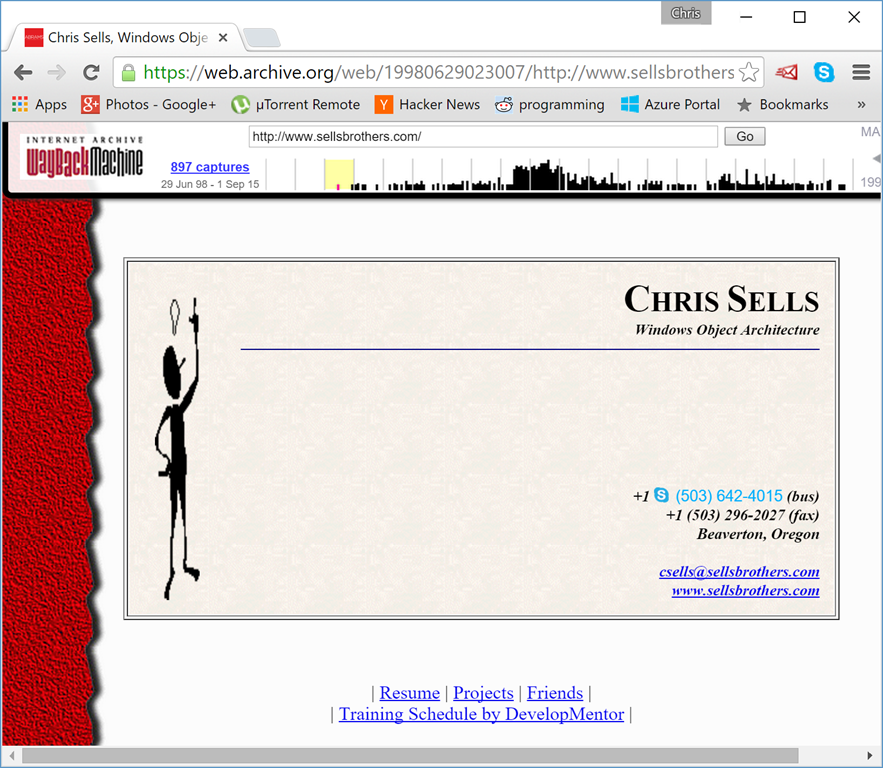
This blog started as a single static page in 1995 as a set of links to provide to my students while I was teaching at DevelopMentor. I would like to show you a screenshot of that initial page, but as it turns out, the site predates the internet archive, so I can only show you what it looked like in 1998:

image

I guess I was doing some independent contracting at the time, because I was billing myself as a “Windows Object Architect,” whatever that is. BTW, I wouldn’t call that phone number if I were you — I don’t know who it will ring, but it won’t be me. The rest still works, however.

Posts

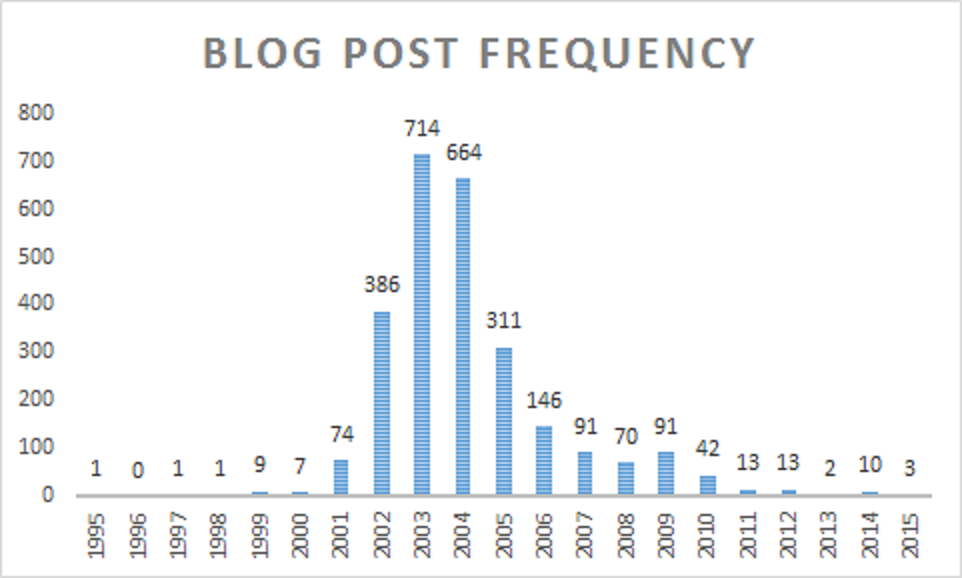
Over the years, I’ve done more or less blogging based on my current gig:

image

This post will be my 2,650th, with the peak in 2003.

Tweets

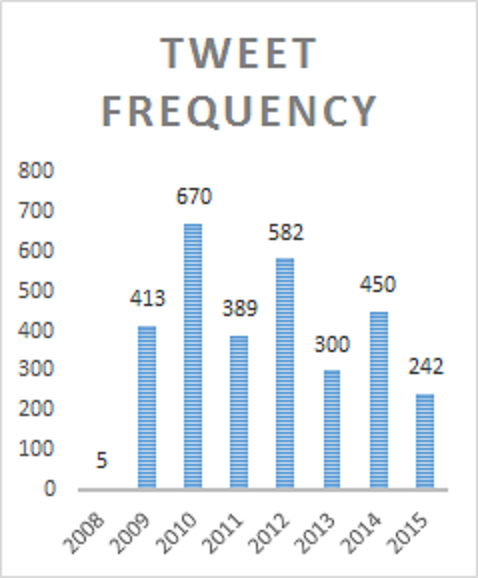
Now, I’m far more active on Twitter:

image

My first tweet was in October of 2009. I’d had an account for a while before that, but I just didn’t get it at first. Now I love it and have produced 3,053 tweets in 7 years. I find that while I like long-form writing a great deal, it’s much easier to find the time to turn a single thought into 140 characters then into 1400 words.

Blot

This is all coming up now because I’m busy moving to Blot, which gives me a chance to take a look back at all of this content I’ve generated. I love Blot because I can dump all of my old content into Dropbox in HTML fragment format (along with some per-file metadata) and Blot will produce a reasonable static site for me. By moving to the file system from a blogging API (AtomPub in my case), I can remove the need to use blogging tools (like Live Writer) and instead switch to any reasonable editor I want.

Further, since Blot supports all kinds of formats, I can move to Markdown for new content but not have to try to translate all of my HTML content, which is a lifesaver.

Unfortunately, the port to Blot is taking longer than I’d like for two reasons. The first is simply that David Merfield just didn’t anticipate some old guy dumping 20 years worth of blog content into his system, so there have been some problems. The good news is that David is extremely responsive. Every system has issues, but the measure of quality is how long it takes to go from issue reported to issue fixed and in the case of Blot, that time is sometimes days but often hours, which includes adding features specifically for my use case that he just hasn’t needed before. Highly recommended.

The Dead Web

The other reason that this translation is taking some time is that I’ve got a few link formats in my content and relied on IIS URL rewriting to keep them working. As I move to Blot, it’s easier to just fix the URLs as I extract the data from SQL Server (and I still use and love RegexD to figure out how to translate those URLs). As I do that, I’m testing for 404 links on my new site to make sure that I haven’t screwed anything up (I like Xenu’s Link Sleuth for that work).

What I’m finding is that I’m fixing my own URLs but finding hundreds of links into the larger web that are broken. That’s just depressing. I work hard to keep my site running for anyone that wants the old data and I’ll be working with David on a URL forwarding scheme and 404 logging to keep external links working as I move to Blot. However, that doesn’t seem like an important goal for other folks.

Where Are We?

Still, I get to move to Blot and use whatever editor I want from whatever OS I want, so I’m a happy guy. Hopefully that happiness will translate into more blog posts, but if it doesn’t, I imagine I’ll still be spouting off on Twitter at the very least. Everyone needs a place to spout off sometimes.

May 20, 2010 colophon

a whole new sellsbrothers.com

a whole new sellsbrothers.com

The new sellsbrothers.com implementation has been a while in the making. In fact, I’ve had the final art in my hands since August of 2005. I’ve tried several times to sit down and rebuild my 15-year-old sellsbrothers.com completely from scratch using the latest tools. This time, I had a book contract (“Programming Data,” Addison-Wesley, 2010) and I needed some real-world experience with Entity Framework 4.0 and OData, so I fired up Visual Studio 2010 a coupla months ago and went to town.

The Data Modeling

The first thing I did was design my data model. I started very small with just Post and Comment. That was enough to get most of my content in. And that lead to my first principle (we all need principles):

thou shalt have no .html files served from the file system.

On my old site, I had a mix of static and dynamic content which lead to all kinds of trouble. This time, the HTML at least was going to be all dynamic. So, once I had my model defined, I had to import all of my static data into my live system. For that, I needed a tool to parse the static HTML and pull out structured data. Luckily, Phil Haack came to my rescue here.

Before he was a Microsoft employee in charge of MVC, Phil was well-known author of the SubText open source CMS project. A few years ago, in one of my aborted attempts to get my site into a reasonable state (it has evolved from a single static text file into a mish-mash of static and dynamic content over 15 years), I asked Phil to help me get my site moved over to SubText. To help me out, he built the tool that parsed my static HTML, transforming the data into the SubText database format. For this, all I had to do was transform the data from his format into mine, but before I could do that, I had to hook my schema up to a real-live datastore. I didn’t want to have to take old web site down at all; I wanted to have both sites up and running at the same time. This lead to principle #2:

thou shalt keep both web sites running with the existing live set of data.

And, in fact, that’s what happened. For many weeks while I was building my new web site, I was dumping static data into the live database. However, since my old web site sorting things by date, there was only one place to even see this old data being put in (the /news/archive.aspx page). Otherwise, it was all imperceptible.

To make this happen, I had to map my new data model onto my existing data. I could do this in one of two ways:

  1. I could create the new schema on my ISP-hosted SQL Server 2008 database (securewebs.com rocks, btw — highly recommended!) and move the data over.
  2. I could use my existing schema and just map it on the client-side using the wonder and beauty that was EF4.

Since I was trying to get real-world experience with our data stack, I tried to use the tools and processes that a real-world developer has and they often don’t get to change the database without a real need, especially on a running system. So, I went with option #2.

And I’m so glad I did. It worked really, really well to change names and select fields I cared about or didn’t care about all from the client-side without ever touching the database. Sometimes I had to make database changes and when that happened, I has careful and deliberate, making the case to my inner DB administrator, but mostly I just didn’t have to.

And when I needed whole new tables of data, that lead to another principle:

build out all new tables in my development environment first.

This way, I could make sure they worked in my new environment and could refactor to my heart’s content before disturbing my (inner) DB admin with request after request to change a live, running database. I used a very simple repository pattern in my MVC2 web site to hide the fact that I was actually accessing two databases, so when I switched everything to a single database, none of my view or controller code had to change. Beautiful!

Data Wants To Be Clean

And even though I was careful to keep my schema the same on the backend and map it as I wanted in my new web site via EF, not all of my old data worked in my new world. For example, I was building a web site on my local box, so anything with a hard-coded link to sellsbrothers.com had to be changed. Also, I was using a set of <a name=“tag” ? elements to reference specific posts in my static HTML that just didn’t scale to my dynamic ID-based permalinks, so data had to be “cleaned.”

To do this cleaning, I used a combination of LINQPad, SSMS and EF-based C# code to perform data cleaning tasks. This yielded two tools that I’m still using:

  1. BlogEdit: An unimagintively named general-purpose post and comment creation and editing tool. I built the first version of this long before WPF, so kept hacking on it in WinForms (whose data binding sucks compared to WPF, btw) as I needed it to have new features. Eventually I gave this tool WYSIWIG HTML editing by shelling out to Expression Web, but I need real AtomPub support on the site so I can move to Windows Live Writer for that functionality in the future.
  2. BulkChangeDatabaseTable: This was an app that I’d use to run my questions to find “dirty” data, perform regular expression replaces with and then — and this is the best part — show the changes in WinDiff so I could make sure I was happy with the changes before commiting them to the database. This extra eyeballing saved me from wrecking a bunch of data.

During this data cleaning, I applied one simple rule that I adopted early and always regretted when I ignored:

thou shalt throw away no data.

Even if the data didn’t seem to have any use in the new world, I kept it. And it’s a good thing I did, because I always, always needed it.

For example, when I ran Phil’s tool to parse my static web pages, he pulled out the <a name=“tag” /> tags that went with all of my static posts. I wasn’t going to use them to build permalinks, why did I need them?

I’ll tell you why: because I’ve got 2600 posts in my blog from 15 years of doing this, I cross-link to my own content all the live-long day and a bunch of those cross-links are to, you guessed it, to what used to be static data. So, I have to turn links embedded in my content of the form “/writing/#footag” into links of the form “/posts/details/452″. But how do I look up the mapping between “footag” and “452″? That’s right — I actually went to my (inner) DB admin and begged him for a new column on my live database called “EntryName” where I tucked the <a name=“tag” /> data as I imported the data from Phil’s tool, even though I didn’t know why I might need it. It was a good principle.

Forwarding Old Links

And how did I even figure out I had all those broken links? Well, I asked my good friend and web expert Kent Sharkey how to make sure my site was at least internally consist before I shipped it and he recommended Xenu Link Sleuth for the job. This lead to another principle:

thou shalt ship the new site with no broken internal links.

Which was followed closely by another principle:

thou shalt not stress over broken links to external content.

Just because I’m completely anal about making sure every link I ever pass out to the world stays valid for all eternity doesn’t mean that the rest of the world is similiarly anal. That’s a shame, but there’s nothing I can do if little sites like microsoft.com decide to move things without a forwarding address. I can, however, make sure that all of my links worked internally and I used Xenu to do that. I started out with several hundred broken links and before I shipped the new site, I had zero.

Not all of that was changing old content, however. In fact, most of it wasn’t. Because I wanted existing external links out in the world to find the same content in the new place, I had to make sure the old links still worked. That’s not to say I was a slave to the old URL format, however. I didn’t want to expose .aspx extensions. I wanted to do things the new, cool, MVC way, i.e. instead of /news/showTopic.aspx?ixTopic=452 (my old format), I wanted /posts/details/452. So, this lead to a new principle:

thou shalt built the new web site the way you want and make the old URLs work externally.

I was using MVC and I wanted to do it right. That meant laying out the “URL space” the way it made sense in the new world (and it’s much nicer in general, imo). However, instead of changing my content to use this new URL schema, I used it as a representative sample of how links to my content in the real-world might be coming into my site, which gave me initial data about what URLs I needed to forward. Ongoing, I’ll dig through 404 logs to find the rest and make those URLs work appropriately.

I used a few means of forwarding the old URLs:

  1. Mapping sub-folders to categories: In the old site, I physically had the files in folders that matched the sub-folders, e.g. /fun mapped to /fun/default.aspx. In the new world, /fun meant /posts/details/?category=fun. This sub-folder thing only works for the set of well-defined categories on the site (all of which are entries in the database, of course), but if you want to do sub-string search across categories on my site you can, e.g. /posts/details/?category=foo.
  2. Kept sub-folder URLs, e.g. /tinysells and /writing: I still liked these URLs, so I kept them and built controllers to handle them.
  3. Using the IIS URL Rewriter: This was the big gun. Jon Galloway, who was invaluable in this work, turned me onto it and I’m glad he did. The URL Rewriter is a small, simple add-in to IIS7 that lets you describe patterns and rules for forwarding when those patterns are matched. I have something like a dozen patterns that do the work to forward 100s of URLs that are in my own content and might be out in the world. And it works so, so well. Highly recommended.

So, with a combination of data cleaning to make my content work across both the old site and the new site under development, making some of my old URLs work because of conventions I adopted that I wanted to keep and URL rewriting, I had a simple, feature-complete, 100% data-driven re-implementation of sellsbrothers.com.

What’s New?

Of course, I couldn’t just reimplement the site without doing something new:

  • Way, way faster. SQL Server 2008 and EF4 make the site noticibly faster. I love it. Surfing from my box, as soon as the browser window is visible, I’m looking at the content on my site. What’s better than that?
  • I made tinysells.com work again, e.g. tinysells.com/42. I broke when I moved it from simpleurl.com to godaddy.com. Luckily, godaddy.com was just forwarding to sellsbrothers.com/tinysells/<code>, so that was easy to implement with a MVC controller. That was all data I already had in the database because John Elliot, another helper I had on the site a while ago, set it up for me.
  • I added reCAPTCHA support: Now I’m hoping I won’t have to moderate comments at all. So far, so good. Also, I added the ability to add HTML content, which is encoded, so it comes right back the way it went in, i.e. no action scripts or links or anything a spammer would want but the characters a coder wants putting content into a technical blog.
  • Per category ATOM and OData feeds (and RSS feeds, too, if you care). For example, if you click on the ATOM or OData icons on the home page, you’ll get the feed for everything. However, if you click on it on one of the category pages, e.g. /fun, you’ll get a feed filtered by category.
  • Paging in OData and HTML: This lets you scroll to the bottom of both the OData feed and the HTML page to scroll backwards and forwards in time.
  • New layout including fixed-sized content area for readability, google ads and bing search (I’d happily replace google ads with bing ads if they’d let me).
  • Nearly every sub-page is category driven, although even the ones that aren’t, e.g. /tinysells and /writing and still completely data-driven. Further, the writing page is so data-driven that if the data is just an ISDN, it creates an ASIN associate ID for amazon.com. Buy those books, people! : )

The Room for Improvement

As always, there’s a long list of things I wish I had time to do:

  • The way I handle layout is with tables ’cuz I couldn’t figure out how to make CSS do what I wanted. I’d love expert help!
  • Space preservation in comments so code is formatted correctly. I don’t actually know the right way to go about this.
  • Blog Conversations: The idea here is to let folks put their email on a forum comment so that when someone else comments, they’re notified. This happens on forums and Facebook now and I like it for maintaining a conversation over time.
  • In spite of my principle, I didn’t get 100% of the HTML content on the site into the database. Some of the older, obscure stuff is still in HTML. It’s still reachable, but I haven’t motivated myself to get every last scrap. I will.
  • I can easily expose more via OData. I can’t think why not to and who knows what folks might want to do with the data.
  • I could make the site a little more readable on mobile devices.
  • I really need full support for AtomPub so I can use Windows Live Writer.
  • I’d like to add the name of the article into the URL (apparently search engines like that kind of thing : ).
  • Pulling book covers on the writing page from the ISBN number would liven up the joint, I think.
  • Pass the SEO Toolkit check. (I’m not so great just now.)

Luckily, with the infrastructure I’ve got in place now, laying in these features over time will be easy, which was the whole point of doing this work in the first place.

Where are we?

All of this brings me back to one more principle. I call it Principle Zero:

thou shalt make everything data-driven.

I’m living the data-driven application dream here, people. When designing my data model and writing my code, I imagined that sellsbrothers.com was but one instance of a class of web applications and I kept all of the content, down to my name and email address, in the database. If I found myself putting data into the code, I figured out where it belonged in the database instead.

This lead to all kinds of real-world uses of the database features of Visual Studio, including EF, OData, Database projects, SQL execution, live table-based data editing, etc. I lived the data-driven dream and it yielded a web site that’s much faster and runs on much less code:

  • Old site:
    • 191 .aspx file, 286 KB
    • 400 .cs file,  511 KB
  • New site:
    • 14 .aspx files, 19 KB
    • 34 .cs files,  80 KB

Do the math and that’s 100+% of the content and functionality for 10% of the code. I knew I wanted to do it to gain experience with our end-to-end data stack story. I had no idea I would love it so much.

April 17, 2003 colophon

Major Retrofit for ASP.NET 1.0

This site, the logo, business cards and t-shirts were designed by guonan. She’s got an amazing style and she’s very easy to work with.

The initial version of this site was implemented by Jon Flanders. The way he was able to make conflicting requirements work for this site was inspirational. Most of what I know about ASP.NET, I learned from this site and Jon.

Continuous grammar checking is provided by Craig Andera (whether I want it or not : ).

The site itself is hosted at SecureWebs.

The implementation is a mixture of ASP.NET as the navigation and layout framework and HTML for the content. My goals for the site were simple: look nice, easy to maintain. I didn’t want to give up FrontPage for my HTML editor (’cuz it has the Word key bindings that are hard-coded into my brain : ), but I wanted to be able to get the functionality of ASP.NET. So, the main content comes for an ascx file that reads in the index.htm and strips off the head section. Except for the home page, which is laid out specially, each default.aspx on my site just pulls in a single pageLayout.ascx file that does all of the layout using content from the target of the URL. By separating content from layout, I get the best of both FrontPage and ASP.NET, making both content and site maintenance easy.

January 1, 1995 colophon

Initial Launch

This site was launched sometime in 1995. I have no idea when. It was just a home page with a set of links I wanted to share with my students.