AI

AI Agent with Dart + Gemini April 24, 2025 Flutter AI

AI Agent with Dart + Gemini

To say that there has been a lot of activity in the AI space for developers lately would be an understatement. As we transition from “Ask” mode in our AI-based dev tooling to “Agent” mode, it’s easy to see agents as something magical.

“Any sufficiently advanced technology is indistinguishable from magic.” –A. C. Clarke

And while the vendors of AI-agent-based tooling might like you to think of their products as PFM, as Thorsten Ball points out in his blog post, How to Build an Agent or: The Emperor Has No Clothes, AI agents are not as magical as they appear. He then demonstrates that fact by implementing an AI agent using Go and Claude right before your eyes. I highly recommend reading it — Thorsten tells a gripping tale of AI and code. By the end, he’s pulled back the curtain on AI agents and made it quite clear that this technology is within anyone’s reach.

AI Agent in Dart

Combine Thor’s post with the recent Building Agentic Apps campaign announced by the Flutter team and I just couldn’t help myself from doing a bit of vibe coding to produce the Dart and Gemini version:

import 'dart:io';

import 'package:google_generative_ai/google_generative_ai.dart';

Future<void> main() async {
  final apiKey = Platform.environment['GEMINI_API_KEY'];
  if (apiKey == null) {
    stderr.writeln('Please set the GEMINI_API_KEY environment variable.');
    exit(1);
  }

  final model = GenerativeModel(
    // model: 'gemini-2.0-flash',
    // model: 'gemini-2.5-flash-preview-04-17',
    model: 'gemini-2.5-pro-preview-03-25',
    apiKey: apiKey,
    tools: [
      Tool(
        functionDeclarations: [
          FunctionDeclaration(
            'read_file',
            'Read the contents of a file at a relative path.',
            Schema(
              SchemaType.object,
              properties: {'path': Schema(SchemaType.string)},
            ),
          ),
          FunctionDeclaration(
            'list_files',
            'List all files in a given directory.',
            Schema(
              SchemaType.object,
              properties: {'dir': Schema(SchemaType.string)},
            ),
          ),
          FunctionDeclaration(
            'edit_file',
            'Overwrite the contents of a file with new content.',
            Schema(
              SchemaType.object,
              properties: {
                'path': Schema(SchemaType.string),
                'replace': Schema(SchemaType.string),
              },
            ),
          ),
        ],
      ),
    ],
  );

  final chat = model.startChat();

  print('Gemini 2.0 Flash Agent is running. Type "exit" to quit.');
  while (true) {
    stdout.write('\x1B[94mYou\x1B[0m: ');
    final input = stdin.readLineSync();
    if (input == null || input.toLowerCase() == 'exit') break;

    final response = await chat.sendMessage(Content.text(input));

    final text = response.text?.trim();
    if (text != null && text.isNotEmpty) {
      print('\x1B[93mGemini\x1B[0m: $text');
    }

    final functionResponses = <Content>[];
    for (final candidate in response.candidates) {
      for (final part in candidate.content.parts) {
        if (part is FunctionCall) {
          final result = await handleToolCall(part);
          print('\x1B[92mTool\x1B[0m: ${part.name}(${part.args})');
          functionResponses.add(
            Content.functionResponse(part.name, {'result': result}),
          );
        }
      }
    }

    if (functionResponses.isNotEmpty) {
      final response = await chat.sendMessage(
        Content(
          '',
          functionResponses.map((c) => c.parts).expand((p) => p).toList(),
        ),
      );
      if (response.text != null) {
        print('\x1B[93mGemini\x1B[0m: ${response.text}');
      }
    }
  }
}

Future<String> handleToolCall(FunctionCall call) async {
  final args = call.args;
  try {
    switch (call.name) {
      case 'read_file':
        return await readFile(args['path'] as String);
      case 'list_files':
        return await listFiles(args['dir'] as String? ?? '.');
      case 'edit_file':
        return await editFile(
          args['path'] as String,
          args['replace'] as String,
        );
      default:
        final err = 'Unknown tool: ${call.name}';
        print(err);
        return err;
    }
  } catch (e) {
    final err = 'Error executing ${call.name}: $e';
    print(err);
    return err;
  }
}

Future<String> readFile(String path) async {
  final file = File(path);
  if (!await file.exists()) return 'File not found: $path';
  return await file.readAsString();
}

Future<String> listFiles(String dirPath) async {
  final dir = Directory(dirPath);
  if (!await dir.exists()) return 'Directory not found: $dirPath';
  final entries = await dir.list().toList();
  return entries.map((e) => e.path).join('\n');
}

Future<String> editFile(String path, String content) async {
  final file = File(path);
  await file.writeAsString(content);
  return 'File $path updated successfully.';
}

The full project is available on GitHub, but everything of interest is right here, with code that does the following:

  1. Connects to the Gemini API using an API key.
  2. Defines tools for file operations (read_file, list_files, edit_file).
  3. Enters a loop to chat with the user via the console.
  4. Sends user input to the Gemini model.
  5. Handles function calls requested by the model by executing corresponding local Dart functions for file system interaction.
  6. Sends the results back to the model and prints the final response.

To demonstrate functional parity with Thorsten’s Go implementation, the following are some examples.

Example: horsing around

Here’s an example of context carrying on from one prompt to the next:

$ dart bin/main.dart

Gemini 2.0 Flash Agent is running. Type "exit" to quit.
You: Hey! My name is Chris! How are you?
Gemini: Hi Chris! I'm doing well, thank you for asking!

How can I help you today?
You: I recently purchased a horse and I'm looking for some playful horse-related names based on my own name. Can you give me a hand with that?
Gemini: That's a fun idea, Chris! Let's brainstorm some playful horse names related to your name:

1.  **Chris-Cross Gallop:** Playful, suggests movement and maybe jumping.
2.  **Krispy Kremeigh:** A silly pun combining a treat with a horse sound.
3.  **Sir Chris-top-hoof:** A more elaborate, knightly-sounding pun, especially if your full name is Christopher.
4.  **Chriscendo:** Like a musical crescendo, suggesting growing speed or presence.
5.  **Chrispy Trot:** Simple, catchy, and combines "Chris" with a horse gait.
6.  **Christo-fur:** If your horse is particularly furry or fluffy!
7.  **Captain Chris:** Simple, classic, gives a sense of leadership.
8.  **Whinny Chris:** Combines a horse sound with your name.
9.  **Topher Trot:** If your full name is Christopher, using the shorter form.
10. **Chrispy Comet:** Suggests speed and energy.

Hopefully, one of these sparks some inspiration! Do any of these sound like a good fit for your new horse's personality? Or would you like some more ideas?
You: exit

Notice that Gemini remembers my name.

Example: read_file tool

Here’s an example of the tool that reads files:

You: Gemini, buddy, help me solve a riddle in the secret-file.txt file.
Gemini: Okay, buddy! I can help with that. First, let's see what the riddle is.
Tool: read_file({path: secret-file.txt})
Gemini: Okay, the riddle in `secret-file.txt` is:

"what animal is the most disagreeable because it always says neigh?"

The answer is a **horse**!

Do you need help with anything else, buddy?
You: what's going on in bin/main.dart? be brief!
Tool: read_file({path: bin/main.dart})
Gemini: It's a Dart command-line application that:
1.  Connects to the Gemini API using an API key.
2.  Defines tools for file operations (`read_file`, `list_files`, `edit_file`).
3.  Enters a loop to chat with the user via the console.
4.  Sends user input to the Gemini model.
5.  Handles function calls requested by the model by executing corresponding local Dart functions for file system interaction.
6.  Sends the results back to the model and prints the final response.

It’s really the independent use of tools that makes an agent an agent — I tell it about the riddle in secret-file.txt but I don’t tell it use a tool. It has the tool — because I told it so in the system instructions — and it uses it as it sees fit.

Example: list_files tool

Here the agent is using another tool that knows how to list files in a folder, which it uses multiple times and in conjunction with the tool to read files.

You: what do you see in this directory?
Tool: list_files({})
Gemini: Okay, I see the following files and directories in the current directory:

*   `.DS_Store` (macOS metadata file)
*   `bin` (directory, likely containing executable scripts)
*   `CHANGELOG.md` (Markdown file)
*   `pubspec.lock` (Dart package lock file)
*   `secret-file.txt` (Text file)
*   `README.md` (Markdown file)
*   `pubspec.yaml` (Dart package configuration file)
*   `.gitignore` (Git configuration file)
*   `analysis_options.yaml` (Dart analysis configuration file)
*   `.dart_tool` (Dart build/cache directory)
*   `.git` (Git repository directory)
*   `.vscode` (VS Code editor configuration directory)

You: tell me about all of the Dart and Dart-project-related files in this directory and in the bin directory
Tool: list_files({})
Tool: list_files({dir: bin})
Gemini: Okay, I can list the files in the current directory and the `bin` directory and then describe the Dart-related ones.

Based on the file listing:

**In the `bin` directory:**

*   `bin/main.dart`: This is a Dart source code file, likely the main entry point for an executable application.

**In the current directory (`./`):**

*   `pubspec.yaml`: This is the core Dart project definition file. It defines the project's name, description, dependencies, and other metadata.
*   `pubspec.lock`: This file locks the specific versions of the dependencies listed in `pubspec.yaml` to ensure reproducible builds. It's automatically generated or updated when you run `dart pub get`.
*   `analysis_options.yaml`: This file configures the Dart static analyzer and linter rules for the project.
*   `.dart_tool/`: This directory is created and managed by the Dart/Flutter tools. It contains build artifacts, package configuration files (`package_config.json`), and other temporary files needed for the project. You usually don't edit files inside it directly.
*   `.gitignore`: While not strictly a Dart file, it often contains entries specific to Dart projects to prevent generated files (like `.dart_tool/`, `build/`, `.packages`, `pubspec.lock` - although `pubspec.lock` is often committed) from being checked into version control.
*   `bin/`: This directory itself, which we already examined, typically contains the executable Dart scripts for a project.

You: what dart sdk version are we using for this project?
Gemini: Okay, the Dart SDK version constraint for the project is defined in the `pubspec.yaml` file. I'll read that file to find the constraint.
Tool: read_file({path: pubspec.yaml})
Gemini: Based on the `pubspec.yaml` file, the Dart SDK version constraint for this project is:

environment:
  sdk: ^3.7.2

This means the project requires a Dart SDK version that is compatible with `3.7.2`. Specifically, it allows any version from `3.7.2` up to (but not including) `4.0.0`.

Again, the prompt isn’t explicit about what tool(s) to use — it decides itself based on what task it’s trying to accomplish.

Example: edit_file tool

One more tool — the ability to edit files:

$ dart bin/main.dart

Gemini 2.0 Flash Agent is running. Type "exit" to quit.
You: hey, gemini, create fizzbuzz.js that I can run with nodejs and that has fizzbuzz in it and executes it
Tool: edit_file({path: fizzbuzz.js, replace: function fizzBuzz(n) {
  for (let i = 1; i <= n; i++) {
    if (i % 3 === 0 && i % 5 === 0) {
      console.log("FizzBuzz");
    } else if (i % 3 === 0) {
      console.log("Fizz");
    } else if (i % 5 === 0) {
      console.log("Buzz");
    } else {
      console.log(i);
    }
  }
}

// Execute the function up to 100
fizzBuzz(100);
})
Gemini: OK. I've created the `fizzbuzz.js` file with the FizzBuzz logic. It will print FizzBuzz up to 100 when you run it using Node.js (e.g., `node fizzbuzz.js`).
You: exit

$ node fizzbuzz.js
1
2
Fizz
4
Buzz
Fizz
7
8
Fizz
Buzz
11
Fizz
13
14
FizzBuzz
16
17
Fizz
19
Buzz
Fizz
22
23
Fizz
Buzz
26
Fizz
28
29
FizzBuzz
31
32
Fizz
34
Buzz
Fizz
37
38
Fizz
Buzz
41
Fizz
43
44
FizzBuzz
46
47
Fizz
49
Buzz
Fizz
52
53
Fizz
Buzz
56
Fizz
58
59
FizzBuzz
61
62
Fizz
64
Buzz
Fizz
67
68
Fizz
Buzz
71
Fizz
73
74
FizzBuzz
76
77
Fizz
79
Buzz
Fizz
82
83
Fizz
Buzz
86
Fizz
88
89
FizzBuzz
91
92
Fizz
94
Buzz
Fizz
97
98
Fizz
Buzz

$ dart bin/main.dart

Gemini 2.0 Flash Agent is running. Type "exit" to quit.
You: please edit fizzbuzz.js so that it only prints until 15
Gemini: Okay, I can help with that. First, I need to read the current content of `fizzbuzz.js` to see how it's written.
Tool: read_file({path: fizzbuzz.js})
Gemini: Okay, I see the content of `fizzbuzz.js`. It defines a function `fizzBuzz(n)` and then calls it with `fizzBuzz(100);`.

To make it print only until 15, I will change the last line from `fizzBuzz(100);` to `fizzBuzz(15);`.

Here's the code to edit the file:

You: go ahead
Tool: edit_file({path: fizzbuzz.js, replace: function fizzBuzz(n) {
  for (let i = 1; i <= n; i++) {
    if (i % 3 === 0 && i % 5 === 0) {
      console.log("FizzBuzz");
    } else if (i % 3 === 0) {
      console.log("Fizz");
    } else if (i % 5 === 0) {
      console.log("Buzz");
    } else {
      console.log(i);
    }
  }
}

// Execute the function up to 15
fizzBuzz(15);
})
Gemini: OK. I have edited the `fizzbuzz.js` file to change the function call from `fizzBuzz(100)` to `fizzBuzz(15)`. The script will now only print the FizzBuzz sequence up to 15 when executed.
You: exit

$ node fizzbuzz.js
1
2
Fizz
4
Buzz
Fizz
7
8
Fizz
Buzz
11
Fizz
13
14
FizzBuzz

Not only can the agent list, read and write files all on its own, it can update existing files. And it can do so while producing code that actually works (which is more than many interview candidates can do with fizzbuzz in my experience).

Congrats!

And finally:

$ dart bin/main.dart

Gemini 2.0 Flash Agent is running. Type "exit" to quit.
You: Create a congrats.js script that rot13-decodes the following string 'Pbatenghyngvbaf ba ohvyqvat n pbqr-rqvgvat ntrag!' and prints it
Tool: edit_file({replace: function rot13(str) {
  return str.replace(/[a-zA-Z]/g, function(char) {
    const charCode = char.charCodeAt(0);
    // Check case: uppercase A-Z (65-90), lowercase a-z (97-122)
    const base = charCode < 97 ? 65 : 97;
    // Apply ROT13 shift
    return String.fromCharCode(base + (charCode - base + 13) % 26);
  });
}

const encodedString = 'Pbatenghyngvbaf ba ohvyqvat n pbqr-rqvgvat ntrag!';
const decodedString = rot13(encodedString);
console.log(decodedString);
, path: congrats.js})
You: exit

$ node congrats.js
Congratulations on building a code-editing agent!

At this point, it should be clear that building an AI agent in Dart using Gemini is certainly not magic. In fact, it’s not even hard — the whole thing is less than 140 LOC. This sample is obviously not something I’d recommend shipping, since there are no guardrails keeping the AI from seeing and changing every file in your file system. It does make a good place to start when building agentic apps for Dart and Flutter, however. Enjoy!


Building Generative AI for DartPad April 9, 2025 Flutter AI

Building Generative AI for DartPad

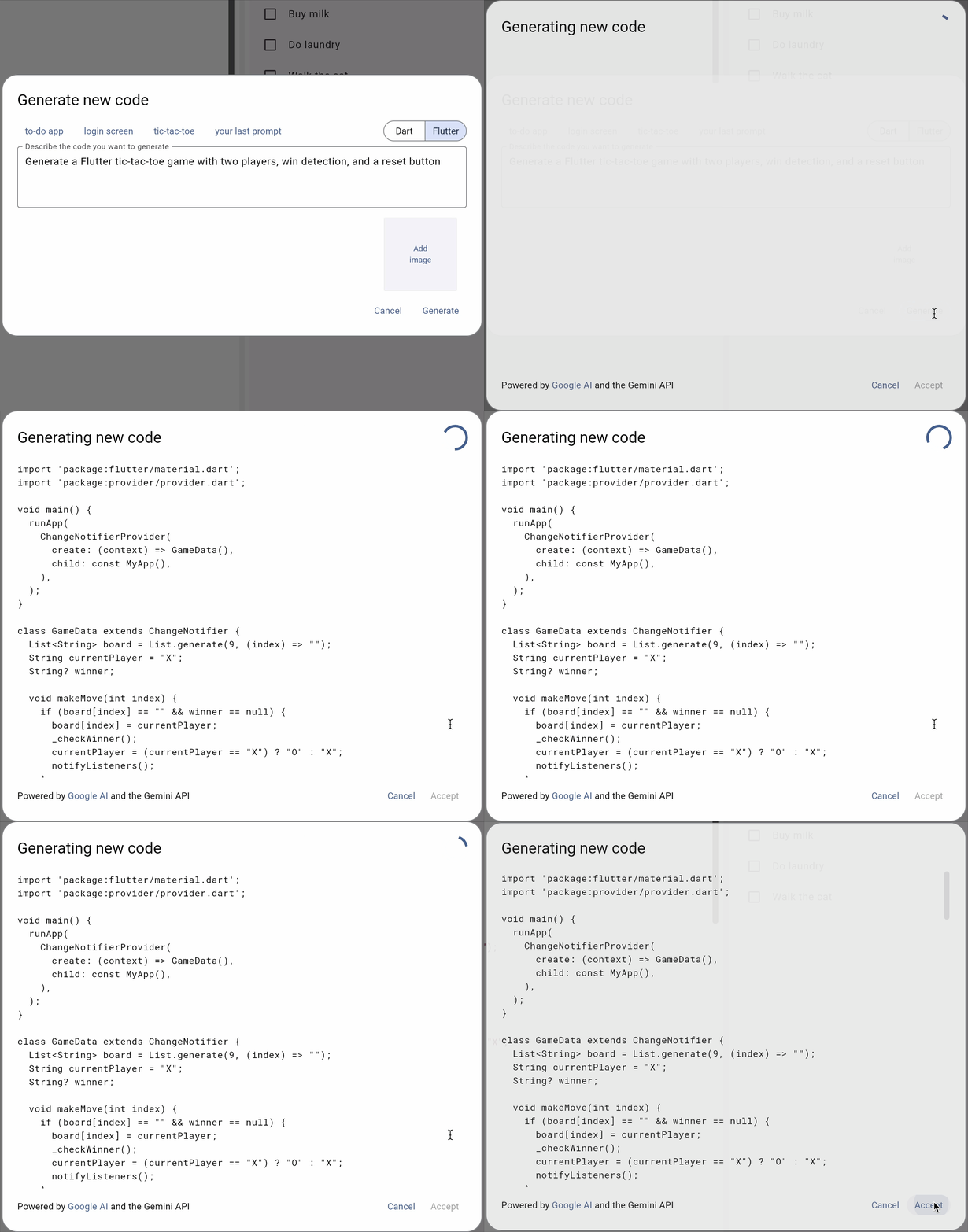
Hello, again, and welcome to another installment of “Flutter + AI = Joy.” In today’s episode, we’re taking a behind-the-scenes look at the design and implementation of the generative AI features in the latest version of DartPad. Before we get started, if you haven’t already read Amanda’s most excellent blog post for an overview of the new functionality, I recommend starting there.

Streaming Responses

The first thing I needed to do to enable generative AI in DartPad was to add support for streaming responses. Even as fast as Gemini 2.0 Flash is, if you have to wait for the complete code for anything beyond Dart “hello, world”, you’re gonna get antsy.

The backend service for DartPad is built on top of shelf, the package that provided server-wide support for Dart before it was cool. Shelf supports streaming, but the docs aren’t exactly available on the topic. Also, streaming hasn’t been used in DartPad before, so it was a bit of an experiment. Ultimately I turned gzip and I/O buffering off for the code-gen API endpoints and streamed the generated code back as UTF8-encoded bytes, which the client is expected to decode.

And this worked great — the server sent data back in chunks of bytes and the client decoded them back into a string, updating the UI for each chunk that it received. Except that the client only got one chunk with the complete response for every request. And this was true even though the server was sending back multiple chunks as Gemini provided them. So what was the problem?

It took a ridiculously long time (days!) to figure out that the Dart http package on the web was using XMLHttpRequest, which collapsed streaming responses into a single response, killing any chance to provide progress updates. With some hacking around, I figured out that the fetch API did the right thing, so the http package needed an update. I discovered this in February of 2025. The good news is that the Dart team had already done that work in November of 2024 and that the PR was pending! Once that PR landed, we were good to go.

Error Handling

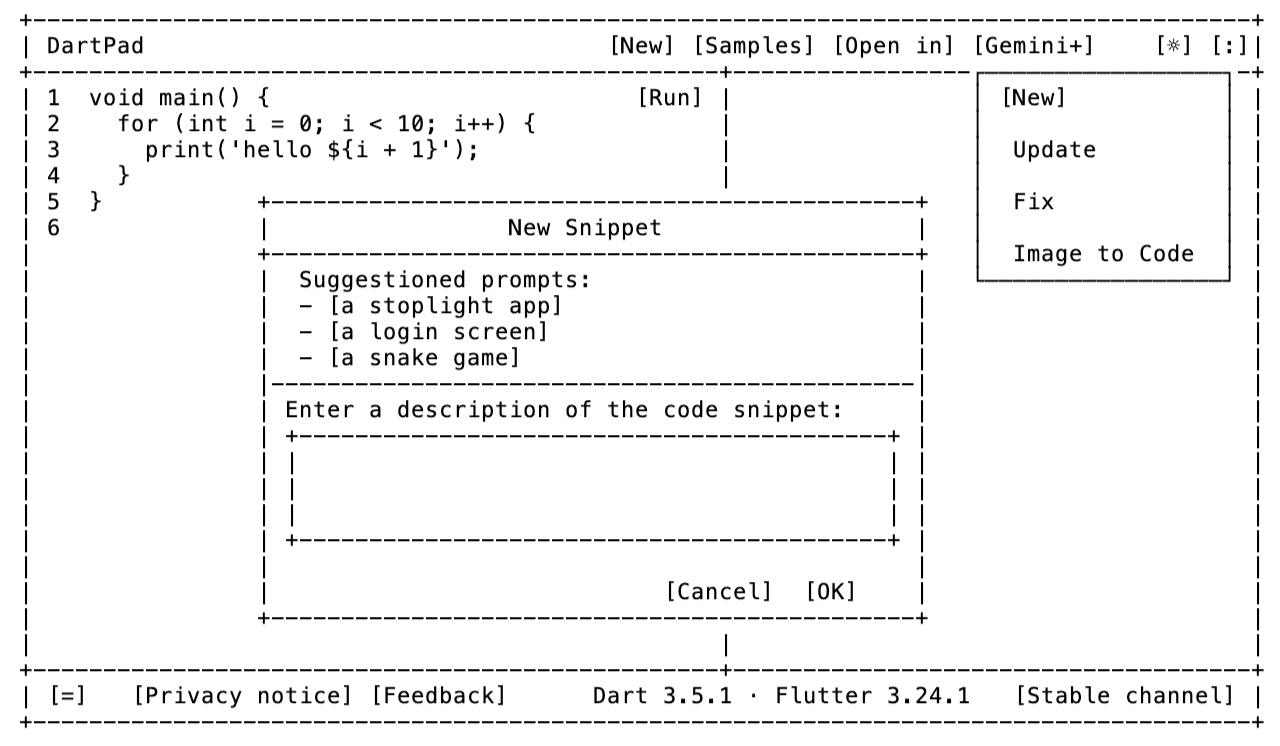
My initial design proposal called for adding a Gemini menu to DartPad with New, Update, Fix and Image to Code functionality:

Image to Code was bundled together with Dart/Flutter Snippet (New) and Update code (Update) via the ability to attach images. Bringing up a dialog to enter a prompt made sense for New and Update, since DartPad doesn’t know what kind of code you want to generate or what updates you want to make.

For Fix, however, it was annoying to have to tell DartPad what the error was, since the analyzer was reporting the errors to me! So I hijacked the analyzer error message UI with the idea of building the prompt to suggest a fix for the user. The result is that now there’s a lightbulb to indicate analyzer messages and to provide an easy way for the user to trigger the menu of potential fixes. Right next to that, I added a Gemini sparkle icon:

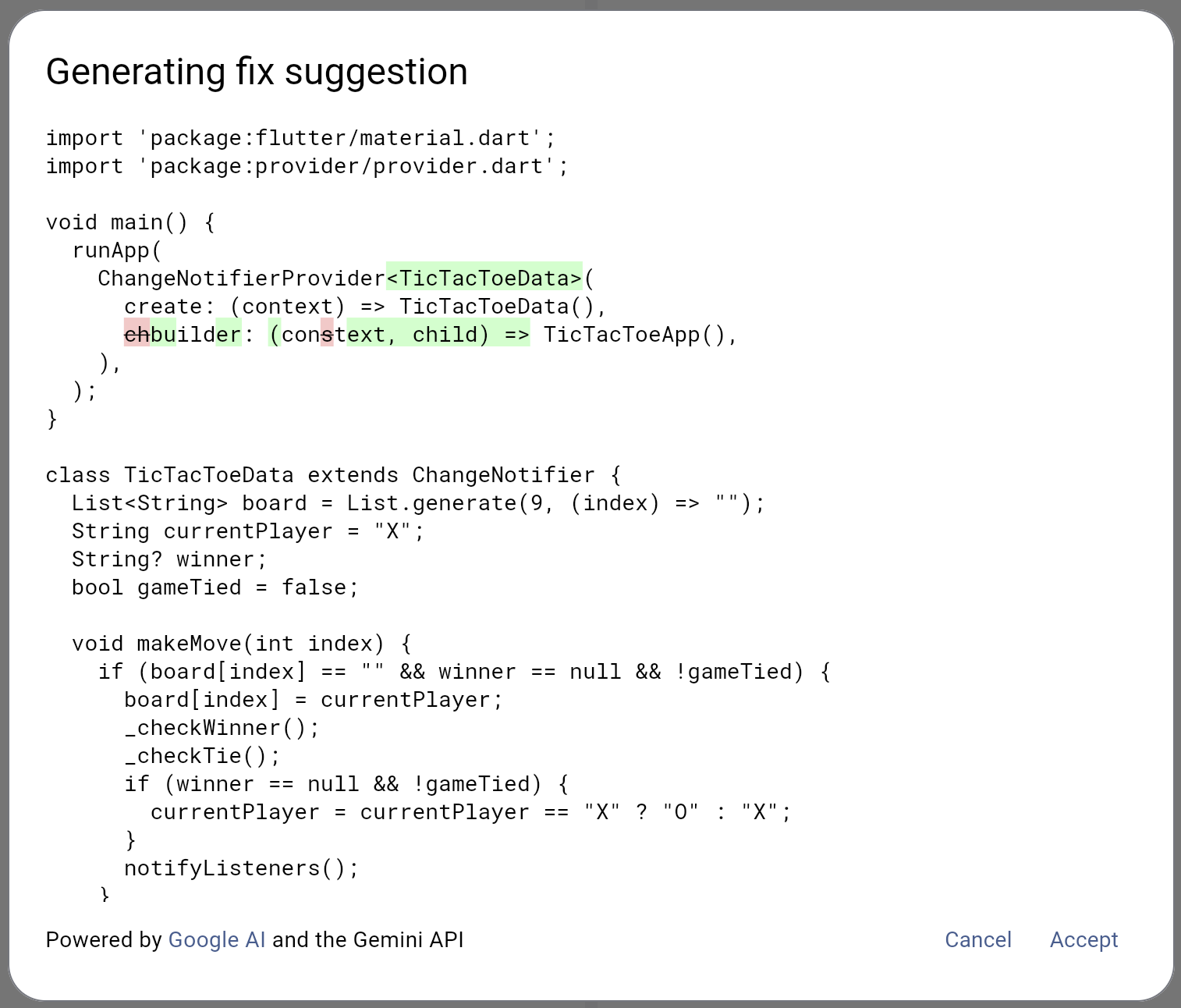
Clicking on the sparkle bundles up the error message automatically, asks Gemini for a fix and provides you a diff:

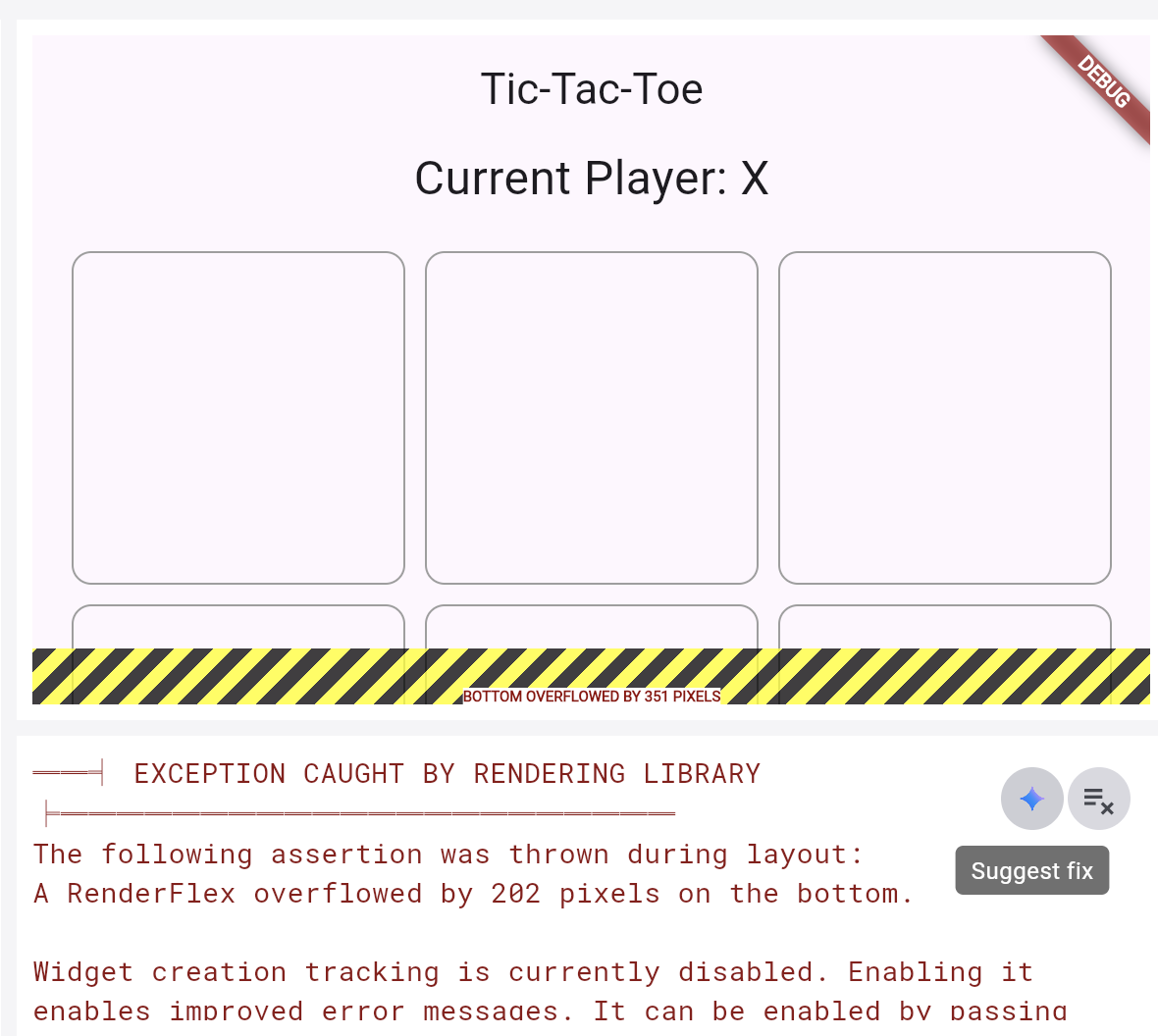
That’s just magic! Once I had it working for analyzer errors, I needed it for run-time errors, too, so I added the Gemini sparkle to the console output window.

When you press on the sparkle icon in this case, DartPad will bundle up your run-time error and suggest a fix.

Unfortunately, there was some work to enable the magic for run-time errors. Previously, there had been no reason to distinguish between normal console output and error output. That meant there was no good way to decide when to show the blue sparkle. However, you certainly do not want to show the Suggest Fix button when a Dart app is printing the last 10 numbers of pi. Luckily, John Ryan, Flutter DevRel and engineering lead for DartPad, came to the rescue with a fix that allowed me to reliably show the blue sparkle only when it was needed.

UX Shortcuts

After a long time on Unix before Windows and a long time on Windows before Mac, I’ve become a keyboard guy. I want to know all of the keyboard shortcuts so I can avoid using the mouse. While building and testing DartPad, I spent a lot of time in the prompt and code generating dialogs, both of which require you to press the Accept button. So I was doing that a lot. This annoyed me, so I added a keyboard shortcut:

  • Ctrl+Enter (Cmd+Enter on macOS) will trigger the Accept action

And because I’m super lazy:

  • Accepting the generated code will trigger the Run action

  • Or if hot reload is enabled, the Reload action will be triggered instead

I added all of this simply because I couldn’t figure out a case when that isn’t what you wanted to happen. This means that you can enter your prompt, press Ctrl/Cmd+Enter once to generate the code, then again to accept it and it will automatically be run/reloaded for you. No muss, no fuss. No [mouses](https://en.wikipedia.org/wiki/Computer_mouse#:~:text=A computer mouse (plural mice,motion relative to a surface.) harmed in the creation of this feature.

“Necessity is not the mother of invention; laziness is.” –J. Michael Sells (my dad)

Future Hopes & Dreams

The initial goal for adding generative AI features to DartPad was to do so with a simple one-and-done style prompt in a modal dialog instead of the multiple prompts of a chat-style UI. Plus, by adding the new functionality without interfering with any of the existing DartPad UI, we could test it first to see if anyone cared.

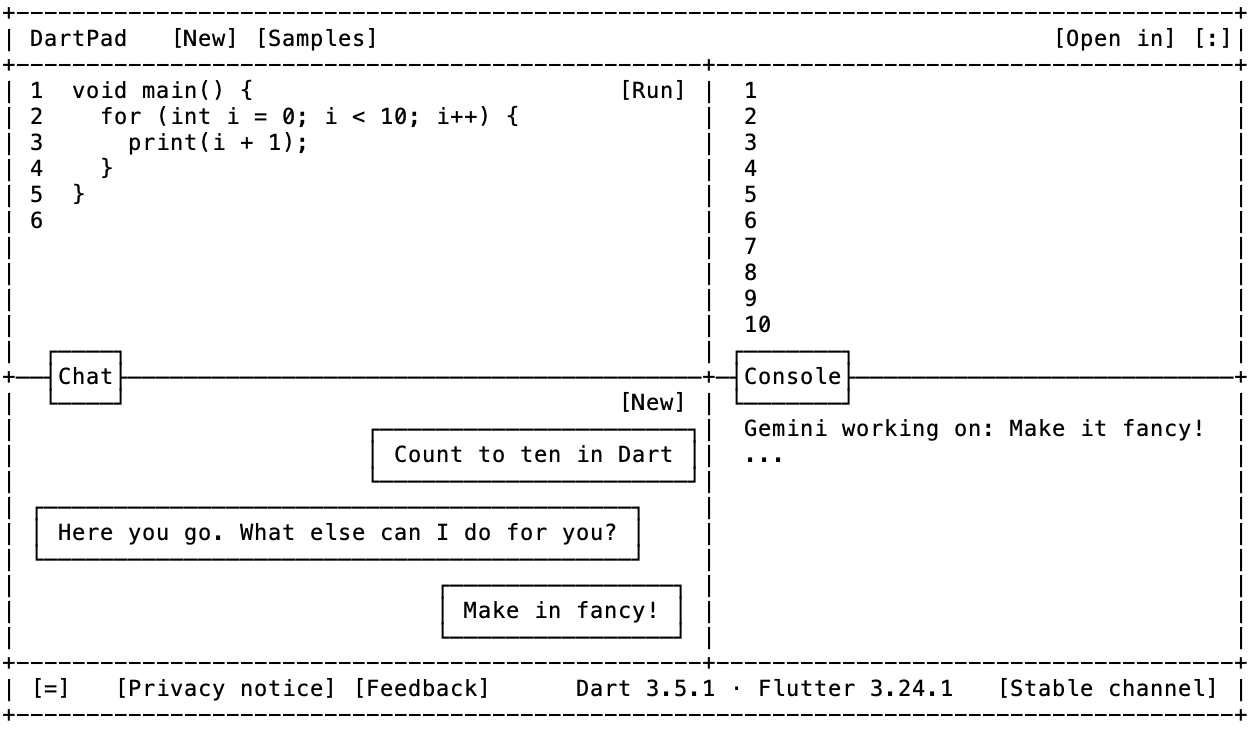
It’s already apparent that you care. And that you really don’t like the modal dialogs. Instead, you want the prompt and iterate style of a chat interface (aka vibe coding). Toward that end, personally I’d like to see DartPad move towards something like this in the future:

What do you think? How would you like DartPad to work wrt generative AI? Please drop your thoughts below!

Building the Flutter AI Toolkit April 2, 2025 Flutter AI

Building the Flutter AI Toolkit

It has been quite an exciting few years since I left Google in 2022. I had been on the Flutter team for 3 years by that point, helping it go from v1.0 to v3.0, from hundreds of thousands of users to millions. It was exciting, but time for a change. And boy did I get some! Over the next 3 years I did the following:

  • Worked on the developer experience for VR/AR/XR at Meta in their Reality Labs division.
  • Helped to ship the v1.0 for both the consumer and the enterprise versions of Cody from Sourcegraph, a long-time start-up with amazing code search capabilities. Seriously, if you haven’t tried Sourcegraph Code Search, you should. And if your company is using Code Search, their AI coding assistant Cody integrates with the same code. Give ’em both a try!
  • Retired from full-time employment after a 35-year software engineering career (and more than that if you count when I started writing code on my Apple ][+ at the age of 14).
  • Put up my shingle as an independent consultant specializing in applied AI.
  • Built the Flutter AI Toolkit.
  • Started giving Flutter talks again with Dart and Flutter and AI, Oh My! at FlutterCon in 2024 (you click the link to watch the talk).
  • Built the generative AI features in the latest version of DartPad.
  • Have built some other AI stuff too that hasn’t shipped yet. Stay tuned!

Even before I left the Flutter team, I was spending my spare time digging into AI. When I was at Meta, I was focused on xR, but again, spending my spare time on AI. And then ChatGPT flipped the table, so when the opportunity to work on AI in the developer tooling space came up, I couldn’t say “no.”

In June of last year, I decided that I wanted to control my own time again, so I “retired.” That’s not to say that I wanted to stop the work — I love what I do — it’s just that my pesky job was taking up all my time. As the VP of Product, I had all kinds of influence on what other folks did but no time to get my own hands dirty! Once I retired, of course, I wanted to spend time with Flutter; it’s got the best API, the best team and the best community in tech, and I’ve seen more than my share. But now I had a new focus: applied generative AI.

The first thing I did in this new area was work with the Flutter and Firebase teams on the creation and application of the Flutter AI Toolkit.

Hello, Flutter AI Toolkit

The goal of the Flutter AI Toolkit (or just AIT from now on) is that it provides an LLM chat widget that you can easily plug into your existing Flutter apps. The Flutter team shipped the initial version in December, 2024, which you can read all about in Amanda’s most excellent blog post on the topic. Since then, I’ve been taking user feedback to add new features and fix issues. The current version as I write this is 0.6.8 but I’m going to be shipping a 0.7.0 soon.

To get started, I’ll refer you to the flutter_ai_toolkit package README. Once you’ve done that, a minimal chat app in Flutter using Gemini 2.0 is as easy as this:

import 'package:flutter/material.dart';
import 'package:flutter_ai_toolkit/flutter_ai_toolkit.dart';
import 'package:google_generative_ai/google_generative_ai.dart';

void main() => runApp(_MainApp());

class _MainApp extends StatelessWidget {
  @override
  Widget build(BuildContext context) => MaterialApp(
    home: Scaffold(
      body: LlmChatView(
        provider: GeminiProvider(
          model: GenerativeModel(
            model: 'gemini-2.0-flash',
            apiKey: 'GEMINI-API-KEY',
          ),
        ),
      ),
    ),
  );
}

There’s not much to this code, but it brings up some interesting points anyway:

  • The name of the chat widget is LlmChatView
  • It supports many options, but only one is required — a provider that connects your LLM to the features needed by the chat widget
  • There are two LLM providers that come out of the box: GeminiProvider and VertexProvider
  • These two providers both take a GenerativeModel instance provided by the Google AI Dart SDK and Vertex AI in Firebase Flutter packages respectively, enabling you to configure them fully as you choose.
  • The separation of the chat widget from the communication channel with the LLM allows you to plug in any LLM-like service you’d like.

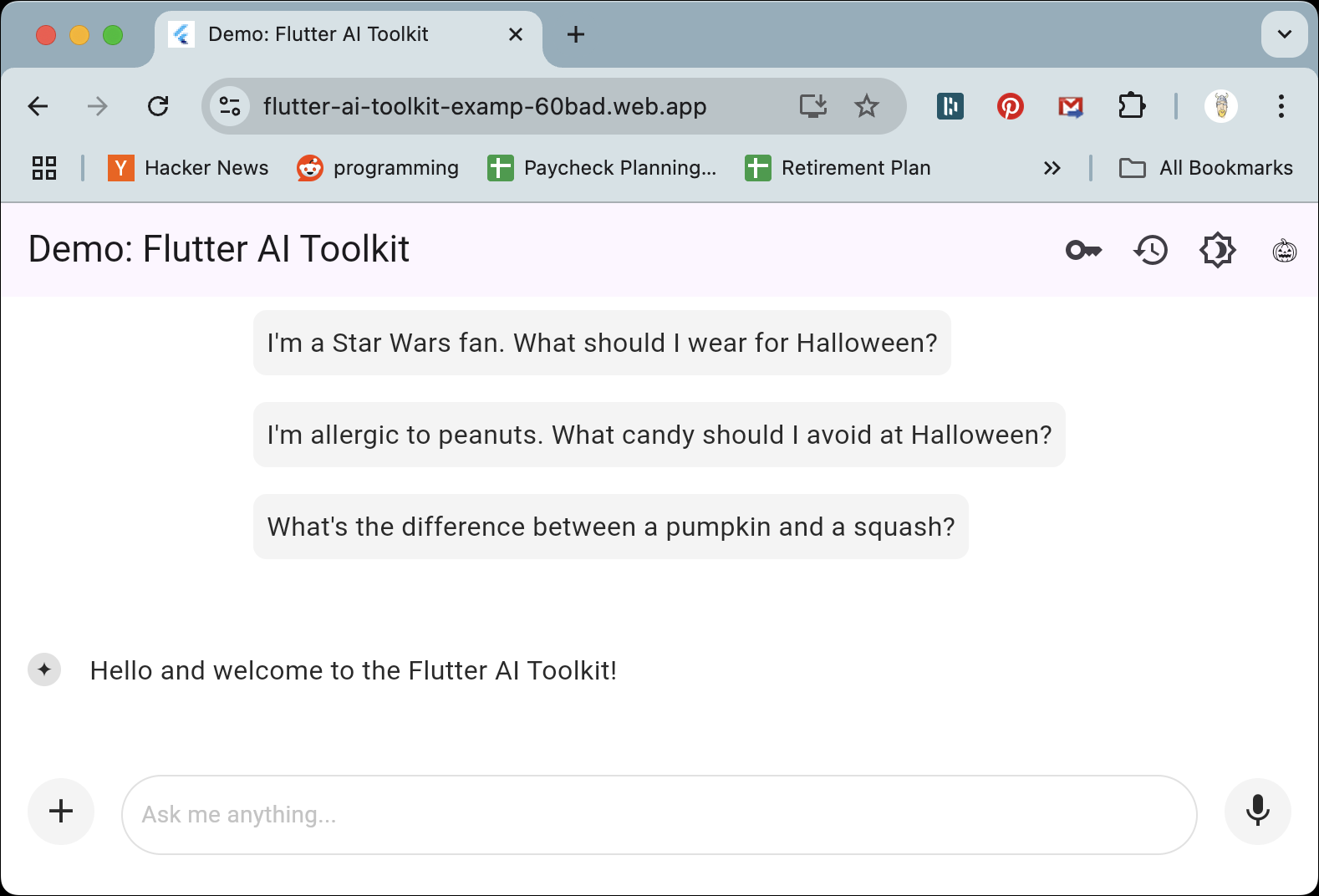
If you run this code, you’ll get a very simple, but fully functional, cross-platform AI chat app. A slightly fancier version is hosted online that you can try right now. It looks like this by default:

Notice the suggestions and the welcome message, both of which you can specify as optional parameters to LlmChatView. Also notice the + button, which allows the user to upload an image or a file, and the mic button, which allows the user to provide voice input.

Custom Styling

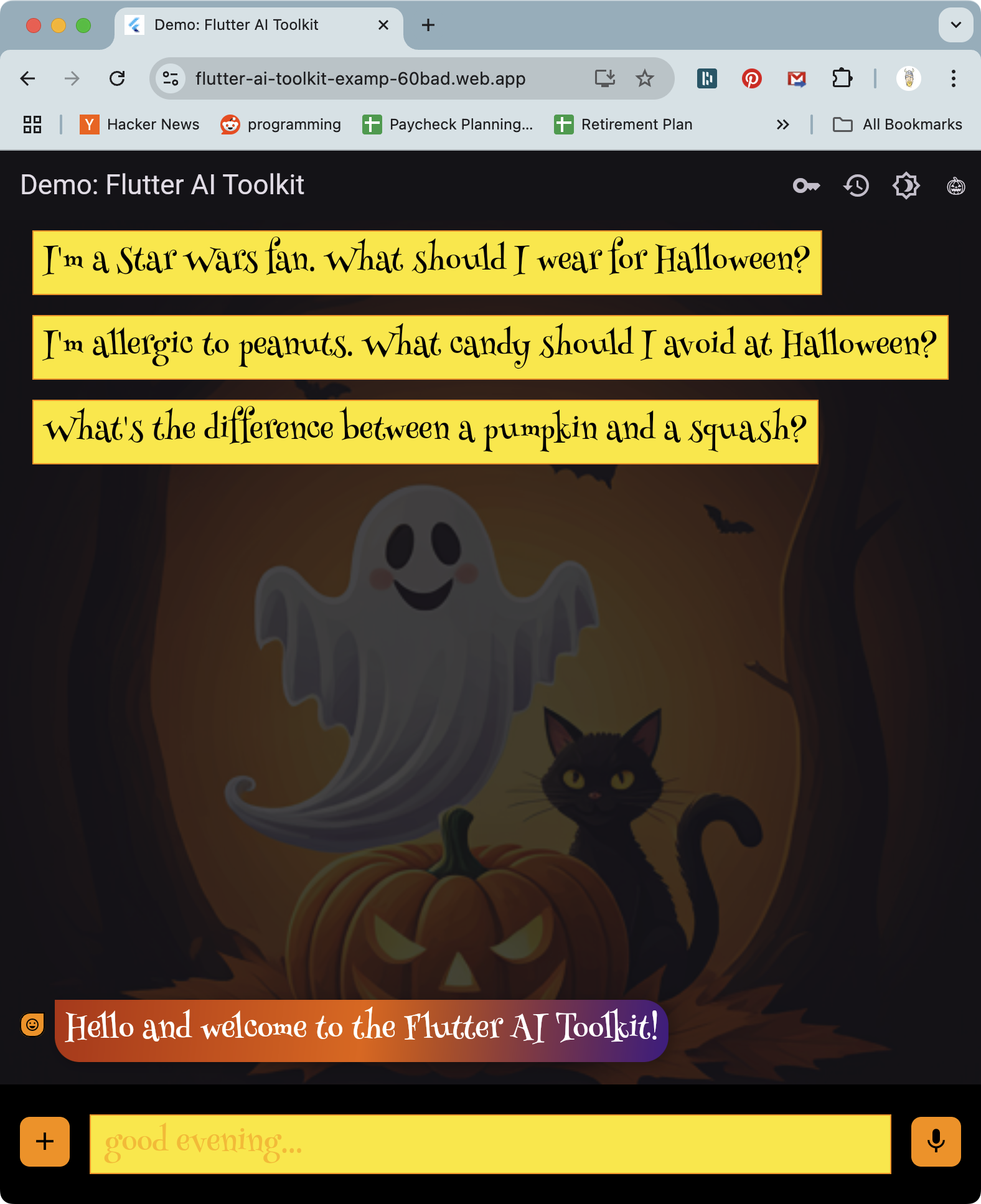
Beyond the basic look ‘n’ feel, the demo example also provides some styling options:

Out of the box, the Flutter AI Toolkit supports being hosted in MaterialApp or CupertinoApp. However, as of the pre-release status at the time of this writing, it does not automatically adapt to the current theme provided by either. Instead, the look ‘n’ feel was designed by a Google UX designer to have its own modern style. And if you’d like to tailor it to your app, you have complete control (as you can see above). Check out the dark_mode and custom_styles examples for the details.

When I went to implement styling support, I took my inspiration for the styling support from the flutter_markdown package. Theming is great for when you’d like to have a lot of a widget in your app, e.g. you don’t want to set the styles for each Text widget — you want to use a theme for that. However, I figured that you’d have about one LlmChatView widget, so theming didn’t make as much sense as just passing in a style object like you can do with the Markdown widget.

That said, it’s an obviously missing feature to be able to add the ability to pick up on the current Material or Cupertino theme and set those as defaults for an LlmChatWidget. If this is something you’re passionate about, PRs are gladly considered!

Custom Response Widgets: Beyond Text

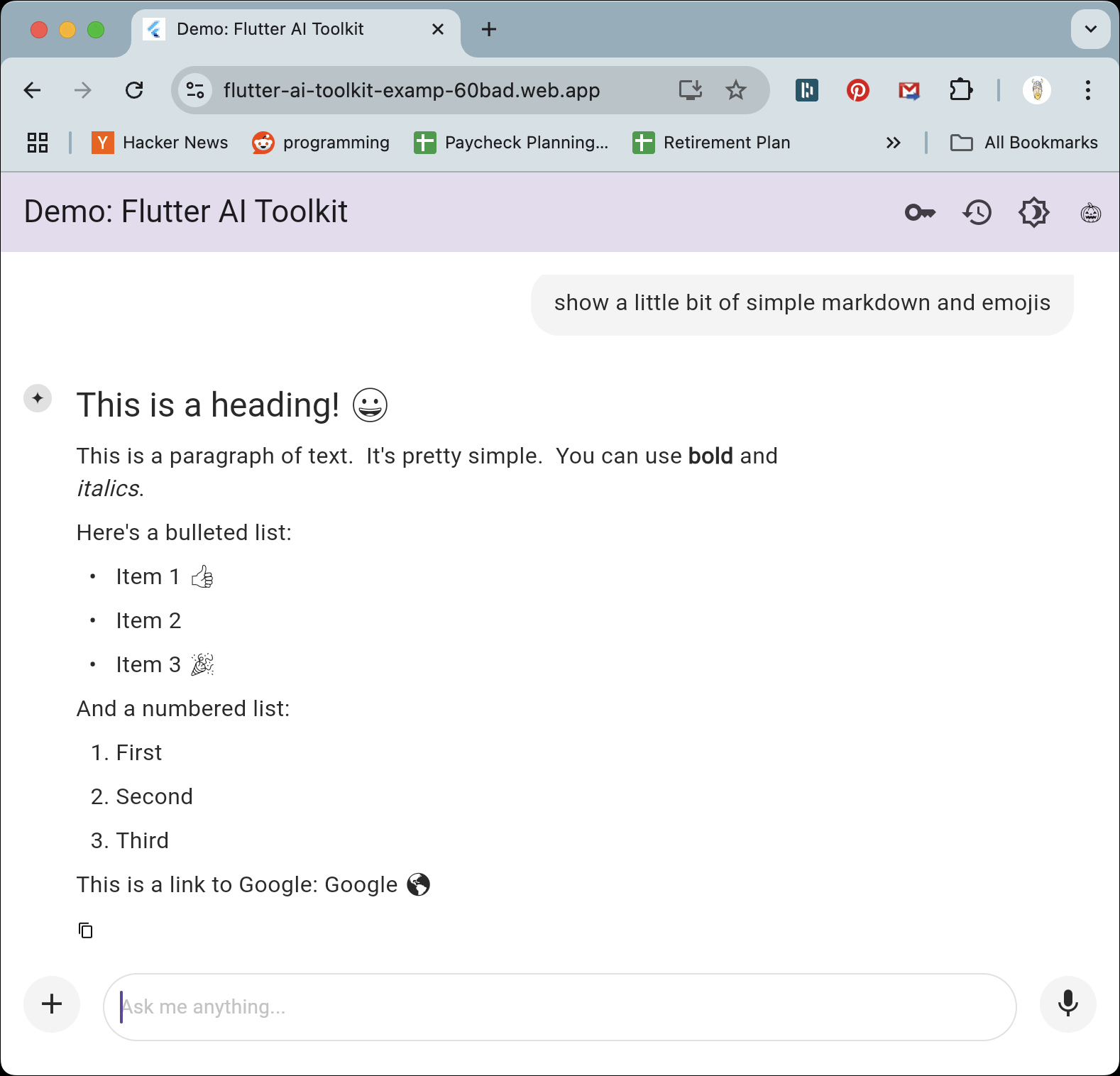
By default, the AIT shows LLM responses as Markdown:

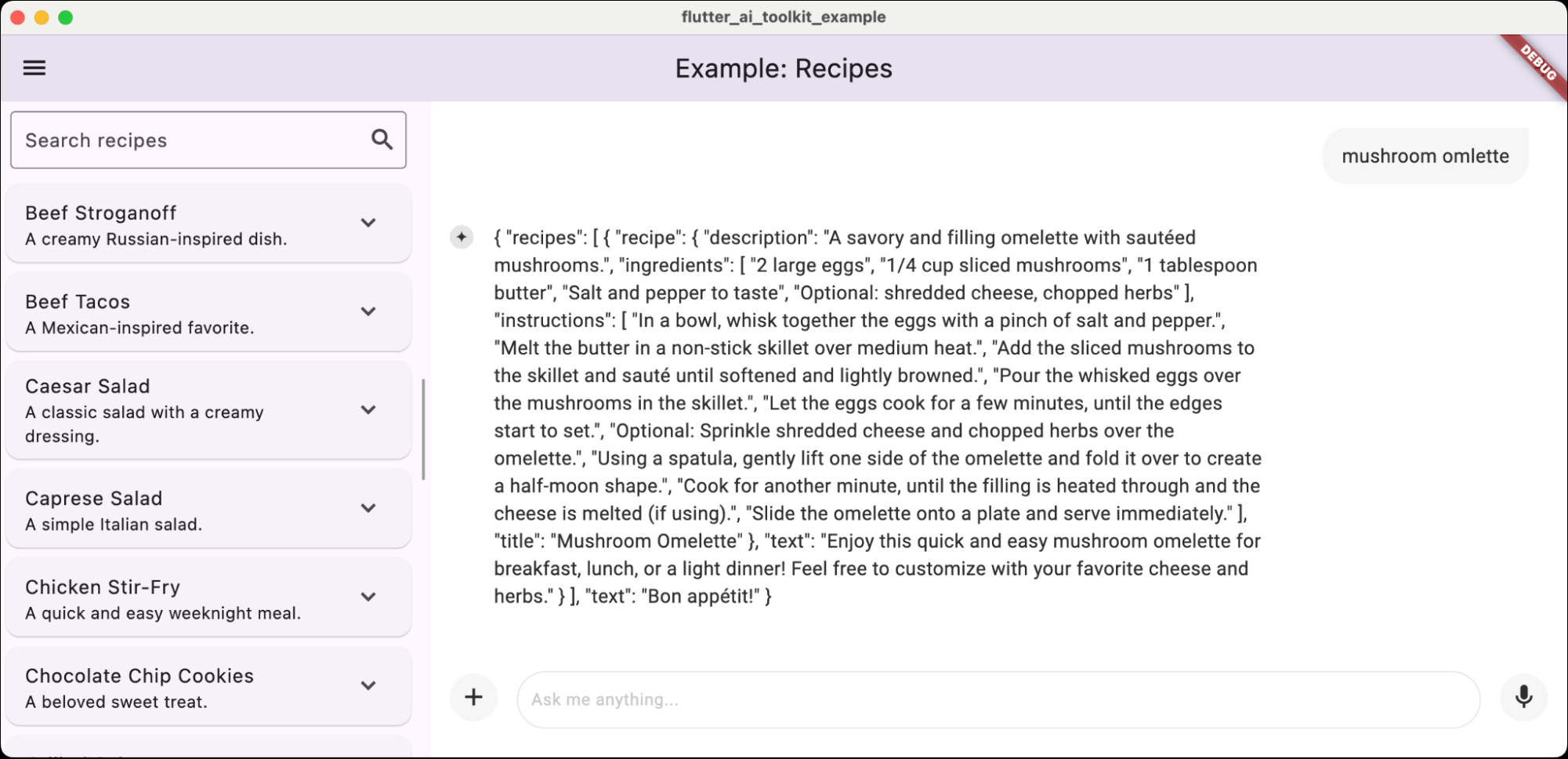
But what if you want the AI to respond with something richer — like a card UI, a chart or a recipe? As an example, consider a recipes app that allows the user to maintain a database and to add to it via a conversation with an LLM. To be able to get the data out of the LLM to add to the database, you don’t want to scrape it out of Markdown — you want well-formed data that you can parse reliably. You can get that by configuring your model to output JSON. By default, that JSON would look like this when shown to the user:

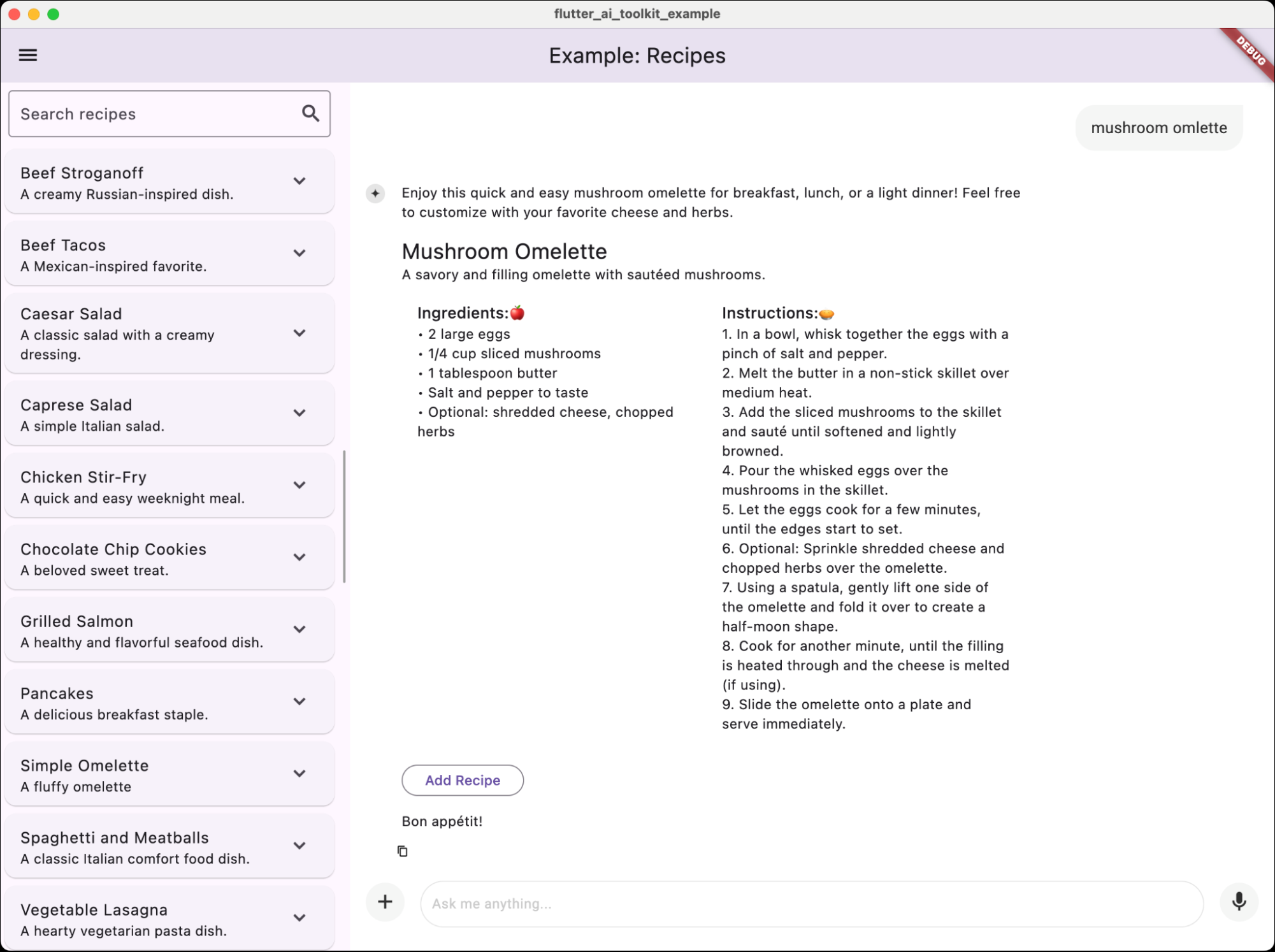
Of course, this isn’t particularly useful for the user, so the AIT allows you to show your own Flutter widget, as the recipe example does:

In addition to showing the recipe in a way the user can read, the example also provides an Add Recipe button to allow the user to easily drop the recipe into their database, all from the comfort of their AI chat.

Pluggable LLMs

As big of a fan as I am of the Gemini models (2.5 pro experimental is blowing the doors off as I write this), different apps have different needs. Since I had to make LLMs pluggable to support Gemini and Vertex (both of which have their own API over the Gemini LLMs), I thought it would be useful to support the ability to talk to any LLM-like backend. And the community has responded with the flutter_ai_providers package. Together with what comes out of the box and what is provided by the community, the AIT supports the following models:

  • Google Gemini 1.x and 2.x, flash and pro, stable and experimental
  • OpenAI GPT and o series of models
  • Anthropic Claude series of models
  • 100s of locally hosted Ollama models, including Google Gemma3, QWQ, Deepseek, Llama3.x, etc.

If that isn’t enough for you, you can implement the LlmProvider interface and plug in anything you like. For debugging purposes, I built EchoProvider but my favorite use of this feature is hooking up the LlmChatView to flows that I define in Firebase Genkit.

Check out the AI Toolkit docs for more details, but it’s a pretty simple interface. Even the Gemini and Vertex AI providers are only ~150 LOC each.

Can Haz More?

I’ve just touched on some of the big pieces of the AIT; for the full details, I recommend the AI Toolkit docs. In addition, there are extensive feature-specific samples on GitHub.

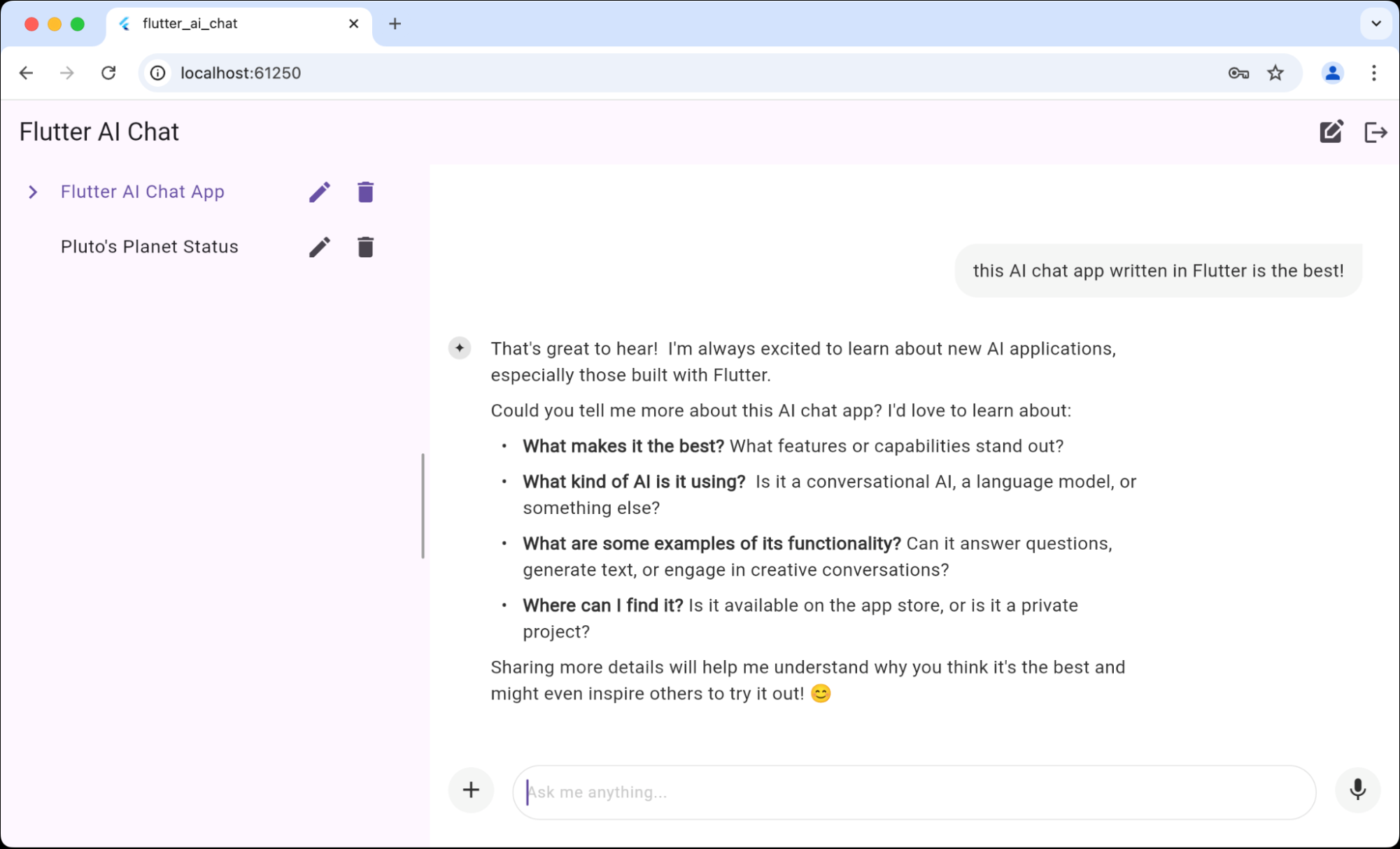
For something a bit more end-to-end, I’ve also built out a full chat app using the AIT:

Notice the list of chats on the left. Those are stored in Firestore and the app provides full management of the history and name of each chat, so the user can rename them, delete them and create new ones. There’s even a little magic that automatically names each chat based on the first question the user answers, just for fun.

In addition, there’s a more fully-featured version of the recipe sample using Firebase for the storage of recipes as well as the Vertex AI LLM.

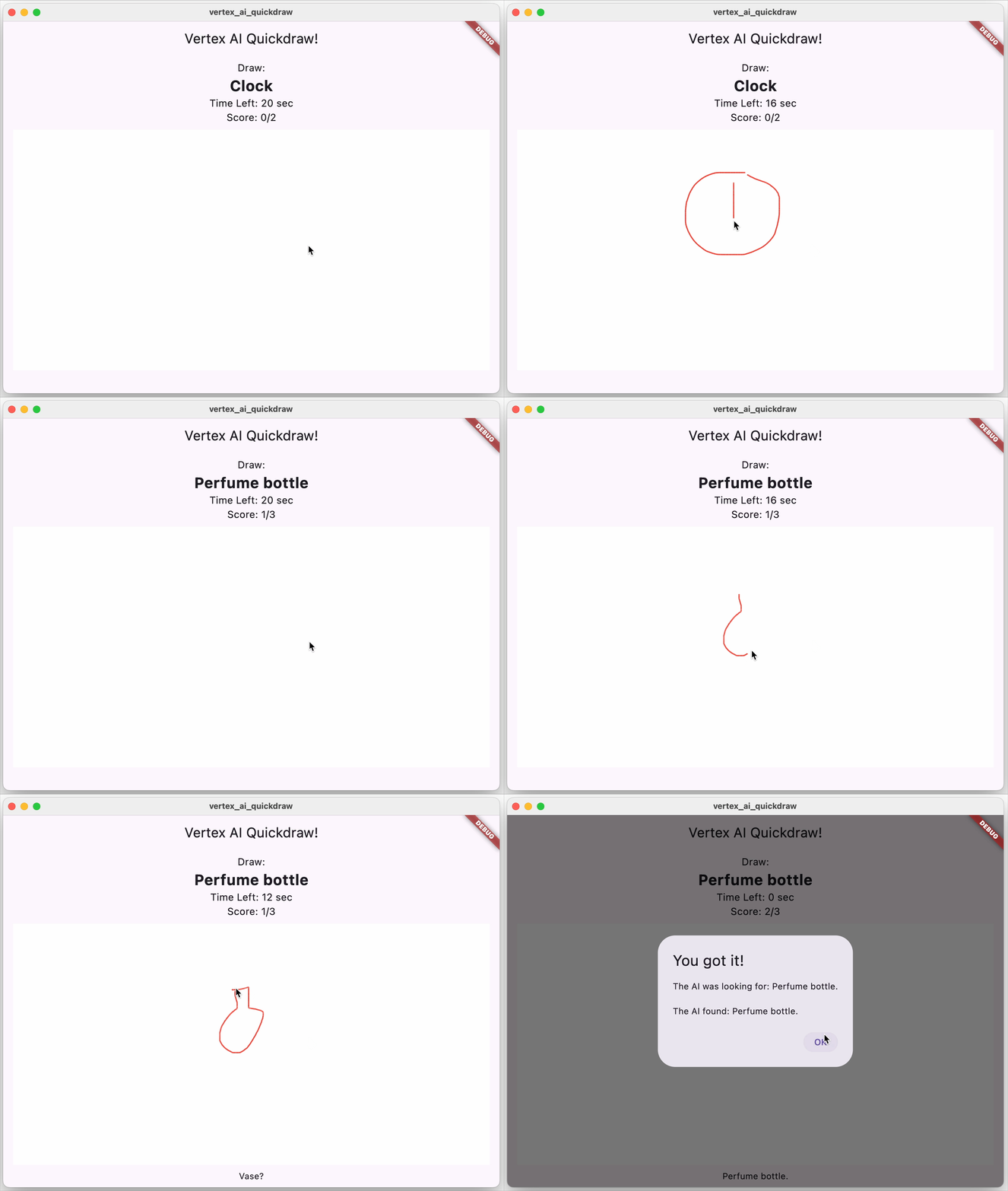
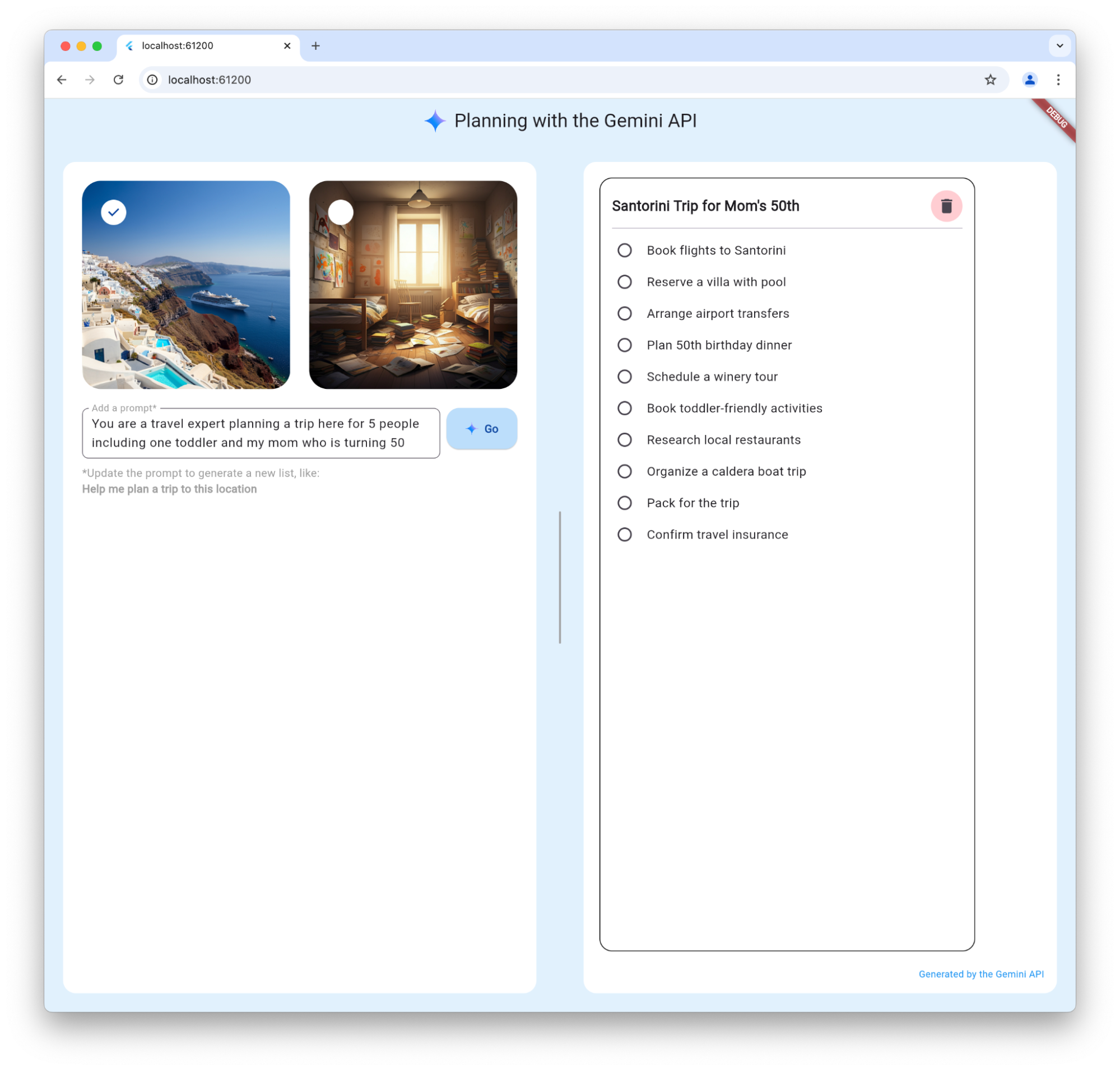
If you’re interested in other Flutter and Firebase AI samples, I’ll point you at the Quickdraw and Planning samples:

Where Are We?

I was not alone in building the AIT. In addition to the contributors on the repo (thank you, contributors!), I want to give a special shout-out to Rory Blyth. He’s been my friend for decades now and been working on generative AI since the GPT-1 era. He did a bunch of advance work on the mic input and the recipe sample as well as being my build buddy through the whole thing. Thanks, Rory!

It is amazing to me how much — and how quickly! — AI is changing the development tooling landscape. Hopefully you’ll find that the Flutter AI Toolkit makes it easy for you to integrate LLM chats into your Flutter apps. Customize the chat interface, display rich responses beyond text, and leverage community-driven providers for a myriad of LLM options. Dive into the docs, explore the samples, and don’t hesitate to contribute or report issues. Or just drop me a line; I’m super interested to see what you’re building!


← Newer Entries