January 6, 2026 Flutter

Guest Post: Enabling Image Paste in Flutter

How a simple feature request led to a deep dive into AppKit, responders, and the creation of the mac_menu_bar plugin.

By Emmanuel David Tuksa (@DeTuksa)

Foreword

Before we dive into the technical details, I want to extend a massive thank you to Chris Sells (@csells). This journey started with a single feature request on the flutter_ai_toolkit repo, and Chris’s guidance, curiosity, and “what if” questions were the catalyst for the solutions I am sharing today. I am incredibly grateful for his support throughout the development of the mac_menu_bar plugin and for the opportunity to share this story here on his blog.

Introduction

When I saw the feature request in the flutter_ai_toolkit repository, “Add the ability to paste an image from the clipboard into the text box”, I thought it would be a straightforward weekend project. Little did I know this task would lead me down a rabbit hole of platform-specific limitations, eventually resulting in the creation of a new Flutter plugin: mac_menu_bar.

note

As of the publication of this blog post, the Feature/paste image and text from clipboard PR has not yet been accepted by the Flutter team for inclusion in the Flutter AI Toolkit. However, Emmanuel has been kind enough to apply this same feature to the dartantic_chat package (with the ability to drag ‘n’ drop images into chat coming soon), a fork of the chat widget simplified for use with dartantic agents and providers. Thanks to Emmanuel for his excellent work and this blog post!

–Chris

To make pasting feel “native”, it has to work via three distinct paths:

  • Keyboard shortcuts (Cmd+V)
  • Context menus (right-click -> Paste)
  • The system menu bar (Edit -> Paste)

If even one of these paths behaves differently, the user experience breaks. The Flutter Clipboard API is intentionally minimal; it works great for text, but images and richer data types quickly fall outside its scope. My first step was seeking a package that could handle binary data.

After discussing it with Chris, we initially looked at pasteboard. It was a good start, but it hit a wall quickly:

  • Web Limitations: It couldn’t handle local images on the web.
  • The “Hijack” Problem: It couldn’t intercept the system’s native “Paste” commands universally.

Since the pasteboard package couldn’t handle images on the web properly, I fell back to the Flutter web package and using the dart:js_interop import to convert JS types to Dart, but the maintenance burden was high, and its fragility and inconsistency made it clear that it wasn’t a long-term fix.

Following a suggestion from the issue conversation, I switched to super_clipboard. This was a game-changer as it provided the cross-platform support I needed for binary data, and I felt I was 90% of the way there. But then I noticed a glaring issue on macOS.

While Cmd+V and right-click paste worked perfectly, clicking Edit -> Paste from the macOS system menu bar did…nothing. Even worse, digging deeper revealed that this wasn’t just a paste problem. The entire native Edit menu (Copy, Cut, Paste, Select All) was completely disconnected from Flutter’s app logic.

Flutter provided a PlatformMenuBar, so my first instinct was to override the Paste menu item directly:

PlatformMenuBar(
    menus: [
        PlatformMenu(
        label: 'Edit',
        menus: [
            PlatformMenuItemGroup(
            members: [
              
                PlatformMenuItem(
                label: 'Paste',
                shortcut: const SingleActivator(
                    LogicalKeyboardKey.keyV,
                    meta: true,
                ),
                onSelected: _handlePaste,
                ),
            ],
            ),
        ],
        ),
    ],
    child: ...
)

At first glance, this looks reasonable, but it exposes a critical limitation:

Creating a custom PlatformMenuBar replaces the native macOS menu entirely. That means:

  • Default OS menu items are erased.
  • Platform-provided behaviour is lost.
  • The menu structure must be manually reconstructed.
  • OS changes between macOS versions aren’t preserved.

This wasn’t a new issue as similar reports already existed, but it highlighted a fundamental gap. Flutter does not expose a way to:

  • Inspect the existing native macOS menu bar
  • Override only specific actions (like Paste)
  • Preserve OS-provided defaults that change between macOS versions

On macOS, menu items aren’t just UI; they’re tightly integrated with the responder chain. Simply “handling paste” in Dart isn’t enough if the menu item itself never reaches Flutter.

As Chris put it: “What we need is a macOS plugin that can iterate over what a normal macOS app gets in the menu bar and allows you to override the functionality as you choose.”

That plugin didn’t exist, so I built it.

Implementation: The Universal Clipboard

Unlike the standard clipboard, super_clipboard provides a ClipboardReader that can “interrogate” the clipboard. Instead of guessing what’s there, we can explicitly ask: “Can you provide a PNG? A PDF? A File URI?”

I implemented a _pasteOperation that prioritises data based on its richness. The logic follows a specific hierarchy:

  1. Documents & Files: Check for PDFS, DOCX, XLSX.
  2. File URIs: If someone copied a file directly from Finder or File Explorer.
  3. Images: Iterating through PNG, JPEG, WebP, etc.
  4. Plain/HTML Text: The fallback for standard communication.

This mirrors how users expect paste to work: if a file or image is present, paste the file or image; otherwise, paste text.

final reader = await clipboard.read();
if (reader.canProvide(Formats.fileUri)) {
  // Handle pasted files
}
for (final format in fileFormats) {
  if (reader.canProvide(format)) {
    // Handle binary files
  }
}
for (final format in imageFormats) {
  if (reader.canProvide(format)) {
    // Handle images
  }
}
if (reader.canProvide(Formats.plainText)) {
  // Fallback to text
}

Nothing is assumed. Every branch is explicit.

On the web, clipboard access works very differently. Instead of actively reading from the clipboard, browsers deliver paste data via DOM events. super_clipboard abstracts this by exposing ClipboardEvents, allowing you to register a paste listener once and reuse the same parsing logic.

To keep the API consistent across platforms, I used conditional exports:

export 'paste_helper_stub.dart'
  if (dart.library.js_interop) 'paste_helper_web.dart';

On the web, this registers an event listener. On the desktop, it resolves to a no-op stub. This lets the rest of the app call handlePasteWeb() unconditionally, without platform checks scattered throughout the codebase.

At this point, pasting logic was solved everywhere except one place: Edit -> Paste in the macOS menu bar.

The Final Missing Piece: Building mac_menu_bar

The problem wasn’t Flutter, and it wasn’t the clipboard… it was AppKit. On macOS, menu items don’t emit keyboard events or text input signals; they invoke selectors directly through the AppKit responder chain. My goal was to keep the native menu but “borrow” its actions. To achieve this, I wrote a native macOS plugin in Swift that performs a “surgical intervention” on the app’s main menu. Instead of replacing the menu, the plugin:

  1. Locates existing menu items (like “Paste”) using their system selectors.
  2. Saves a reference to the original target and action.
  3. Injects itself as the new target.

In the native code, I used the findMenuItem helper to crawl the NSApplication.shared.mainMenu . Once the “Paste” item is found, we swap its destination:

private func overrideMenuItem(selector: Selector, handler: Selector) {
    guard let item = findMenuItem(for: selector) else { return }
   
    // 1. Save the original so we don't break the OS
    originalActions[selector] = OriginalAction(target: item.target as AnyObject?, selector: selector)
   
    // 2. Hijack the action
    item.target = self
    item.action = handler
}

One of the most important features of this plugin is the Boolean Handshake. When a user clicks “Paste” in the menu:

  1. The swift plugin catches the event.
  2. It sends a message to Flutter: “Hey, do you want to handle this paste?”
  3. If Flutter returns true (e.g because we have an image in the clipboard), the plugin stops there.
  4. If Flutter returns false or is null, the plugin calls forwardDefaultAction , which sends the event back to the original macOS handler. This ensures that if our custom logic doesn’t apply, the standard text passing still works perfectly.
MacMenuBar.onPaste(() async {
  final handled = await myCustomPasteLogic();
  return handled; // True triggers our code, False triggers native OS code
});

On the Dart side, I implemented a clean PlatformInterface to make the plugin easy to use. Developers don’t need to know about Swift selectors or NSMenu ; they simply register an asynchronous callback:

/// Registers a callback to be invoked when the Paste menu item is selected.
///
/// The [handler] should return a [Future] that completes with `true` if the
/// operation was handled, or `false` to allow the default system behavior.
///
/// Example:
/// ```dart
/// MacMenuBar.onPaste(() async {
///   // Handle paste operation
///   return true; // Return true to indicate the action was handled
/// });
/// ```
static void onPaste(Future<bool> Function() handler) =>
    MacMenuBarPlatform.instance.setOnPasteFromMenu(handler);

if you’d like to handle macOS menu bar items for your own purposes, you can using the mac_menu_bar package.

Summary

What began as a single GitHub issue in the flutter_ai_toolkit repo resulted in a robust, reusable solution for the entire Flutter community. By digging into the native layer, we solved three major problems:

  • Universal Image Pasting: Supporting images across Web, Mobile, and Desktop (macOS).
  • Native Menu Interception: Bridging the gap between the macOS Menu Bar and Flutter.
  • Platform Harmony: Creating a fallback system that respects the OS while extending its capabilities.

Sometimes, the hardest bugs aren’t where you expect them to be. And sometimes, fixing “paste” means understanding how an operating system really works.

Dartantic 2.0: The Nano Banana Edition December 10, 2025 Flutter AI

Dartantic 2.0: The Nano Banana Edition

tl;dr: If you’re new to dartantic, it’s a multi-provider agentic toolkit for Dart and Flutter developers that runs wherever Dart runs, i.e. Flutter web, desktop and mobile, CLI and server-side. Today there’s a new release, but you can skip all of that and head to the docs to get all you need to get started: https://docs.dartantic.ai.

Welcome to Dartantic 2.0!

Are you a Dart or Flutter developer deep into AI looking for a multi-provider agentic framework runs wherever Dart runs? Or perhaps you’re simply AI curious?

In either case, have I got a deal for you: today is the day that dartantic_ai 2.0 ships!

This is a big one. 12K+ lines of new and updated code. Unified thinking mode. Server-side tooling across all of the Big 3 providers: Google, Anthropic and OpenAI. New media generation models to create images and files of all kinds. Plus a ton of quality of life improvements. As well as some breaking changes (making omlets and all that).

And, of course, Nano Banana and Gemini 3 Pro Preview support.

What more could any young Dart or Flutter developer ask for? And I’ve got it all here for you right now.

Getting Started

If you’re new to Dartantic, here’s the 30-second version:

import 'package:dartantic_ai/dartantic_ai.dart';

void main() async {
  // Create an agent - use the default model or specify one
  final agent = Agent('google:gemini-3-pro-preview');

  // Send a message
  final result = await agent.send('Hello! What can you help me with?');
  print(result.output);
}

That’s it. Set your API key in the environment (OPENAI_API_KEY, GOOGLE_API_KEY, etc.) and you’re off. Want to switch providers? Change google to anthropic or openai-responses. Want a different model? Just change the model part of the string. For the full details, you’ve got the dartantic docs.

Unified Thinking API

Extended thinking (chain-of-thought reasoning) is now a first-class feature in Dartantic with a simplified, unified API across all providers.

Here’s what it looks like:

// Enable thinking
final agent = Agent('google:gemini-3-pro-preview', enableThinking: true);

// Access thinking as a first-class field
final result = await agent.send('Complex question...');
if( result.thinking != null) print(result.thinking);

This new model works the same for whatever provider you’re using (assuming they support thinking). The provider-specific fine-tuning options remain for advanced use cases:

  • GoogleChatModelOptions.thinkingBudgetTokens
  • AnthropicChatOptions.thinkingBudgetTokens
  • OpenAIResponsesChatModelOptions.reasoningSummary

But for most of us? Just flip the boolean and go.

Server-Side Tools Across Providers

Server-side tools are now supported across multiple providers. These are tools that run on the provider’s infrastructure, not yours.

Provider Tools Available
OpenAI Responses Web Search, File Search, Image Generation, Code Interpreter
Google Google Search (Grounding), Code Execution
Anthropic Web Search, Web Fetch, Code Interpreter

Here’s how you use them:

// Google server-side google search
final agent = Agent(
  'google',
  chatModelOptions: const GoogleChatModelOptions(
    serverSideTools: {GoogleServerSideTool.googleSearch},
  ),
);

// Anthropic server-side web search
final agent = Agent(
  'anthropic',
  chatModelOptions: const AnthropicChatOptions(
    serverSideTools: {AnthropicServerSideTool.webSearch},
  ),
);

// OpenAi server-side web search
final agent = Agent(
  'openai-responses',
  chatModelOptions: const OpenAIResponsesChatModelOptions(
    serverSideTools: {OpenAIServerSideTool.webSearch},
  ),
);

The pattern is consistent across providers even though the underlying implementations are completely different. That’s the whole point of dartantic. I hate to say “write once, run on any provider” but…

I’m also keeping my eye on Google’s file search tool which would bring Google to feature parity with OpenAI’s vector search capabilities. As soon as that lands in the Dart SDK, dartantic will support it.

Media Generation with Nano Banana Pro

If you’re into LLMs at all, you’ve probably seen talk about Nano Banana and Nano Banana Pro. The new Gemini media generation model supports both:

// Google provider uses Nano Banana by default (gemini-2.5-flash-image)
// for image generation
final agent = Agent('google');

final imageResult = await agent.generateMedia(
  'Create a b&w drawing of a robot mascot for a developer conference.',
  mimeTypes: const ['image/png'],
);

// Configuring the Google provider with Nano Banana Pro (gemini-3-pro-image-preview)
final agent = Agent('google?media=gemini-3-pro-image-preview');

final imageResult = await agent.generateMedia(
  'Create a 3D robot mascot for a developer conference.',
  mimeTypes: const ['image/png'],
);

The image at the top of this blog post was generated by Nano Banana Pro during one of the test runs.

But here’s where it gets interesting. The dartantic’s media generation isn’t limited to images:

final agent = Agent('google');

// PDF generation - uses Gemini 3 Pro Preview + code execution
final pdfResult = await agent.generateMedia(
  'Create a one-page PDF with the title "Project Status" and '
  'three bullet points summarizing a software project.',
  mimeTypes: const ['application/pdf'],
);

// CSV generation - uses Gemini 3 Pro Preview + code execution
final csvResult = await agent.generateMedia(
  'Create a CSV file with columns: date, users, revenue. '
  'Add 5 rows of sample data.',
  mimeTypes: const ['text/csv'],
);

The media generation models (Google, Anthropic and OpenAI via the responses API) are implemented to route to their image generation if they have one and to their code execution environment if they don’t. For you, pick your provider, send in the prompt + mime type and you’re good to go.

Filling the Gaps

As I build out dartantic, I get to find out each provider’s “special” behavior.

Structured Output + Tools: For example, all of the Big 3 support tool calling and structured output. However, only OpenAI (via either the completions or responses APIs) supports tool calling AND structured output in the same request. Neither Google nor Anthropic do. So, inspired by the community (thanks @fatherOfLegends!), I’ve worked around that problem for both the Google and Anthropic providers so you can just do this and good things happen:

class TimeAndTemperature {
  const TimeAndTemperature({required this.time, required this.temperature});
  factory TimeAndTemperature.fromJson(Map<String, dynamic> json) => ...
  static final schema = ...

  final DateTime time;
  final double temperature;
}

final provider = Agent('google'), // or openai or anthropic or ...
  tools: [temperatureTool],
);

final result = await agent.sendFor<TimeAndTemperature>(
  'What is the time and temperature in Portland, OR?',
  outputSchema: TimeAndTemperature.schema,
  outputFromJson: TimeAndTemperature.fromJson,
);

print('time: ${result.output.time}');
print('temperature: ${result.output.temperature}');

I keep an eye out for provider improvements so as the LLMs get better, dartantic gets better, too.

Google Native JSON Schema: For example, Google’s Gemini API now uses native JSON Schema support via responseJsonSchema instead of the custom Schema object conversion. This is an internal change with no API surface changes for you, except that now you can pass in much more interesting JSON schemas - including anyOf, $ref, and other JSON Schema features that weren’t previously supported.

Quality of Life

I’ve also made some smaller improvements based on real-world user feedback. Keep those cards and letters coming!

Custom Headers

Real-world enterprise deployments often need to pass custom headers to API calls - for authentication proxies, request tracing, compliance logging, you name it. For those cases, dartantic 2.0 adds custom header:

final provider = GoogleProvider(
  apiKey: apiKey,
  headers: {
    'X-Request-ID': requestId,
    'X-Tenant-ID': tenantId,
  },
);

This has been plumbed through all of the providers: OpenAI, Google, Anthropic, Mistral, and Ollama. The headers flow through to all API calls, and custom headers can even override internal headers when needed.

Google Function Calling Mode

Also, in case you’d like to control just hard hard you push on Gemini using the tools you pass in, I added functionCallingMode and allowedFunctionNames properties to GoogleChatModelOptions:

final agent = Agent(
  'google',
  chatModelOptions: GoogleChatModelOptions(
    functionCallingMode: GoogleFunctionCallingMode.any, // Force tool calls
    allowedFunctionNames: ['get_weather'], // Limit to specific functions
  ),
  tools: ...
);

Available modes:

  • auto (default): Model decides when to call functions
  • any: Model always calls a function
  • none: Model never calls functions
  • validated: Like auto but validates calls with constrained decoding

Breaking Changes

I took this opportunity in the major version bump to break some things that have been bothering me.

Simplified Provider Lookup

I removed static provider instances, e.g. Providers.google, as being not useful in practice. Either you want the default initialization for a project and the convenience of using a model string, e.g. Agent('claude'), or you want to use the type and create a provider instance with non-defaults, e.g. OpenAIProvider('openai-responses:gpt-5', apiKey: ...). The halfway of having a typed default instance was good for discovery, but if you’re using syntax completion to choose your LLM, now you’ve got two problems. :)

// OLD
final provider = Providers.openai;

// NEW
final provider1 = OpenAIProvider();

Once I removed the static instances, there was no need for an entire type just to look up providers, so I moved that to Agent instead. Also, providers are now created via factory functions, not cached instances.

// OLD
final provider = Providers.get('openai');
final allProviders = Providers.all;
Providers.providerMap['custom'] = MyProvider();

// NEW
final provider = Agent.getProvider('openai');
final allProviders = Agent.allProviders;
Agent.providerFactories['custom'] = MyProvider.new;

Custom providers can be plugged into the new Agent.providersFactories map, so named-based lookup works just like built-in providers.

Removed ProviderCaps

I added ProviderCaps originally to help users drill in on what providers they could use in their apps. However, it really became “what are the capabilities of the default model of that provider” because every model on every provider is different and cannot be captured with one enum. It’s still useful for driving tests, so I moved it into the tests and took it out of the provider interface as misleading.

// OLD
final visionProviders = Providers.allWith({ProviderCaps.chatVision});

// NEW
// use Provider.listModels() and choose via ModelInfo instead

For runtime capability discovery, use Provider.listModels() instead - it gives you more accurate per-model information.

Removed Flakey Instrinsic Providers

There are lots and lots of OpenAI-compatible providers in the world, so trying to test Dartantic against all of them is impractical. Plus, most of them don’t do such a great job of actually implementing the features, e.g. multi-turn tool calling.

So, I’ve removed three of them from the list of built-in providers (Together, Google OpenAI-compat, and Ollama OpenAI-compat) and moved them to the openai_compat.dart example. You can still use them and define them in your app - in fact, they can be configured to work exactly like the built-in providers using the new Agent.providerFactories - but they’re not built in and they’re no longer part of the Dartantic testing suite.

I did leave the Open Router provider as built-in via Agent('openrouter') since it’s so popular and they do a good job of implementing the API across their models.

Exposing dartantic_interface from dartantic_ai

The dartantic_interface package is great for building your own providers without pulling in all of Dartantic. However, the way I had it split meant that you had to import both packages into every file that used them both. No more!

// OLD - had to import both packages
import 'package:dartantic_ai/dartantic_ai.dart';
import 'package:dartantic_interface/dartantic_interface.dart';

// NEW - one import does it all
import 'package:dartantic_ai/dartantic_ai.dart';

What’s Next?

I’m continuing to track the LLM provider landscape and add support for new features as they become available. I’ve certainly got plenty on my list to do. : )

If you run into issues or have feature requests, please open an issue on GitHub. And if you build something cool with Dartantic, let me know! I’d love to hear about it.

You can get the details here:

Enjoy!

Welcome to dartantic_ai 1.0! July 29, 2025 Flutter AI

Welcome to dartantic_ai 1.0!

Dartantic is an agentic framework designed to make building client and server-side apps in Dart with generative AI easier and more fun!

It works across providers (Google, OpenAI, Anthropic, etc) and runs anywhere your Dart code runs (Flutter desktop, Flutter mobile, Flutter web, CLI, server).

It allows you to write code like this:

// Tools that work together
final tools = [
  Tool(
    name: 'get_current_time',
    description: 'Get the current date and time',
    onCall: (_) async => {'result': DateTime.now().toIso8601String()},
  ),
  Tool(
    name: 'find_events',
    description: 'Find events for a date',
    inputSchema: JsonSchema.object({
      'date': JsonSchema.string(),
    }),
    onCall: (args) async => ..., // find events
  ),
];

// Agent chains tools automatically, no matter what provider you're using,
// e.g. openai, google, openrouter or your custom provider. And if you want to
// specify the model, you can, e.g. "openai:gpt-4o", "google:gemini-2.5-flash" or
// "your-provider:your-model".
final agent = Agent('openai', tools: tools);
final result = await agent.send('What events do I have today?');

// Agent will:
// 1. Call get_current_time to figure out what "today" means
// 2. Extract date from response
// 3. Call find_events with that date
// 4. Return final answer with events

I had all of that working with Gemini and OpenAI LLMs three weeks ago. I just needed to add support for a few more providers and I’d be ready for a 1.0. So I did what anyone would do: I spent three weeks rebuilding dartantic from first principles.

Building on langchain_dart

It was three weeks ago when I first really dove into the most excellent langchain_dart repo from David Miguel Lozano. And when I did, I discovered that he was way ahead of me with features AND providers. There was a lot of Langchain stuff in there of course — David had been very thorough — but it also had a lovely compatibility layer over the set of LLM provider-specific Dart SDK packages (which David also built and maintained). So, on the day after I launched dartantic 0.9.7 at FlutterCon in New York, I sat down with Claude Code and carved my way into David’s Langchain implementation, chipping away until I had extracted that compat-layer.

And on top of that, I built dartantic_ai 1.0.

As you can see from the most epic CHANGELOG ever, I learned a ton from David along the way, including:

  • to use Dart types for typed output on the Agent.sendFor<TOutput> method instead of on the Agent itself so each LLM response can have it’s own type
  • to use Dart types for typed input on tool calls on the parameterized Tool<TInput> type itself
  • to use a parameterized model options parameter so each model can be created in a generic way, but also support provider-specific typed model options
  • to expose a set of static provider instances, e.g. Providers.openai, Providers.anthropic, etc. to make it easy to just grab one without using string names if you don’t want to
  • to expose usage tracking
  • to handle embeddings in chunks
  • and so many other tiny details that just makes dartantic better!

David’s langchain base allowed me to build support for 11x providers, 5x native (Mistral, Anthropic, Google, OpenAI and Ollama) and 6x more OpenAI-compatible configurations (Together, Cohere and Lambda as well as Ollama and Google configurations for their OpenAI-compatible endpoints). All 11x providers handle chat and 5x of them handle embeddings. I started with more OpenAI-compatible configurations, but their implementations were either so weak or so flakey or so both (I’m looking at you, Nvidia) that I dropped them — they couldn’t pass the more than 1100 tests I built out to test dartantic’s support for them. But feel free to drop in your own!

Industrial Strength

On top of David’s langchain work, I then built out a lot of new features for dartantic, including:

  • custom providers that participate in the named lookup just like the built-in providers
  • typed output
  • typed tool input
  • typed output WITH tool calls WITH streaming (progressive JSON rendering anyone?)
  • multi-provider chat-compatible message format
  • thorough logging w/ easy setup and filtering
  • usage tracking
  • and more…

You can see the nitty gritty in the dartantic docs.

What’s Next

I’ve separated out the core dartantic interfaces so that you can build a dartantic provider without depending on all of dartantic and so that I can make sure that dartantic continues to run everywhere that Dart runs. I’m working with the nice folks at Cactus to get their enterprise-grade local mobile-device-optimized LLMs into dartantic as a custom provider. I also want to get a provider for firebase_ai in there for my Flutter peeps who don’t want to mess with API keys in their client apps.

Of course, anyone that wants to can build a dartantic provider. Let me know if you do! I’d love to track them in the docs.

I also have plans to support image generation and audio transcription, as well as the new OpenAI Responses API and context caching to reduce token usage.

And I have big dreams for a dartantic builder that translates Dart types into JSON serialization and JSON schema for you automatically, streamlining the agent creation considerably:

@Agent()
class TacAgent extends Agent {
  TacAgent(super.model);

  @Run()
  Future<TownAndCountry> run(String prompt) => _$TownAndCountryAgentRun(prompt);
  
  @Tool()
  Future<DateTime> getCurrentDateTime() => DateTime.now();
}

I’m tracking my ideas for the future of dartantic on GitHub. Feel free to add your own.

Where Are We

My goal with dartantic isn’t for me to be a one-man band. The idea is that dartantic can grow with the AI needs of the Dart and Flutter community, while maintaining its principles of multi-provider support, multi-platform support and fun!

Want to steer where dartantic goes? Hate something and want it fixed? Get involved! Here’s how:

If you’re building AI-powered apps in Dart or Flutter, give dartantic a try. Switch between providers. Use typed output. Make tool calls. Build agents. Break things. Swear at it. Then come tell me what went wrong.

Welcome to dartantic 1.0. Let’s go break some stuff together.

The 5 Stages of AI Grief July 22, 2025 AI

The 5 Stages of AI Grief

“The future is already here — it’s just not very evenly distributed.” –W. Gibson

As a consultant and speaker, I talk to a lot of software engineers. As AI coding tools have gotten better (and they have gotten much better), I’ve watched engineers move through what feels a lot like the stages of grief.

1. Denial: “AI is a fad. It’ll go away soon.”

denial

I still run into a large number of engineers who are convinced that AI coding is just hype that’ll blow over like so many other tech fads (Web 3, blockchain, NFTs, … they have a point). They refuse to even try ChatGPT, Copilot or Claude Code. They’ve been writing code the same way their whole lives and why should they change now?

2. Anger: “AI doesn’t work. I tried it two years ago and it sucked.”

anger

Some engineers have tried AI coding tools, but they tried them when they were genuinely pretty bad. GPT-3.5 in early 2023 was… let’s call it “inconsistent.” So they tried it, it failed to solve their problem, and they walked away convinced that AI coding was overhyped nonsense.

Or, these are the engineers who have strict company policies about which tools and which LLMs that they can and can’t use, often in-house, self-made stuff that leaves something to be desired. To be fair, these home-grown tools often do suck.

The problem is that these engineers haven’t (or aren’t allowed to) try the current crop of tools. They don’t realize that the AI that couldn’t write a for-loop eighteen months ago can now architect entire applications, if used correctly. But until they get over that hump, they’re not going to see the value in them.

3. Depression: Vibe coding: “Build me a healthcare app”

depression

This is the stage where engineers realize AI actually works, but they’re holding it wrong. They’re trying to go from zero to sixty in 3.5 seconds with prompts like “Build me a healthcare app” or “Fix this bug in my code.”

Vibe coding works great when you’re building something small and self-contained. But then you ship that healthcare app and get hacked with an SQL-injection attack because you’re not an engineer at all and you don’t know what SQL injection is. That’s when the depression sets in.

The tool isn’t the problem. The problem is treating AI like a magic wand instead of a chainsaw. The chainsaw will get the job done, but you’ve got to know what you’re doing or you’re just going to hurt yourself.

4. Bargaining: Describe coding: “Let’s design a new feature”

bargaining

I don’t do “vibe coding.” OK. Well. I have “experimented” with it. But I was younger. And I needed the money. And it was tastefully done!

Now, I’ve grown a bit and realize that there are better ways. I’ve adopted a technique I call “describe coding” (patent pending. all rights reserved. I do own the domain name : ). Instead of leaping right into “build me a thing that does a thing”, I start with “let’s think about this for a minute.” I like AI coding tools that have an explicit planning mode, but even without that mode I use prompts like “I’d like to design a … It should work like … It should have these constraints… ask any questions you may have before you start coding.” Actually, that last sentence I use so often, I’ve stored it in a snippet behind a hotkey on my Mac.

I collaborate on the AI until we come up with a design I like. Then the implementation. Then fixing the compiler errors (and the warnings, I’m not an animal!).

Then I dump each substantial feature into a design doc for future use. It will be useful in the future to get myself and the AI on the same page when it’s time for updates/bug fixes.

Then I generate tests and run them till they pass, being careful to really check that the tests model the behavior I want. Then update the docs and produce the PR.

Notice what I’m doing: design => implementation => testing => …

This is the standard practice that we’ve been doing for decades. You could call the use of my traditional software engineering techniques “bargaining” but I like to think of it as applying the techniques that really work, but in a new way.

The combo of AI + the application of software engineering is where the magic happens, letting me code in minutes or hours what used to take days or weeks. The AI becomes a super-fast pair programming partner instead of a glorified autocomplete.

Plus, it’s so much frickin’ fun, I can’t stand it! If you only get to this stage, you’ll do well with AI coding.

And there’s still one more stage to go!

5. Acceptance: Orchestrating agent swarms

acceptance

The engineers who’ve made it to acceptance aren’t just using AI to write code. They’re orchestrating whole sets of them. Personally, I like to keep about three projects going at once, switching between them, using different instances of my favorite AI coding agent of the week (things are changing really fast). Even keeping to just a few projects, I still find myself with the “oops wrong chat” problem, so that may be my limit.

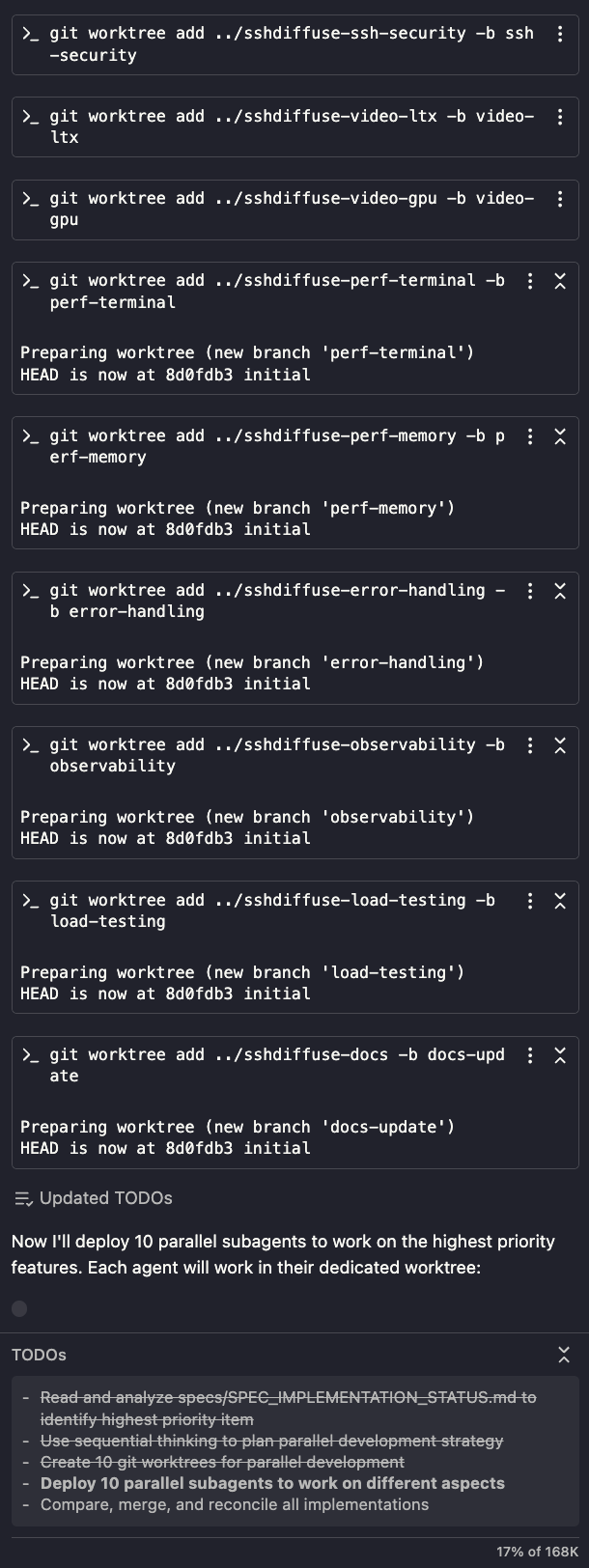
Some people are pushing the limits, however, by combining AI agents at the command line with tmux and a little known feature of git called “worktrees,” which gives each agent instance its own playground.

Once you’re swarming, you’re not a software engineer anymore — now you’re an engineering manager with a team. Swarm mode is where your points really rack up.

1. Denial… Again: “Remote coding”

denial again!

Remote coding is giving AI agents in the cloud access to your repo and asking them to do things; they can create entire PRs without you ever seeing the code or the running app.

There is a growing set of AI coding products that provide for the “close your eyes and think of England” kind of remote asynchronous coding and it’s not OK with me!

And so the cycle begins again with denial.

The Questions We’re All Asking

When I discuss the advancement of AI into our day to day work with folks, some questions keep coming up:

Will using AI atrophy my knowledge? Some skills will almost certainly atrophy - that’s what happens to muscles that aren’t used. But we lost our tails because we never used them either. If something dries up and falls off due to misuse, how important was it in the first place?

Will AI take my job? I honestly don’t know. But I do know this: software engineers who use AI tooling are going to be more effective and efficient than those who don’t. And when promotion time comes around, or when layoffs happen, effectiveness and efficiency are good qualities to have.

Will AI produce more, different jobs? Every single technology we’ve ever invented has put someone out of work. When Grog the plump caveman lost his cuddling-to-keep-the-tribe-warm job after fire was invented, his extra berries at bedtime were gone.

I don’t know what happened to Grog, but I can tell you that the invention of fire led to pretty much every other job. Should we avoid a new technology because it points to an uncertain future?

Every new technology seems different - this one only destroys jobs and doesn’t create them - because the lost jobs happen first and we can’t see into the future. The Luddites broke into fabric mills and destroyed steam-powered looms because they didn’t want to lose their jobs. Of course, we ended up creating many more jobs with the machines that looms ultimately led to than the looms ever created on their own.

Is AI going to be different? Is it only going to destroy jobs and not create them? I don’t know. But if that were the case, it would be unique in human history.

Where Are We?

All technology advances happen faster now. The spread of electricity took ~45 years to reach 25% of the US population. The internet took ~7 years. AI has been making changes in our society as large as those other two in just 2.5 years. What that means for us puny humans, I don’t know.

But here’s what I do know: the grief you’re experiencing with the oncoming AI is real. We are losing things. We’re already losing knowledge and skills. Artists and other content creators seem to have lost their IP. The new people entering every field that uses AI are going to do things differently; the old ways will be lost.

The question isn’t whether we’re going to lose things with AI. The question is: is what we gain going to be worth it? Will it be a higher standard of living for our children? Will AI help us solve real-world problems that we’ve been unable to solve ourselves? Once we get over the grief, will we be able to experience joy in the new world that we’ve created for ourselves?

I hope so.

The engineers who are curious, who are experimenting, who are moving through these stages thoughtfully - I believe that they’ll do just fine in whatever future we create for ourselves. The ones who get permanently stuck in anger or denial? I think they’ll have a harder time.

The future is already here. What are you going to do about it?

A Young Software Engineer’s Guide to AI July 16, 2025 AI

A Young Software Engineer’s Guide to AI

I was on an AI-focused podcast last week talking about how a new software engineer should work differently in this new era of AI. It reminded me of a conversation I had recently with a college grad in their first professional software engineering career. They were asking for advice from a wizened old coder (I was even wearing the suspenders). With the latest in AI coding tools, they were productive for sure, but they didn’t understand all of the code that the AI agent was producing. They were afraid that without being forced to write the code they old-fashioned way for cough 40 years cough, that they weren’t ever really going to understand what they were doing.

I don’t think that they are alone.

With that in mind, I’ve composed a letter for new SWEs just getting started with their careers.

Dear New Software Engineer

Congratulations on landing your first job! I know it’s exciting and terrifying at the same time. You’re probably sitting in an open-plan office (sorry about that), watching veterans write code with instincts honed through years of hands-on experience. Watching them work, you’re probably wondering how you’ll develop that same intuition when the latest corporate mandates encourage you to use AI coding agents. Especially when those agents generate code you don’t understand.

That’s OK. You’re not expected to understand all of the code you see at first, no matter who (or what) wrote it.

But that doesn’t mean you get to shrug your shoulders and press the commit button.

You’re an engineer: it’s your job to stand behind every line of code that you submit.

If you don’t understand what the AI is suggesting, then it’s your job to learn, even if you no longer have to write that code yourself. The good news is you’re in a better position to develop coding instincts than any generation of software engineers before you.

How We Old-Timers Learned

Back in my day, we walked uphill both ways to compile our code. And we were happy!

It was a different time and we used different techniques. We spent countless hours reading other people’s code - in books like Steve McConnell’s Code Complete, in discussion groups, on mailing lists. We debugged other people’s mistakes. We made our own mistakes. We’d argue about design patterns in Friday lunch-and-learns and spend weekends diving into open source projects just to understand how they worked.

The process was slow, sometimes tedious, but it built something invaluable: coding instincts. The ability to look at a piece of code and know “that’s just wrong” even before you can articulate why. Having an opinion about what’s okay and what’s not OK in your code. Everyone develops their own instincts, but once you have them, you can spot problems that would take someone else hours to debug.

Learn the Same Way, But Faster

Those same learning techniques still work today. In fact, they work better than ever because you have an all-day, every-day collaboration partner who never gets tired of your questions (sorry, Mike, I know you had other work to do…).

You don’t have to wait for Friday’s lunch-and-learn to discuss the code you read about in Jon Bentley’s Programming Pearls. You can ask your AI to explain itself to you right now. When you see code you don’t understand, ask questions:

  • Why did you choose that approach?
  • What other options were available?
  • Is that the right solution for this specific problem?
  • What are the trade-offs of this approach?
  • Can you show me an alternative way to solve this?
  • What happens if [edge case] occurs?
  • Can you walk through this algorithm step by step?

Here’s a conversation I had recently with my AI-coding-agent-of-the-week:

Me: We (well, you really) just implemented simple hierarchical logging using a naming scheme, e.g. Logger(‘dartantic.chat.models’). I understand that the Dart logging package has a “hierarchical logging feature built in. How does that differ from ours and should we be using that instead?

AI: I’ll take a look…

…looks it up…

AI: “Here’s some sample code for using the hierarchical logging feature in the logging package:

…ugly, complicated hierarchical detail control code…

What you’ve done in this library is simpler and fits the needs of the library better. Let’s keep using what you’ve already done.”

Me: Thanks. I agree.

I learned about a feature I didn’t know existed, saw how it worked and then decided not to use it. That’s exactly the kind of exploration we’d do in the olden days of yore but now it happens in minutes or hours instead of days or weeks.

Go Further

But you don’t have to stop at learning the way we old-timers; you can go beyond:

  • Explore architectural patterns we never had time to try
  • Experiment with different approaches in minutes instead of days
  • Get instant feedback on code quality and best practices
  • Build prototypes to test ideas that would have taken weeks to implement
  • Write the spec, generate the code, throw away the code, update the spec, generate the code again, etc.

You’re not just getting help from an AI coder. You’re getting help from an AI coder trained on the collective knowledge of every software engineer who ever lived.

The patterns that took years to discover, the insights that made industry legends famous, the hard-won wisdom from decades of production systems - it’s all there. You just have to ask.

Coding Instincts - An Example

As you do this more, something interesting happens. You start developing opinions about the code you’re seeing. When something feels wrong, you know it, even if you can’t immediately explain why.

That’s when conversations like this start happening:

AI: I see the problem. It’s a bug in the underlying library. I’ll write a workaround.

…Me hitting the stop button…

Me: I’m sorry. I don’t believe you. Are you saying that we’ve just discovered a new bug in the underlying library that happens to coincide with the new code we just wrote? That’s as unlikely as getting hit by lightning while winning the lottery. I’d like you to write some diagnostic code to validate that claim before committing to a workaround, please.

…writing and running some diagnostic code…

AI: You’re right! The problem is in our code…

That’s what coding instincts look like. And it’s that gut feeling that you’re developing every time you ask the AI to explain itself, every time you ask for alternatives, every time you push back on its suggestions.

Don’t just accept what the AI gives you. Ask it to write tests for the code it created. Ask it to add diagnostic output to validate its assumptions. Ask it to critique its own solution.

Every time you do this, you’re doing the same thing we did when we spent hours in design review meetings or practiced test-driven development. You’re just doing it faster, with more patience from your “mentor,” and with access to more knowledge than any of us ever had.

Keep Asking Why

I know you feel pressure to be immediately productive, to understand everything right away. Don’t get caught up in that. Every software engineer is constantly learning. Even after 40 years of doing things the hard way, I still learn things from AI every day.

If you stay curious and engaged, your coding instincts will develop just fine. In fact, they’ll probably develop faster and be more robust than mine ever were.

Yours sincerely, Chris Sells

P.S. Keep a close eye on AI coders that wrap errors in exception handling in the name of “defensive coding” but really just to get the tests passing. They’re sneaky that way…

Critical Flutter OSS Projects Need Love! (aka Funding) July 9, 2025 Flutter

Critical Flutter OSS Projects Need Love! (aka Funding)

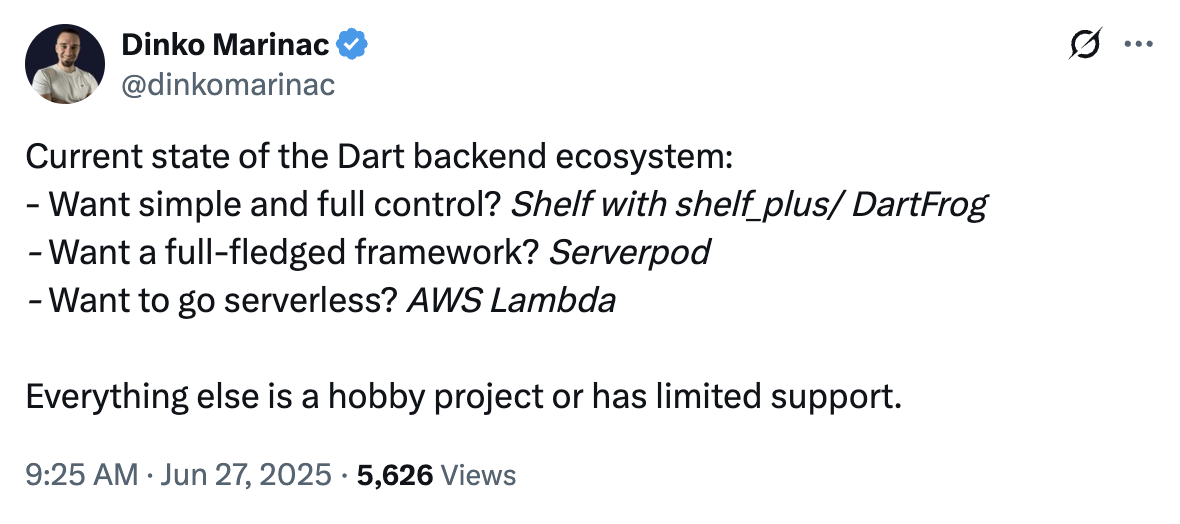
In a recent tweet, Dinko makes an excellent point about much of our Dart ecosystem being comprised of “hobby project[s]” and having “limited support.” He’s not wrong and that applies to Flutter as well. Most of the Flutter ecosystem is driven by passionate OSS developers. And that passion drives different devs to do different things — some like the code, some like the samples, some like the docs, some like the support and some just like to publish a package right out of flutter create and then move on with their day.

Most Dart packages are a hobby project or have limited support

It is unfortunately true that few packages get professional-quality care. For that, you typically need money.

Flutter Favorites

The Flutter Favorite program was invented to give recognition to developers building high-quality packages that really serve the Dart and Flutter community. And it worked. When I was on the team, the Flutter Favorites program contributed to both the number of packages on pub.dev and the average quality to increase. These are not metrics that typically go together.

Unfortunately, I believe that we’ve reached a quality plateau on pub.dev. And I think I know why.

The Need for Flutter Funding

One of the jobs of the Flutter Favorites committee was to provider encouragement and help for package authors on the cusp of meeting the quality bar for a Flutter Favorite candidate package. As one example, I remember reaching out to the author of a popular BLE package that needed some work. There was some missing functionality and the overall package didn’t meet the quality bar, but it was a great start and clearly filling a real need in the community. The author told me that he’d love to be a Flutter Favorite, but he was too busy making a living to dedicate the time. If we had perhaps had a small amount of funding…

Unfortunately, there was no funding for such things at the time. And except for the FlutterFlow Flutter Funding program (which sounds great, btw, but may be biased towards projects that overly favor FlutterFlow), there is no broadly-focused organization whose job it is to fund engineering projects in the Dart and Flutter ecosystem.

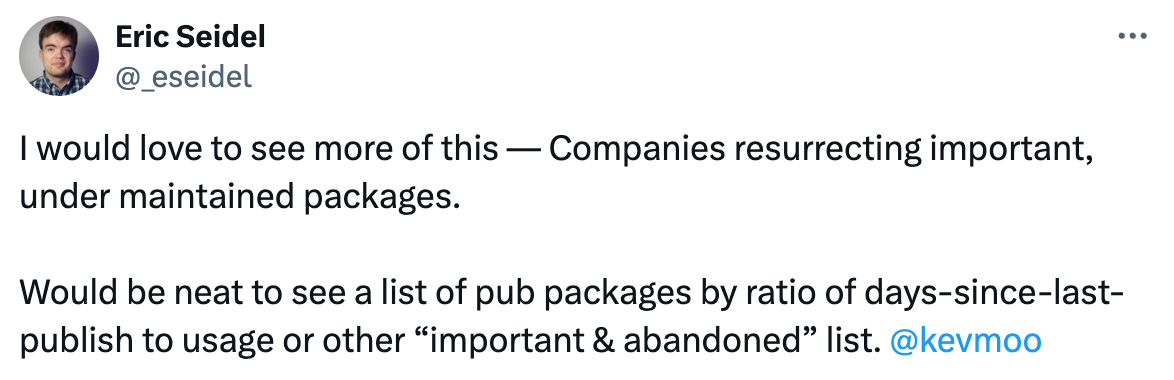
I would love to see more of this – Companies resurrecting important, under maintained packages.

As Eric Seidel pointed out recently, many critical packages in our ecosystem are showing their age. When you look at the data — packages like google_sign_in with 31 open issues, flutter_barcode_scanner with 201 open issues and no updates in 3 years — it’s clear that we have a sustainability problem. The community is willing to help, but maintainers need time, and time costs money.

I have an idea.

Proposal: Flutter Funding Committee

I’ve been working on a proposal to create the Flutter Funding Committee (FFC) — a non-profit organization designed to fill exactly these funding gaps. The idea is simple: take donations from companies deeply invested in the flourishing Dart and Flutter ecosystem and use that money to fund important community projects that would otherwise fall through the cracks. Think of it as an “escape valve” that allows the Dart and Flutter team to move maintenance work off their plate without dropping any balls (to shake a couple of metaphors together with a swizzle stick).

The committee would fund things like:

  • Maintenance and improvement of critical pub.dev packages that are widely used but under-resourced
  • Bug fixes and improvements in Flutter/Dart that are important to the broader ecosystem but not on the current roadmap
  • New tools, packages or plugins that fill gaps in the ecosystem
  • Bounties for targeted issues or enhancements requested by the community

But here’s the key differentiator from similar foundations like Python Software Foundation or the OpenJS Foundation: the FFC explicitly would NOT take over technical governance. The FCC would be purely a funding mechanism to support the ecosystem around that core.

Projects We Could Fund

So what would this look like in practice? Let me give you some concrete examples of the kinds of projects the FFC could tackle:

Emerging Tech Integration: Want to see Flutter work better with emerging technologies? Let’s fund someone to build proper WebAssembly integration, or an agentic toolkit like the cool Python kids have, but for Dart!

Critical Package Maintenance: Remember that BLE package I mentioned? Or google_sign_in. Or another package near and dear to my heart go_router. It’s currently in maintainence mode, but 257 (!) open issues with almost 2M downloads. This is a package in need of some love.


go_router in maintenance mode


Desktop Feature Gaps: Flutter’s desktop support is solid but still has gaps that the core team hasn’t prioritized. Things like system-level menus, OS integration features or platform-specific UI components that would make Flutter desktop apps feel truly native.

And the list goes on…

The beauty of the FFC approach is that the companies funding these projects would get to vote on what gets priority. If you’re a company building Flutter apps for enterprise customers, you might prioritize desktop features. If you’re focused on mobile, maybe you care more about social auth. The committee would work together to decide.

Where Are We?

This isn’t just a pipe dream. I’ve already had conversations with key players in the Flutter ecosystem, and the response has been larely positive (although nobody has written a check yet : ). Companies that depend on Flutter for their business understand the value proposition immediately — instead of each of them solving ecosystem problems in isolation, they can pool resources and tackle the big issues together.

What I find most exciting about this approach is that it builds on the proven success of the Flutter Favorites program. We know that recognition and quality standards work. Now we’re just adding the missing piece: funding to make those standards achievable for maintainers who care but can’t afford to work for free.

The Flutter ecosystem has grown up. We’ve got millions of developers, thousands of companies betting their businesses on Flutter, and a package ecosystem that rivals any platform out there. It’s time our funding mechanisms grew up too.

If you’re interested in this idea — whether as a potential funding company, a maintainer who could benefit, or just someone who cares about Flutter’s long-term health — I’d love to hear from you. Because the future of Flutter isn’t just about what Google builds; it’s about what we build. Together.

Flutter AI Tool Calling May 28, 2025 Flutter AI

Flutter AI Tool Calling

A little while ago, I was inspired by Thorsten’s blog post on building an AI Agent using Rust to build an AI Agent using Dart. The combination of a conversation with Gemini and a set of tools allowed us to build an agent that could take some prompts from the user and turn them into not just responses (Ask mode), but actions (Agent mode!). In the spirit of Agentic Apps month for Flutter this month, I wanted to share how to do the same thing in your Flutter app using the most recent release of the Flutter AI Toolkit.

Flutter AI Toolkit v0.9.0

As we near the 1.0 release of the AI Toolkit, the community has continued to contribute features that they’d like to see in a customizable, style-able and LLM-pluggable widget you can use when you’d like to enable your users to be able to talk to an AI in the context of your app.

In this case, Toshi Ossada contributed a PR that provided the inspiration for tool calling for the new FirebaseProvider in the AI Toolkit. This new provider replaces both the GeminiProvider and the VertexProvider as described in the migration guide for v0.9.0.

Tool calling is the ability to augment an LLM with a set of functions — what the AI industry refers to as “tools” — that the LLM can call when it needs the data that the tools provide. For example, an LLM by itself has no idea what time it is; it needs to have some tool that can provide that information and if it doesn’t have one, it’ll just make something up. With confidence.

Here’s an example of how to provide tools to the FirebaseProvider:

class ChatPage extends StatelessWidget {
  const ChatPage({super.key});

  @override
  Widget build(BuildContext context) => Scaffold(
    appBar: AppBar(title: const Text(App.title)),
    body: LlmChatView(
      provider: FirebaseProvider(
        model: FirebaseAI.googleAI().generativeModel(
          model: 'gemini-2.0-flash',
          tools: [
            Tool.functionDeclarations([
              FunctionDeclaration(
                'get_temperature',
                'Get the current local temperature',
                parameters: {},
              ),
              FunctionDeclaration(
                'get_time',
                'Get the current local time',
                parameters: {},
              ),
            ]),
          ],
        ),
        onFunctionCall: _onFunctionCall,
      ),
    ),
  );
  
  ... // _onFunctionCall goes here...
}

This code initializes the model with two tools: get_temperature and get_time. These tools come with names and descriptions so that the model can understand what they’re for and make an informed decision about when to call them.

The model is also initialized with an onFunctionCall callback so that when the LLM wants to use one of those tools, your function is called to handle it:

class ChatPage extends StatelessWidget {
  ...

  // note: we're not actually calling any external APIs in this example
  Future<Map<String, Object?>?> _onFunctionCall(
    FunctionCall functionCall,
  ) async => switch (functionCall.name) {
    'get_temperature' => {'temperature': 60, 'unit': 'F'},
    'get_time' => {'time': DateTime(1970, 1, 1).toIso8601String()},
    _ => throw Exception('Unknown function call: ${functionCall.name}'),
  };
}

We’re just returning hard-coded values here, but this is the place where you’d look up the data that the LLM wants as part of fulfilling the user’s request, as shown here:
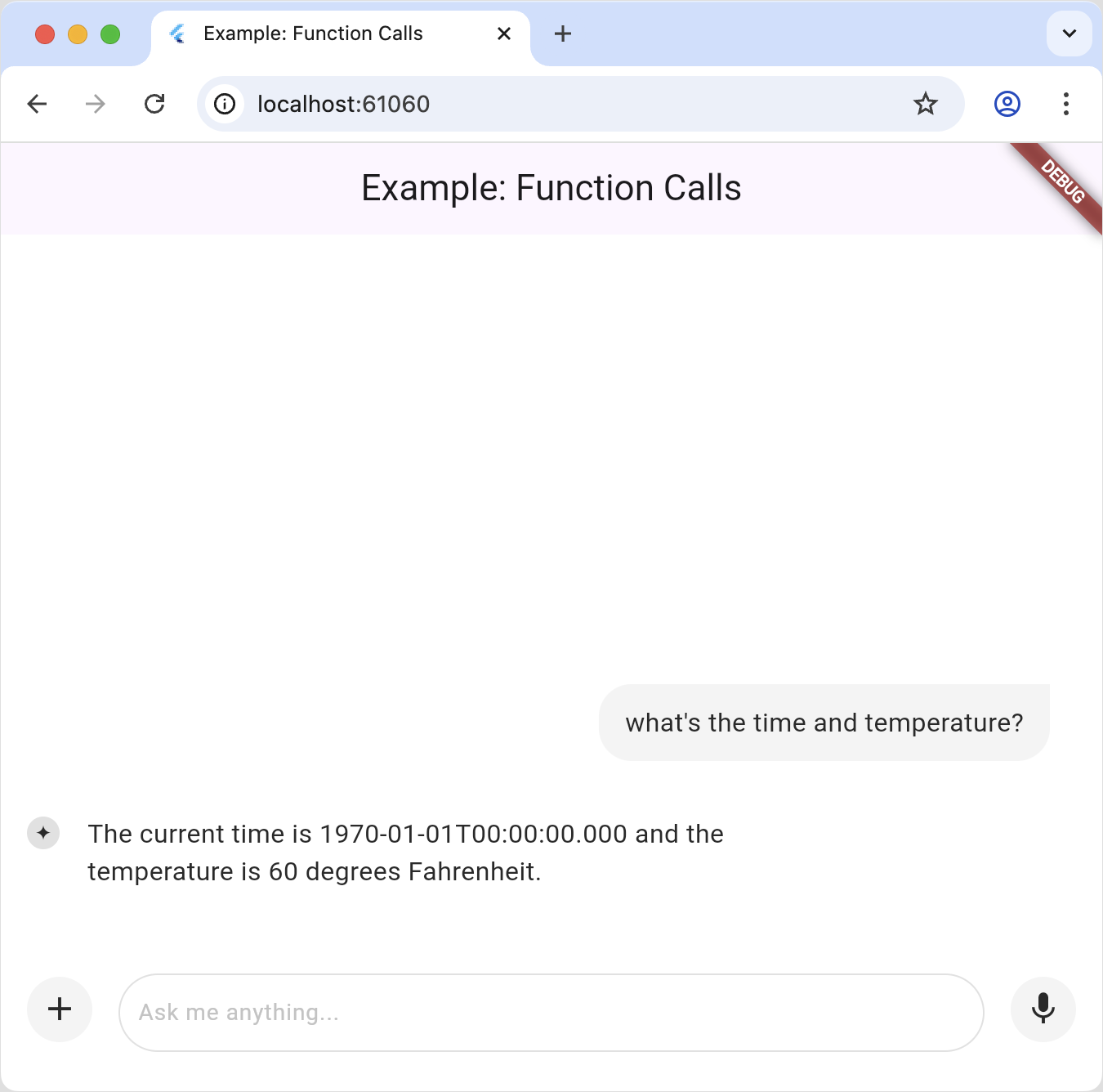
In this example, we’re just looking up information that the LLM would have trouble getting on it’s own. However, if a call to a tool has a side affect then BOOM you’ve moved from Ask mode to Agent mode. Welcome to the future!

Flutter + Genkit + Interrupts (oh my!)

This all works great so long as everything is handled on the client-side. However, as soon as you mix in server-side LLMs, for example by using Genkit, you have some additional considerations to take into account.

Genkit is an open-source framework for building full-stack AI-powered applications, developed and used in production by Google. It currently has language support for Typescript/Javascript, Go and Python but unfortunately not Dart. However, if you’re willing to write some Typescript, it turns out that Genkit has great support server-side tools handled by Flutter apps with something called interrupts.

A Genkit interrupt is a tool that’s invoked on the server but fulfilled on the client.

“How can that work?” I’m hearing you ask through the Interwebtubes.

Well let me tell you.

The way an LLM tool works is that during the handling of a request, if there’s a tool involved, the LLM API will call back into the function you provided via a callback like onFunctionCall . That call might take a while, e.g. you may need to dial up the national weather service, but when, the Future will complete and the LLM will be able to carry on.

“That’s great,” you say. “But how do I stretch a function callback over the wire from a Genkit server to a Flutter client?” You ask such good questions.

Well, as it turns out, tool calls being invoked in the middle of an LLM response is an API fiction. What’s really happening is that when an LLM wants to call a tool, it replies with a message marked as a tool call and that include the tool arguments. The LLM client library — like the firebase_ai package — notices this, calls your callback function, bundles up the response and continues the conversation without bothering you about it at all until the actual LLM response comes back, having taken into account the results of the tool call(s).

For example, the user’s request above in a single prompt looks like it returns a single response, but looking at the actual message history tells a different story:

[
  {
    "role": "user",
    "parts": [
      {
        "text": "what's the time and temperature?"
      }
    ]
  },
  {
    "role": "model",
    "parts": [
      {
        "functionCall": {
          "name": "get_time",
          "args": {}
        }
      },
      {
        "functionCall": {
          "name": "get_temperature",
          "args": {}
        }
      }
    ]
  },
  {
    "role": "function",
    "parts": [
      {
        "functionResponse": {
          "name": "get_time",
          "response": {
            "time": "1970-01-01T00:00:00.000"
          }
        }
      },
      {
        "functionResponse": {
          "name": "get_temperature",
          "response": {
            "temperature": 60,
            "unit": "F"
          }
        }
      }
    ]
  },
  {
    "role": "model",
    "parts": [
      {
        "text": "OK. The current time is 1970-01-01T00:00:00.000 and the temperature is 60 degrees Fahrenheit."
      }
    ]
  }
]

“OK,” you say warming up to another question, “but what’s that got to do with Genkit and server-side tool calls?” I’m getting there!

Genkit Tools

Genkit also provides for tool calls, as shown in this example:

// define a tool
const getWeather = ai.defineTool(
  {
    name: 'getWeather',
    description: 'Gets the current weather in a given location',
    inputSchema: z.object({
      location: z.string().describe('The location to get the current weather for'),
    }),
    outputSchema: z.string(),
  },
  async (input) => {
    // Here, we would typically make an API call or database query. For this
    // example, we just return a fixed value.
    return `The current weather in ${input.location} is 63°F and sunny.`;
  },
);

// use a tool
const response = await ai.generate({
  prompt: "What is the weather in Baltimore?",
  tools: [getWeather],
});

This is semantically the same — we define a tool that the LLM can call during a request. And again, it looks like a seamless callback, which you need to implement on the server, even though we know there is a flow of messages underneath just like what we see above.

But what if you could interrupt the flow of messages when there’s a tool call, pass the stack of messages back to the Flutter app and let it fill in the results? That’s exactly what Genkit interrupts are for.

Genkit Interrupts: Human in the Loop

From the Genkit docs: “Interrupts are a special kind of tool that can pause the LLM generation-and-tool-calling loop to return control back to you. When you’re ready, you can then resume generation by sending replies that the LLM processes for further generation.”

As an example, imagine that you’ve got an app that helps people with their plants, maybe expanding their garden or diagnosing their sick plants.
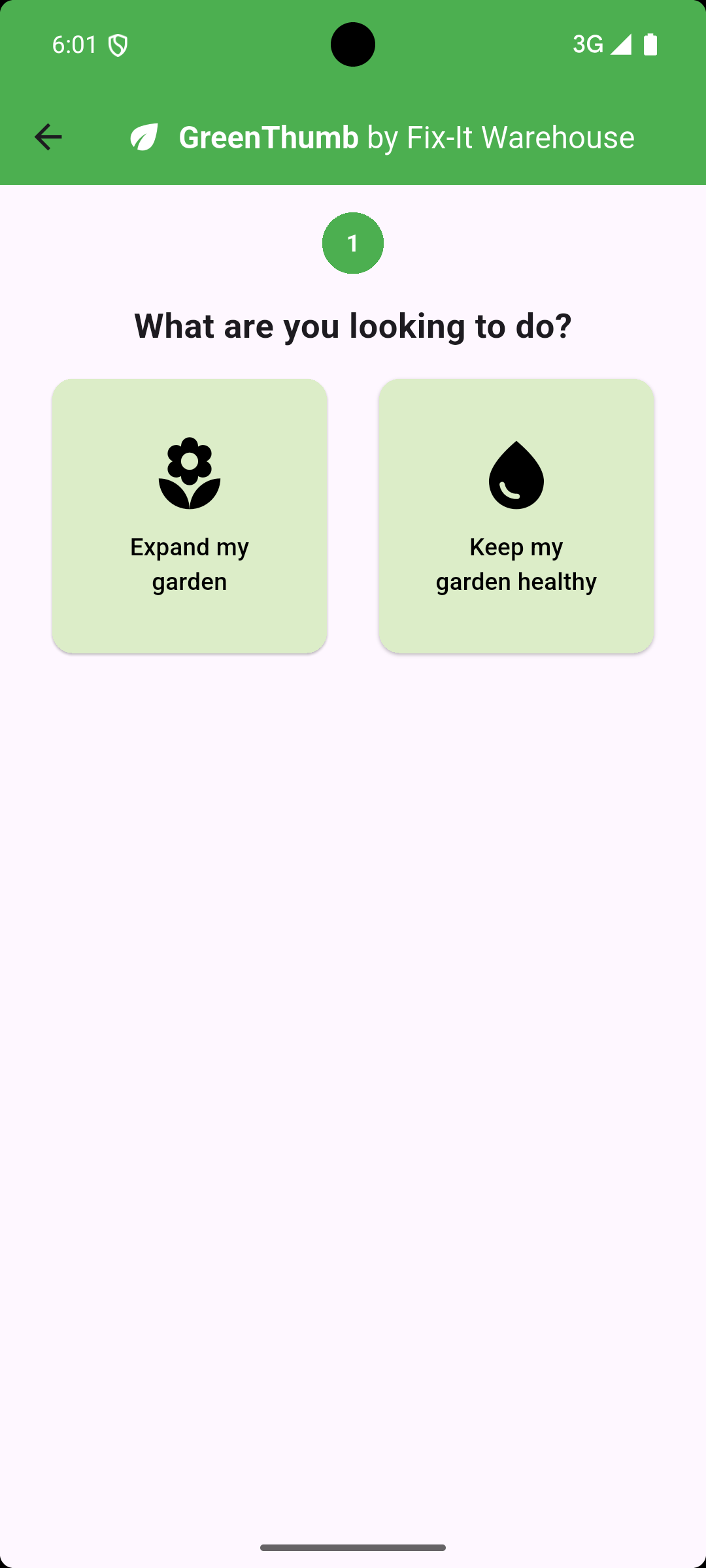
Further imagine that you’ve got an LLM in your server-side code with access to a database of products that can help users with their plant needs.
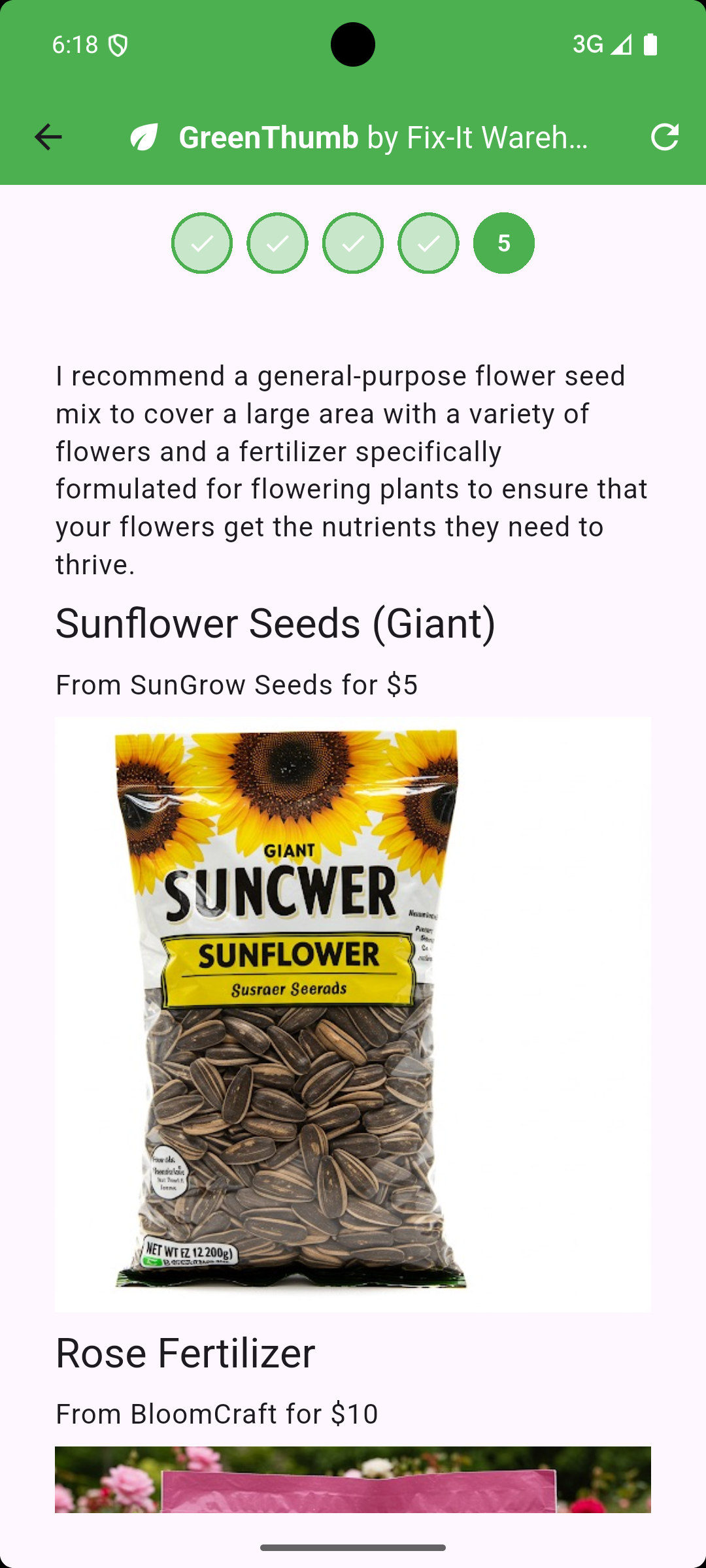
Now imagine that the LLM has been instructed to ask the user a set of questions to clarify the plant needs before recommending one of those products.
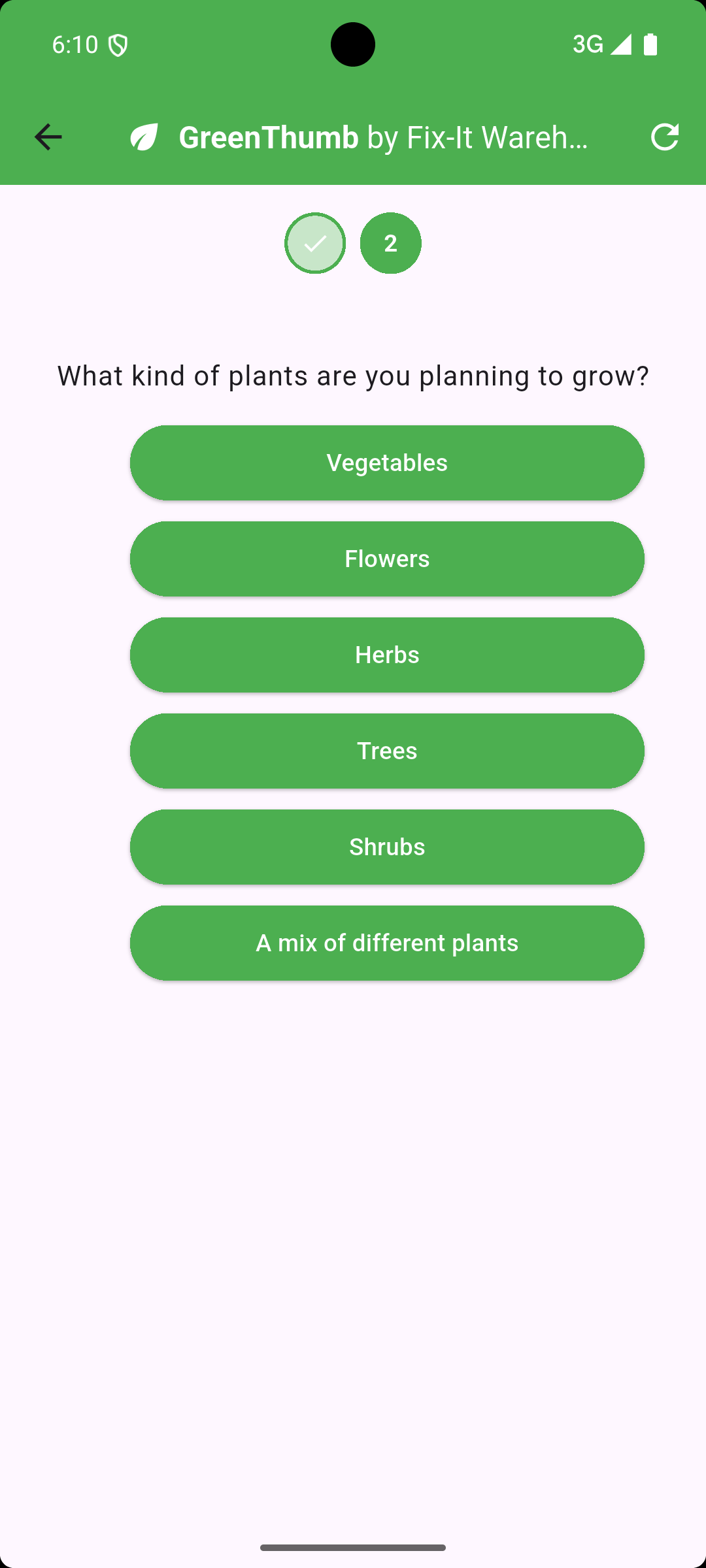
Since the LLM is running in your Genkit server with access to your server-side database of products, to involve the user of your Flutter app in a conversation, you’ve now got the perfect storm for using interrupts to keep the “human in the loop.”

To implement this in Genkit, you define your tools as interrupts so that the LLM can pause the response to gather data from the user:

const choiceInterrupt = ai.defineInterrupt(
  {
    name: 'choice',
    description: 'Asks the user a question with a list of choices',
    inputSchema: z.object({
      question: z.string().describe("The model's follow-up question."),
      choices: z.array(z.string()).describe("The list of choices."),
    }),
    outputSchema: z.string().describe("The user's choice."),
  });

In Genkit, an endpoint that you can call from your Flutter app via HTTP is called a “flow”:

const greenThumb = ai.defineFlow(
  {
    name: "greenThumb",
    ...
  },
  async ({ prompt, messages, resume }) => {
    const response = await ai.generate({
      ...(messages && messages.length > 0 ? {} : { system: gtSystem }),
      prompt,
      tools: [choiceInterrupt, ...],
      messages,
      resume,
    });

    return { messages: response.messages };
  });

Notice that the greenThumb flow takes a set of messages and returns a set of messages. To kick things off in your Flutter code, you pass an empty list of messages. If the last message in the LLM response is an interrupt, it will include the info you need to show a UI to ask the user to answer the LLM’s question:

{
  "messages": [
    {
      "role": "system",
      "content": [
        {
          "text": "\n  You're an expert gardener. The user will ask a question about how to manage\n  their plants in their garden. Be helpful and ask 3 to 5 clarifying questions,\n  using the choiceInterrupt tool.\n  \n  When you're done asking questions, provide a description of a product or\n  products that will help the user with their original query. Each product\n  description should NOT include another question for the user nor should it\n  include the name of any specific product.\n"
        }
      ]
    },
    {
      "role": "user",
      "content": [
        {
          "text": "I'd like to expand my garden."
        }
      ]
    },
    {
      "role": "model",
      "content": [
        {
          "text": "That's great! To give you the best advice, I need a little more information.\n\n1.  What kind of plants are you planning to add to your garden (e.g., vegetables, flowers, shrubs)?\n2.  What is the approximate size of the area you're planning to expand?\n3.  What type of soil do you have in your garden currently (e.g., sandy, clay, loamy)?\n4.  What is the average amount of sunlight your garden receives each day?\n\n"
        },
        {
          "toolRequest": {
            "name": "choiceInterrupt",
            "input": {
              "choices": [
                "Vegetables",
                "Flowers",
                "Shrubs",
                "Other"
              ],
              "question": "What kind of plants are you planning to add to your garden?"
            }
          },
          "metadata": {
            "interrupt": true
          }
        }
      ]
    }
  ]
}

This continues until the LLM gathers the data it needs to provide a response:

{
  "messages": [
    ...
    {
      "role": "model",
      "content": [
        {
          "text": "Based on your answers, here are a couple of product descriptions that might be helpful for expanding your flower garden:\n\n**Product 1:** This soil amendment is designed to improve drainage and aeration in existing soil, while also providing essential nutrients for healthy root development. It's perfect for preparing new garden beds or revitalizing existing ones. Simply mix it into the top layer of soil before planting to create an ideal environment for flowers to thrive.\n\n**Product 2:** These granular plant food spikes provide a slow-release source of nutrients for flowering plants. They are easy to use - simply insert them into the soil around your existing plants, and they will gradually release nutrients over an extended period, promoting vibrant blooms and strong growth. They're especially beneficial for areas with full sun exposure, as they help plants maintain consistent access to the resources they need.\n"
        }
      ]
    }
  ]
}

Of course, there are a lot of picky details to get this right, so I’ll refer you my flutter_fixit_warehouse sample, which provides all of the code and a more thorough explanation.

Where are we?

With the latest updates to the Flutter AI Toolkit, you can now build tool calls into your Flutter agentic apps. Furthermore, with Genkit’s support for interrupts, you can keep the human in the loop by handling server-side tool calls with input from your Flutter app users.

Now, with these new tools in your toolbox, go forth and build!

Pedantic AI in Dart: dartantic_ai May 6, 2025 Flutter AI

Pedantic AI in Dart: dartantic_ai

The Python community has a library called pydantic that adds type checking at run-time to a dynamically typed language. The library allows them to be “pedantic” about type validation in Python aka pydantic; get it? : )

We don’t need that for Dart. We have static type checking and it’s wonderful.

Pedantic AI in Python: pydantic-ai

On top of pydantic, the Python community has built pydantic-ai, which makes it easy for you to specify typed output from your LLM requests and to describe typed access to your tools. For example:

# Python example with support for multiple models
import os

from pydantic import BaseModel
from pydantic_ai import Agent

class TownAndCountry(BaseModel):
    town: str
    country: str

model = 'openai:gpt-4o' # or 'google-gla:gemini-2.0-flash' or ...
print(f'Using model: {model}')
agent = Agent(model, output_type=TownAndCountry)

if __name__ == '__main__':
    result = await agent.run('The windy city in the US of A.')
    print(result.output) // Output: town='Chicago' country='United States'

Check out the definition of the TownAndCountry type and the use of it when creating an Agent object with the output_type parameter. That’s all you need to get an instance of TownAndCountry populated by the LLM based on the prompt.

Now that’s something we don’t have in Dart! Instead, we have to do something like this:

// Dart example for Gemini only
void main() async {
  final model = gemini.GenerativeModel(
    apiKey: Platform.environment['GEMINI_API_KEY']!,
    model: 'gemini-2.0-flash',
    generationConfig: gemini.GenerationConfig(
      responseMimeType: 'application/json',
      responseSchema: gemini.Schema.object(
        properties: {
          'town': gemini.Schema.string(),
          'country': gemini.Schema.string(),
        },
        requiredProperties: ['town', 'country'],
      ),
    ),
  );

  final result = await model.generateContent([
    gemini.Content.text('The windy city of the US of A.'),
  ]);

  final json = jsonDecode(result.text!);
  final obj = TownAndCountry.fromJson(json);
  print(obj); // Output: TownAndCountry(town: Chicago, country: United States)
}

Plus, while the above code works for the Gemini SDK for Dart, if I want to do the same thing using the OpenAI SDK for Dart, I have to write very different code:

// Dart example for OpenAI only
void main() async {
  final client = openai.OpenAIClient(
    apiKey: Platform.environment['OPENAI_API_KEY'],
  );

  final response = await client.createChatCompletion(
    request: const openai.CreateChatCompletionRequest(
      model: openai.ChatCompletionModel.modelId('gpt-4o'),
      responseFormat: openai.ResponseFormat.jsonObject(),
      messages: [
        openai.ChatCompletionMessage.system(
          content:
              'Respond ONLY with JSON containing keys "town" and "country".',
        ),
        openai.ChatCompletionMessage.user(
          content: openai.ChatCompletionUserMessageContent.string(
            'The windy city of the US of A.',
          ),
        ),
      ],
    ),
  );

  final data =
      jsonDecode(response.choices.first.message.content!)
          as Map<String, dynamic>;

  final result = TownAndCountry.fromJson(data);
  print(result); // Output: TownAndCountry(town: Chicago, country: United States)
}

There must be a better way!

A Better Way: dartantic_ai

I was inspired by pydantic-ai for two main features:

  1. An easy way to go between models using just a string descriptor, e.g. openai:gpt-4o
  2. A common way to provide type information for output and tool calls, i.e. JSON schema

Those are the features I focused on initially for dartantic_ai, allowing you to write code like the following:

// Dart example with support for multiple models
class TownAndCountry {
  TownAndCountry({required this.town, required this.country});
  final String town;
  final String country;  
  
  factory TownAndCountry.fromJson(Map<String, dynamic> json) => TownAndCountry(
      town: json['town'],
      country: json['country'],
    );
  
  static Map<String, dynamic> get schemaMap => {
    'type': 'object',
    'properties': {
      'town': {'type': 'string'},
      'country': {'type': 'string'},
    },
    'required': ['town', 'country'],
    'additionalProperties': false,
  };
  
  @override
  String toString() => 'TownAndCountry(town: $town, country: $country)';
}

void main() async {
  final agent = Agent(
    model: 'openai:gpt-4o', // or 'google:gemini-2.0-flash' or ...
    outputType: TownAndCountry.schemaMap,
  );

  final result = await agent.run('The windy city in the US of A.');
  final obj = TownAndCountry.fromJson(jsonDecode(result.output));
  print(obj); // Output: TownAndCountry(town: Chicago, country: United States)
}

Here we’ve created a class to hold the typed output from the agent, passing in hand-written JSON schema and JSON decoder functions. Already, this is much simpler code than either of the Gemini or the OpenAI samples and it works either family of models by simply changing the model description string.

Further, with a little bit of Dart builder magic, you can use json_serializable and soti_schema to generate the JSON serialization and JSON schema for you:

// Automatic JSON decoding and schema generation
@SotiSchema()
@JsonSerializable()
class TownAndCountry {
  TownAndCountry({required this.town, required this.country});

  factory TownAndCountry.fromJson(Map<String, dynamic> json) =>
      _$TownAndCountryFromJson(json);

  final String town;
  final String country;

  Map<String, dynamic> toJson() => _$TownAndCountryToJson(this);

  @jsonSchema
  static Map<String, dynamic> get schemaMap => _$TownAndCountrySchemaMap;

  @override
  String toString() => 'TownAndCountry(town: $town, country: $country)';
}

void main() async {
  final agent = Agent(
    model: 'openai:gpt-4o'
    outputType: TownAndCountry.schemaMap,
    outputFromJson: TownAndCountry.fromJson,
  );

  final result = await agent.runFor<TownAndCountry>(
    'The windy city in the US of A.',
  );

  print(result.output); // Output: TownAndCountry(town: Chicago, country: United States)
}

Using the builder, we no longer have to write the JSON serialization code or the JSON schema by hand — json_serialization and soti_schema handle that. And, for fun, we’re calling the runFor<T> method so that the output you get is typed w/o you having to manually call jsonDecode. Magic!

Potential Future

Right now, we’re in “phrase 1” of dartantic_ai development — building out the core set of features and providers that work with those features (starting with Gemini and OpenAI). That’s what the code samples above are all about — what’s the best developer experience we can provide for a working Dart developer adding generative AI to their apps?

Once there’s a solid foundation, we can start experimenting with a builder that would allow you to write even simpler code:

@Agent()
class TacAgent extends Agent {
  TacAgent(super.model);

  @Run()
  Future<TownAndCountry> run(String prompt) => _$TownAndCountryAgentRun(prompt);
}

void main() async {
  final result = await TacAgent('openai:gpt-4o').run('The windy city of the US of A.');
  print(result.output); // Output: TownAndCountry(town: Chicago, country: United States)
}

And this is just the beginning. Today, dartantic supports tool calls, which you define with JSON schema in a way that’s similar to typed output from a run call. Now imagine being able to put a @Tool attribute on a method in your agent class and have the tool passed in automatically for you. There are all kinds of possibilities as soon as builders are involved.

Call for Contributors

As of the writing of this post, I’ve just started my dartantic_ai journey with a list of current and pending features you can read about on pub.dev. I only support the smallest amount of the Gemini and OpenAI SDK surface area to implement the initial features that are most important to me.

However, pydantic-ai has a big surface area with lots of great stuff for using LLMs in a type-safe, multi-model way that the Dart community would be interested in, including multi-agent support, agent graphs, multi-media support, streaming, etc. I’m going to need help to cover all of that, let alone making it work in a robust, matrix-tested way that can appeal to a growing community of Dart developers dipping their toes into AI.

Is dartantic_ai a style of interacting with LLMs from Dart that appeals to you? Are there features missing that you want or bugs you’ve found putting it to use? Then have I got a deal for you! Please contribute issues and PRs and let’s get this show on the road!


← Newer Entries Older Entries →