Please don’t run apps in the background on my WP7 phone! March 3, 2010 Spout

Please don’t run apps in the background on my WP7 phone!

When I was but a wee lad, I learned that when it came to my computer, I was often going to be waiting on something, whether it was the CPU, the IO or the memory. Now that I’m all grown up and spending a great deal of time on handheld mobile devices, I’ve discovered a whole new thing I’m waiting on: charging the battery.

In the bad old days of DOS, I spent a disturbing amount of time working on my autoexec.bat and config.sys files to optimize the loading of drivers and TSRs (DOS programs that run in the background for you whippersnappers). Now, instead of optimizing for memory usage on my PC,  I spend my time optimizing for power consumption on my phone, e.g. turning off 3G and Bluetooth when I don’t need them, turning down the polling frequency on my SMTP mail accounts and spreading power adapters everywhere in my world where I sit for more than 5 minutes. The single most important feature on my phone is that’s it’s on and the way power is managed on my iPhone means that this is often not the case. Sometimes I pine for my Windows Mobile Dash for just that reason; it ran for days instead of hours.

And as bad as this power situation is, it would be even worse if my phone ran more than one app at a time. I don’t worry about random apps from the AppStore using too much memory or crashing; I worry about them eating my battery and killing my iPhone in the middle of a route to somewhere I’ve never been. By not allowing background apps to run, Apple is trying to do the right thing but (although my battery life still sucks). I don’t have personal experience with Google phones, but since they do allow background apps to run, I have to imagine battery life is an even bigger problem.

So, when I see people lobbying for background apps on the new Windows Phone 7 Series, all I can say is, you don’t want it. What you want is for work to go on in the background for you without the cost in power.

Oh, I want to listen to my MP3s or Pandora while I answer my email like everyone else, but I don’t want every financial/IM/email/social/sports app I download sucking down my battery life because it feels itself to be more important than everything else on my phone. I want those apps to notify me when something I care about happens but I don’t want the processing to discover such events to happen on my phone - I want the processing to happen in the cloud.

You may recall my piece about how important storage in the cloud is for moble devices. Let’s let somebody else scale and manage the storage so we can leverage it. In the same way, we want to leverage CPU and power in the cloud, saving local resources for cool graphics, twitch games and streaming my “Pink” channel.

Of course, if we’re going to push the processing to the cloud, I’m going to need an efficient and easy way to write my WP7 apps to be notified so I can do the actual processing that needs to happen on the phone. And that all needs to happen while I’m navigating and playing my bad girls party mix.

I’m saving my WP7 phone battery for important things after all.

February 22, 2010 Oslo

Update for SQL Server Modeling CTP and Dev10 RC

We are currently preparing a release of the SQL Server Modeling November 2009 CTP that will install and operate with Visual Studio Release Candidate. We expect to make this release available the first week of March and will make an announcement here at that time.

We are also planning for another release of the November CTP that matches the final Visual Studio product (RTM) when that product becomes generally available.

Windows Phone Series 7 Link Roundup February 15, 2010

Windows Phone Series 7 Link Roundup

I was swamped this morning, so didn’t get to see the Windows Phone Series 7 stuff live. When I did finally get to poke my head out, Scott Stanfield and Damir Tomicic had the list of links all set for me to follow. Thanks, guys!

Now I just have to let my AT&T contract run out and find a buyer for my iPhone. Can’t wait!

February 9, 2010 Tools

Entity Designer Database Generation Power Pack

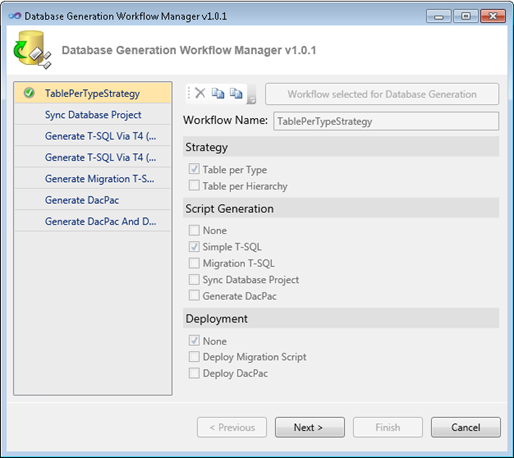
If you like Model-First design in Entity Framework, you're going to love the Entity Designer Database Generation Power Pack. The original Database Generation feature in the Entity Designer in VS 2010 is extensible via Windows Workflows and T4 Templates. This Power Pack builds on these extensibility mechanisms and introduces the following:
  • Basic Table-per-Hierarchy support. This is represented by the “Generate T-SQL via T4 (TPH)” workflow.
  • The SSDL and MSL generation pieces can now be tweaked through T4 templates, both in TPH and TPT strategies through the “Generate T-SQL via T4 (TPT)” and “Generate T-SQL via T4 (TPH)” workflows.
  • Direct deployment and data/schema migration are available through the “Generate Migration T-SQL and Deploy” workflow. This workflow will use the Team System Data APIs to diff our default T-SQL script against the target database and create a new script which will perform non-invasive ALTERs and data migration where necessary.
  • A new user interface will now display when “Generate Database from Model” is selected — this acts as a “workflow manager” which will present to you our default workflows and allow you to create your own, customizable workflows based on your own strategy, script generation, and deployment requirements.

Highly recommended. Enjoy!

Data Binding, Currency and the WPF TreeView February 7, 2010 .NET

Data Binding, Currency and the WPF TreeView

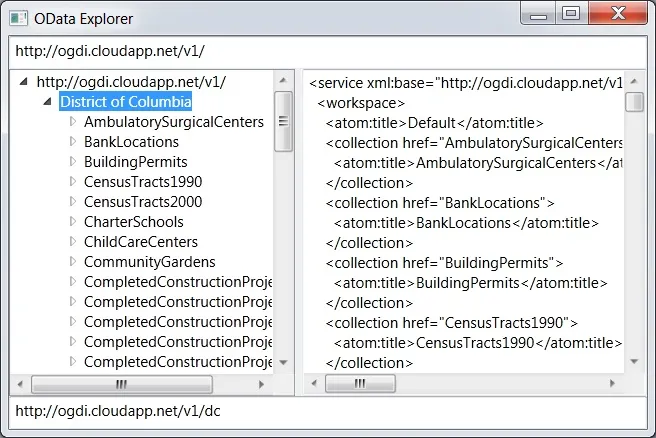
I was building a little WPF app to explore a hierarchical space (OData, if you must know), so of course, I was using the TreeView. And since I’m a big fan of data binding, of course I’ve got a hierarchical data source (basically):

abstract class Node {
public abstract string Name { get; }
  public abstract IEnumerable<Node> { get; }
public XDocument Document { get { ... } }
public Uri Uri { get { ... } }
}

I then bind to the data source (of course, you can do this in XAML, too):

// set the data context of the grid containing the treeview and text boxes
grid.DataContext = new Node[] { Node.GetNode(new Uri(uri)) };
// bind the treeview to the entire collection of nodes
leftTreeView.SetBinding(TreeView.ItemsSourceProperty, ".");
// bind each text box to a property on the current node
queryTextBox.SetBinding(TextBox.TextProperty,
  new Binding("Uri") { Mode = BindingMode.OneWay });
documentTextBox.SetBinding(TextBox.TextProperty,
  new Binding("Document") { Mode = BindingMode.OneWay });

What we’re trying to do here is leverage the idea of “currency” in WPF where if you share the same data context, then item controls like textboxes will bind to the “current” item as it’s changed by the list control. If this was a listview instead of a treeview, that would work great (so long as you set the IsSynchronizedWithCurrentItem property to true).

The problem, as my co-author and the-keeper-of-all-WPF-knowledge Ian Griffiths reminded me this morning, is that currency is based on a single collection, whereas a TreeView control is based on multiple collections, i.e. the one at the root and each one at sub-node, etc. So, as I change the selection on the top node, the treeview has no single collection’s current item to update (stored in an associated “view” of the data), so it doesn’t update anything. As the user navigates from row to row, the “current” item never changes and our textboxes are not updated.

So, Ian informed me of a common “hack” to solve this problem. The basic idea is to forget about the magic “current node” and explicitly bind each control to the treeview’s SelectedItem property. As it changes, regardless of which collection from whence the item came, each item control is updated, as data binding is supposed to work.

First, instead of setting the grid’s DataContext to the actual data, shared with the treeview and the textboxes, we bind it to the currently selected treeview item:

// bind the grid containing the treeview and text boxes
// to point at the treeview's currently selected item
grid.DataContext = new Binding("SelectedItem") { ElementName = "leftTreeView" };

Now, because we want the treeview to in fact show our hierarchical collection of nodes, we set it’s DataContext explicitly:

// set the treeview's DataContext to be the data we want it to show
leftTreeView.DataContext = new Node[] { Node.GetNode(new Uri(uri)) };

Now, the treeview will show the data we wanted it to show, as before, but as the user changes the selection, the treeview’s SelectedItem property changes, which updates the grid’s DataContext, which signals the textboxes, bound to properties on grid’s DataContext (because the DataContext property is inherited and we haven’t overridden it on the textboxes), and the textboxes are updated.

Or, in other words, the textboxes effectively have a new idea of the “current” item that meshes with how the treeview works. Thanks, Ian!


February 4, 2010 Oslo

Telerik LINQ to M Refresh for Nov09 Modeling CTP

The Telerik LINQ to “M” implementation allows developers to use LINQ statements with blocks of "M" values, pure text or the results of a transformed DSL. With the new SQL Server Modeling November 2009 CTP there are some changes to the "M" specification, so Telerik has updated their core DLLs to accommodate these changes. Enjoy!
February 4, 2010 Oslo

Deep Fried Bytes: Doug Purdy on OData and Modeling

"In the 43rd episode of Deep Fried Bytes, Keith and Woody sit down at PDC 2009 with Microsoft’s Douglas Purdy to discuss all things data. Do you remember Oslo from the previous PDC event? Well Oslo has been rebranded to SQL Server Modeling Services to help developers store and manage models for the enterprise. Modeling Services enables you to more productive when building and managing data-driven applications. The guys also get the low down from Douglas on a new web protocol for querying and updating data called OData."
February 2, 2010 Oslo

Rocky’s video series on SQL Server Modeling and CSLA

Rockford Lhotka has created a series of three videos showing how he has applied the SQL Server Modeling, specifically "M", to drive his well-known CSLA, a framework for building the business logic layer in your applications. He shows a custom domain-specific language (DSL) that lets you create a CSLA entity, along with the data serialization, business logic and a forms-based UI, resulting in a 95% coding savings (his words, not mine : ). Enjoy!

← Newer Entries Older Entries →